Memory & Storage
Compression

Contents
Compression is the process of reducing the size of a file so that it is stored using fewer bits. A bit is a single binary digit, either 1 or 0, and every file is stored as a pattern of bits, so using fewer bits means there is less data to store.
A compressed file is not in a form you can use straight away. It must first be decompressed — turned back into a normal, usable file by the software that opens it. A compressed picture cannot be shown on screen, and a compressed game cannot be loaded and played, until it has been decompressed.
Two types of compression
There are two types of compression, and they treat the data in opposite ways. Lossy compression discards some data, and that data cannot be recovered — the file itself still opens and works, but the details that were thrown away are gone for good. Lossless compression keeps every piece of data and only stores it more efficiently.
| Type | What happens to the data | After decompressing | Quality |
|---|---|---|---|
| Lossy | Some data is thrown away and never comes back | An approximation of the original | Lower than the original |
| Lossless | No data is thrown away | Exactly the same as the original | Identical to the original |
Imagine a student films the school science fair on a tablet. Compressing the video lossily might throw away quiet background sounds and slight differences in colour that you barely notice while watching, so the file shrinks a long way — but once that data has gone, decompressing can never bring it back. Compressing the same video losslessly keeps every sound and every shade, so decompressing gives back exactly the video that was filmed, although the file does not shrink as far.
Compression makes a file smaller, and every benefit of it comes from the same thing: the file is stored and sent using fewer bits. That helps in three practical ways.
More files fit on a device
A compressed file takes up less storage space. That matters on any device with a fixed amount of storage, such as a tablet, a memory card or a school's network drive. If each file is smaller, the same amount of space holds more of them, so you can keep more work before you have to delete anything or buy extra storage.
Files are quicker to send and receive
A network can only move a certain amount of data each second, so fewer bits means less waiting, and smaller files transfer faster — both uploads and downloads finish sooner. The robotics club films a 90 MB video of its robot completing a course and uploads it to a shared folder. Compressed it might be 18 MB, so only about a fifth of the data has to travel, and the upload finishes much sooner.
Less bandwidth is used
Bandwidth is the amount of data a connection can carry in a given time. A smaller file takes less of that capacity, so while it is being sent other people on the same connection can still load pages and send their own files without everything slowing to a crawl.
| What is affected | Uncompressed robot video | Compressed robot video |
|---|---|---|
| Storage space needed | 90 MB | 18 MB |
| Data sent over the network | 90 MB | 18 MB |
| Time the upload takes | Longer | Shorter |
| Connection capacity left for others | Less | More |
Streaming means sending audio or video that is played while it is still arriving. For streaming to work, the data must arrive at least as fast as it is played, so the connection has to keep supplying data quickly enough for playback to run without stopping. If the data arrives too slowly, playback pauses while more is downloaded.
Why streamed video is compressed heavily
Uncompressed video is far too large to send over a normal internet connection quickly enough. A few minutes of video can be several gigabytes, which would take far too long to download before anyone could watch it. Video is therefore compressed heavily before it is streamed: the file is made much smaller, so the bits needed for each second of video arrive in time to be played without stopping.
For example, a school streams its winter concert live to families at home. The video is compressed heavily so that each moment of the concert reaches viewers just in time to be shown, letting them watch continuously instead of waiting for large chunks of video.
Why images are compressed for websites
A web page is made from several files, including images. Before the page can appear, your browser must download these files. Images are often the largest files on a page, so compressing images reduces how many bits have to be downloaded. With smaller image files, the page can be displayed sooner.
For example, a pupil on a slow rural connection opens an animal rescue centre's web page to check its opening times. Because the photos on that page are compressed, the page and its pictures appear quickly; the full-size originals would have left the pupil staring at empty boxes for much longer.
An email attachment is a file that travels with a message. Email services set a maximum total size for the attachments in one message, so a single large file, or a set of files, can be rejected and never leave your outbox. Compression rewrites a file in a more compact form, which can bring it back under the limit so that the message sends.
One file instead of many
Compression can squeeze a set of files into a single smaller file, and that one file is what you attach. Everything stays inside it, so the recipient collects the whole set in one download instead of picking the pieces out of several messages, and nothing gets left behind. When they open it, their computer decompresses it and the original files appear again.
- There is one attachment to download rather than several separate ones, so it arrives sooner.
- The files stay together as a set, in the order and folders you chose.
A worked example
The eco club's greenhouse sensor logs the temperature every 30 seconds, and after a term its log file is 62 MB. The club's email service allows 20 MB of attachments per message, so the file is refused. Compressing it brings it down to about 8 MB, well under the limit, and the researcher studying the school's local climate receives every reading.
A set of files like this is compressed with lossless compression, so once it is decompressed every file is exactly as it was. That matters for measurements, documents and program files: lossy compression would delete data for good, and a damaged program file would not run.
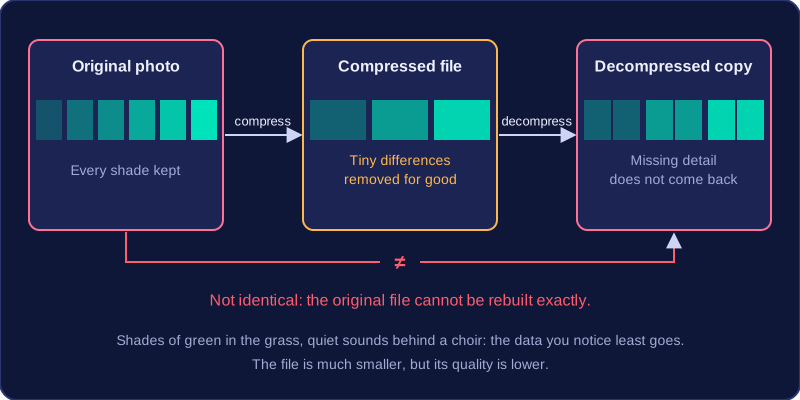
Lossy compression makes a file smaller by permanently removing some of its data. It removes the data you are least likely to notice, so the file still works and still looks or sounds close to the original.
For example, in a photo of a school sports day, lossy compression might remove tiny differences in the shades of green in the grass. In a recording of a choir, it might remove very quiet sounds behind the singing. In both cases, the photo or recording is still usable, but some detail has gone.
The removal is permanent. When the file is decompressed, the missing data does not come back, so the original file cannot be rebuilt exactly. The compressed file is much smaller, but its quality is lower. Light compression may be hard to notice; heavy compression can make an image look blurry or patchy, and make sound seem muffled.
Compressing an already lossy file again removes even more data, so the quality drops further each time.
Advantages and disadvantages
- Advantage: lossy compression reduces file size much more than lossless compression does. Files take up much less storage space and are much quicker to upload, download and stream.
- Disadvantage: quality is reduced, the original file can never be restored, and the method is unsuitable where every detail matters.
For this reason, lossy compression is never used for text documents, spreadsheets or program code. Those files have to be rebuilt exactly as they were, so a method that throws data away for good would leave them unusable rather than slightly worse in quality.
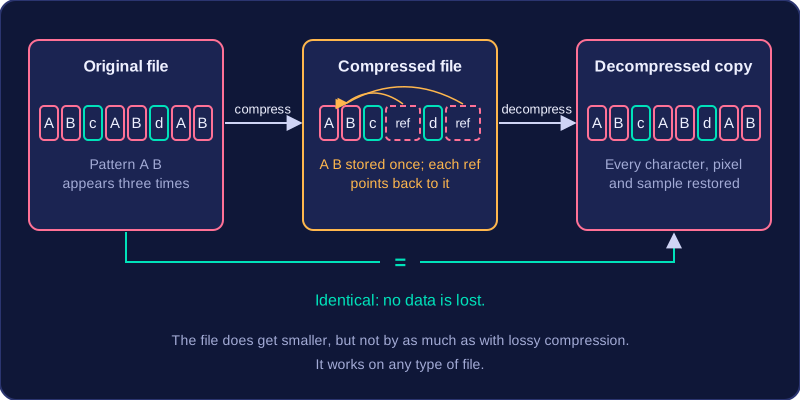
Lossless compression reduces a file's size without permanently removing any data. The data is stored more efficiently, and when the file is decompressed the original is rebuilt exactly.
It works by storing repeated patterns only once, with a note of where each copy belongs, instead of storing every copy. For example, if the same sequence of characters appears many times in a document, it can be stored once with references to each place it is used. Nothing is thrown away. Once a file compressed this way is decompressed, you get back an identical copy: every character, pixel and sound sample is restored exactly as it was. Lossless does not mean that no compression has taken place, or that the file stays the same size; it means that no data is lost.
Advantages and disadvantages
- No loss of quality: the restored file is identical to the original, so lossless compression is safe for text, documents, spreadsheets and program files.
- Works on any type of file: because no data is removed, it can be used for text, images, sound, video or anything else.
- Smaller reduction than lossy compression: the file does get smaller, but not as much as a lossy version would. It therefore takes more storage space and takes longer to transfer than a lossy version of the same file.
Choosing between lossy and lossless compression comes down to one question: is losing some of the data acceptable? If it is, lossy compression can shrink the file far more. If every bit of the original must survive, you need lossless.
What each type gives you
| Feature | Lossy compression | Lossless compression |
|---|---|---|
| File size | Much smaller | Smaller, but not as small |
| Quality | Reduced permanently | Kept exactly the same |
| Original restorable? | No — the removed data is gone for good | Yes — decompressing rebuilds the exact original |
| Suitable files | Images, sound, video | Any file, including text |
Matching the type to the file
Text files, documents, spreadsheets and program files must always use lossless compression. A program is a set of exact instructions, so removing even a few characters changes what it does and it stops running. Losing characters from a report leaves it unreadable. These files cannot tolerate data loss at all.
Images and sound can use either type. Lossy is fine when a small drop in quality will not be noticed: a club logo shown only a few centimetres across in a school app loses detail the eye never sees. Lossless is needed when the picture or recording is the finished product and no detail can be given up.
Video nearly always uses lossy compression because raw video is enormous. Lossless video exists but is used only in professional editing, where the footage will be worked on again and again.
Justify a choice using four things: how much the file size must drop, how much quality is required, whether the original must be restored later, and the type of file. A pupil recording a 20-minute interview with a care home resident for a history project could choose lossy, because the clip must be small enough to upload over slow school Wi-Fi and only the words need to be heard. As the master copy, though, it would be stored losslessly: the pupil will cut out pauses and slot in clips from other interviews, and saving a lossy file again throws away more data and drops the quality further.