Memory & Storage
Character Sets

Contents
A character is one single item of text: a letter, a digit, a punctuation mark, a symbol, a space, or a control character that makes a device do something rather than printing a visible symbol. A word such as chat is simply four characters placed side by side.
Computers cannot store letters directly. Their circuits hold only two states, so everything is kept as binary — patterns of 1s and 0s. To store text, each character is given a number and that number is stored in binary.
Every character gets its own code
A character set is a defined list of every character a computer can recognise, and each character is given a binary code that belongs to it alone. Unique matters: if two different characters shared a code, the computer could not tell them apart, so each character in the set must have its own code that no other character uses.
Imagine a tiny made-up set of five characters: a space stored as 000, p as 001, o as 010, ! as 011 and ? as 100. Here 001 always means p and never anything else, so it cannot be confused with o (010) or ! (011). A character set is not a font or a keyboard layout — a font only decides what a letter looks like, while the set decides which code stands for it.
Why the set has to be agreed
Computers constantly swap text: emails, web pages, word-processed files. That only works if the sender and the receiver use the same or compatible character sets. If one machine's set gives a particular code to b but the receiving machine gives that same code to m, a message about a bat could arrive as mat; where several codes differ, letters are swapped throughout the text. Agreed standards such as ASCII and Unicode prevent this by fixing one meaning for each code, so the same code produces the same character on any device.
Every character you type is stored as a binary code, and that code is used later to display the character. When you press a key, the computer does not store a picture of the letter or symbol. Instead, it finds the code for that character in the character set it is using and stores that code in memory. For example, pressing the key marked G stores the code for G, not the shape of a G.
When the computer needs to display text, it reads each stored code in turn. It looks up the code in the character set to find which character it represents, then outputs that character. Only then is the current font used to draw the character's shape on screen, so the same stored code can look quite different in a different font. The stored code is what connects the key you pressed to the character you see.
Each character in a word or string has its own separate code. If you type the label Year 9, the computer stores six separate codes: one for each letter, one for the space and one for the digit. They are kept in order so the label can be rebuilt. The codes are not squashed into one number. Doing that would lose where each character begins and ends, so the label could not be read back correctly.
| Action | Result |
|---|---|
| Store each character's code separately, in order | The label Year 9 displays correctly, including the space |
| Store the codes as one combined number | The computer cannot tell where each character starts, so the label cannot be rebuilt correctly |
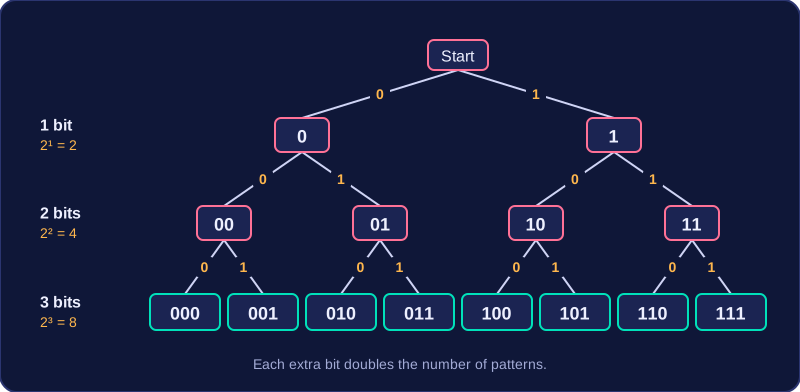
Every character in a character set needs its own binary code, and the number of bits per character decides how many different codes are possible. If each code is n bits long, there are 2 to the power of n different bit patterns, so the set can hold up to 2 to the power of n characters. For example, 3 bits give 2 to the power of 3 = 8 codes, from 000 to 111. Each extra bit doubles the number of codes: 4 bits give 16, 5 bits give 32, and so on. The result is the number of unique codes available, not the largest code value.
| Bits per character | Unique codes available |
|---|---|
| 2 | 4 |
| 3 | 8 |
| 4 | 16 |
| 8 | 256 |
| 12 | 4,096 |
| 16 | 65,536 |
Finding the minimum number of bits
To find the minimum number of bits for a required number of characters, find the smallest n where 2 to the power of n is at least that number. Imagine a language-learning app needs 300 different characters for its on-screen keyboard. Using 8 bits gives 256 codes, which is not enough. Using 9 bits gives 512 codes, which is enough, so the minimum is 9 bits per character. The spare codes could be assigned to new characters later.
More bits means bigger text files
Increasing the bits per character increases the number of characters the set can represent, but every stored character now uses more bits, so the text file grows. A 180-character museum caption stored at 7 bits per character takes 180 × 7 = 1,260 bits. The same 180 characters stored at 12 bits per character take 180 × 12 = 2,160 bits. Text file size therefore increases with both the number of characters stored and how many bits each stored character uses.
ASCII stands for American Standard Code for Information Interchange. It is a character set designed for English text: every character has its own unique code, and each code is stored in 8 bits, which is one byte.
Because every code is 8 bits long, ASCII has 2 to the power 8 = 256 possible codes. These cover:
- upper-case and lower-case English letters
- the numerals 0 through 9
- punctuation marks, including commas and question marks
- symbols such as +, @ and %
- the space character
- control characters
Control characters are included in the set even though they never appear as visible symbols. They tell the computer to do a job, for example sounding a beep or moving to a tab stop, and each one still has its own code.
Why ASCII is useful
Using one byte per character keeps text files small, so they take up little storage and are quick to send between computers.
Where ASCII runs out
The 256 codes are designed for English text, so they soon run out. There are none left for the alphabets of other languages, for many mathematical and technical symbols, or for emoji, so ASCII cannot represent that text. ASCII is a list of characters and their codes, not a font or a keyboard layout.
In exam questions, an ASCII code is written as an 8-bit binary value, for example 00100001.
Unicode is a character set standard designed to cover every writing system in the world, along with symbols such as maths signs, music notes and emoji. Each character in the set has its own unique binary code, so the same code stands for the same character on any device.
More bits means more characters
Unicode gives each character more bits than ASCII does. A version of Unicode that uses 16 bits per character has 2 to the power 16, which is 65,536 different codes, so it can hold many thousands of characters. ASCII's 8 bits stretch only to 2 to the power 8, which is 256 codes, so ASCII is limited to English letters, digits, punctuation and a few extra symbols.
Working alongside ASCII
For any character that appears in both sets, Unicode uses exactly the same code as ASCII. Text made of ASCII characters therefore keeps its meaning when it is read as Unicode, so older files and programs carry on working. Unicode is the larger, more capable set, but it does not throw ASCII away.
One benefit and one drawback
The main benefit is that one standard can store text in any language on any device. A birthday message that ends with a waving-hand emoji, or a name that includes an accented letter, saves and displays correctly whatever computer it is opened on.
The main drawback is storage. Because every character uses more bits, the same piece of text takes up more space in Unicode than it would in ASCII, so files and messages become larger.
A character set is logically ordered: letters and digits are arranged in sequence, so their codes follow a consistent order. Once you know one character's code, you can work out another nearby in the same sequence by counting its position in the set.
Counting positions
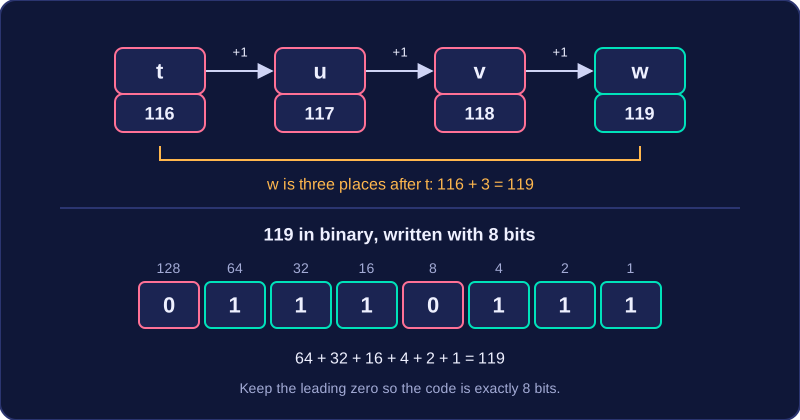
Suppose a question gives you t = 116 and asks for the code for w. Count forward from t:
| Character | Code |
|---|---|
| t | 116 |
| u | 117 |
| v | 118 |
| w | 119 |
w is three places after t, so add 3: 116 + 3 = 119. Counting in the ordered set is safer than guessing, and you must not skip or double-count a position. Digit characters are consecutive too, so if a question gives you one digit's code you can count to another.
Different characters, different codes
Upper-case and lower-case versions of a letter are separate characters, so they have different codes — a capital and its small form are not the same entry. In the same way, when a digit is held as text the computer stores a character code for it, not the number it looks like. Imagine a locker code typed in as 2417: the computer stores character codes for '2', '4', '1' and '7', so a program cannot add them to get 14 until it converts each character to its numeric value.
You do not need to memorise any codes: questions give the codes they rely on.
Writing the code in binary
If the answer must be binary, convert the denary code and write it with 8 bits. ASCII codes are shown using 8 bits. For w, 119 in binary is 01110111. Keep leading zeros so the code is exactly eight bits.
ASCII and Unicode are both character sets: lists of characters, each with its own binary code. They differ in the range of characters they cover, how many bits each character uses, and how much storage the same text needs.
| Feature | ASCII | Unicode |
|---|---|---|
| Range of characters and languages | English letters, digits, punctuation and common symbols. | Writing systems from around the world, plus many extra symbols and emoji. |
| Bits per character | 8 bits, giving 256 possible codes. | More than 8 bits, often 16 bits, giving 65,536 possible codes. |
| Effect on file size | Each character takes 8 bits, so English text stays small. | Each character takes more bits, so the same text takes more storage. |
ASCII's 256 codes are enough for English text, but they cannot cover every character used around the world. Unicode has many more possible codes, so it can store text in other writing systems, as well as symbols and emoji that ASCII has no code for. If a character is not in a character set, that set cannot store it.
The extra range has a cost. Because Unicode generally uses more bits for each character, a piece of text stored in Unicode takes more storage than the same piece stored in ASCII. Think of ASCII as a small English-only phrasebook and Unicode as a large multilingual dictionary: the larger book covers far more, but it takes up more shelf space. The text looks the same on screen, but its Unicode file is bigger.
That trade-off is why both are still used: ASCII keeps English text compact, while Unicode lets you store text in any writing system, or symbols such as emoji, at the cost of more storage for the same number of characters.