Algorithms
Writing and Refining Algorithms

Contents
Pseudocode is a way of writing down an algorithm so that it looks like programming instructions, but is not tied to the exact syntax of any one programming language. It lets you concentrate on the logic, such as the order of the steps, the decisions and the repeats, without worrying about punctuation and spelling rules.
An algorithm can be recorded as pseudocode, or written straight away as program code in a high-level language such as Python.
Pseudocode must be precise
Pseudocode is not vague. It must be logically correct and precise enough for another programmer to turn it into program code. Each step should make clear what is input, stored, calculated, decided or output, and each decision should be written as a full comparison.
Python building blocks
When you convert an algorithm into Python, you use these building blocks:
input()andprint()for input and output.if,elifandelsefor selection.forwithrange()for count-controlled iteration.whilefor condition-controlled iteration.- a flag variable for a loop that must run at least once.
Because the computer runs your Python, every line must follow the rules of the language exactly; a computer cannot guess what a line was meant to say.
For example, to plan an algorithm that asks for a number and outputs whether it is positive, pseudocode lets you set the steps out in order: ask for the number, store it, decide whether it is greater than zero, then output a suitable message. In Python, the same algorithm has to be written using the exact rules of the language:
number = int(input("Enter a number: "))
if number > 0:
    print("Positive")
else:
    print("Not positive")
Output when the user types 7:
Enter a number: 7
PositivePrograms often need information from the user, and a way of showing the result. In Python, input() handles the way in and print() handles the way out.
Getting text in and out
input() shows a message on the screen, called a prompt, and waits for the user to type something. Whatever they type is returned by the function, and you normally store it in a variable so you can use it later. The prompt is just a message for the user, so make it say clearly what you want them to type.
print() outputs values and messages to the screen. You can print a piece of text on its own, or a mix of text and variables separated by commas.
input() always hands back a string
Even if the user types 21, input() returns the text "21", not the number 21. A string is a sequence of characters, so the digits are stored as characters with no numerical value. To use what was typed as a number, cast it with int() for a whole number or float() for a number that may have a decimal point. Only then can you do arithmetic with it, or compare it with a number using < and >.
lapLength = float(input("Length of one lap in km: "))
lapCount = int(input("How many laps? "))
totalDistance = lapLength * lapCount
print("Total distance:", totalDistance)
Output when the user types 0.4, 5:
Length of one lap in km: 0.4
How many laps? 5
Total distance: 2.0
Wrapping input() in int() casts the text the moment it arrives, so lapCount holds a real whole number and * multiplies properly. The lap length needs float() because it can include a decimal part.
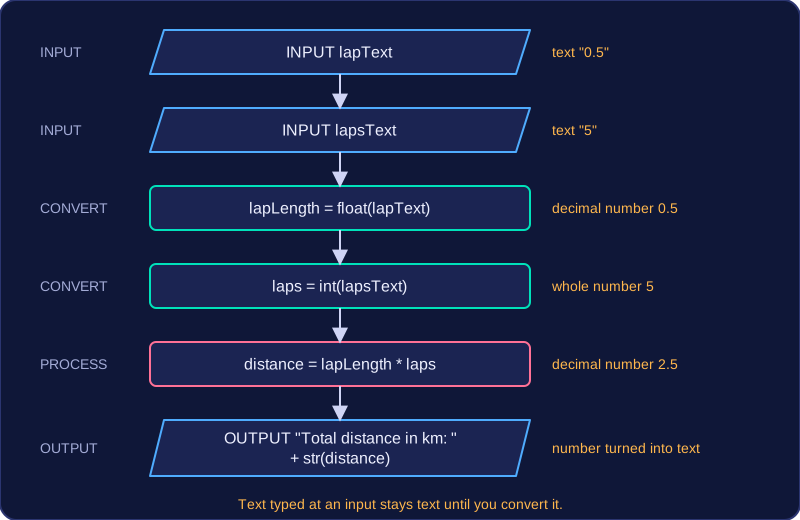
What happens without a cast
score = input("Score: ")
newScore = score + 4
print(newScore)
Output when the user types 21:
Score: 21
TypeError: can only concatenate str (not "int") to str (line 2)
score holds the text "21", not the number 21. Python will not add the number 4 to a string, so the program stops with a TypeError. Joining two inputs with + does not add them either: the text is placed side by side. To do arithmetic, cast first.
Using text and a number together in a calculation or a comparison always stops the program in the same way. A calculation such as amount + 5, or a comparison such as score > 80, stops with an error, because Python will not quietly turn text into a number for you.
| Situation | Without casting | With casting |
|---|---|---|
| Joining two entered values | The pieces of text are joined end to end, so digits sit side by side | The two numbers are added |
| Comparing an entered value with a limit | Program stops with an error | The comparison is carried out as numbers |
Assignment stores a new value in a variable. A comparison asks a question about values and answers True or False, leaving everything as it was.
Assignment updates a variable
An assignment is written with a single =, with the variable name on the left and the value on the right. Python works out the right-hand side first, then stores the result, so whatever the variable held before is replaced. That is what makes it an update.
For example, coins = 8 stores 8 in coins. A later line coins = coins * 3 works out 24 and stores it, and the 8 has gone for good. The same variable now holds a different value.
Comparison asks a question
A comparison checks two values against each other and produces a Boolean, either True or False. Nothing is stored, so the variables keep the values they already had. Comparisons matter because the True or False they produce is what a condition uses to decide which path an algorithm takes.
| Operator | Meaning | Example when score holds 12 | Result |
|---|---|---|---|
== | equal to | score == 12 | True |
!= | not equal to | score != 12 | False |
< | less than | score < 20 | True |
> | greater than | score > 20 | False |
<= | less than or equal to | score <= 12 | True |
>= | greater than or equal to | score >= 15 | False |
= assigns, == compares
The two are easy to mix up because they look so alike. A single = gives a variable a value; a double == asks whether two values are the same. A condition must be a question that produces True or False, so Python rejects an assignment used where a comparison is needed and reports a syntax error. Remembering that one symbol stores and two symbols ask keeps the two jobs apart.
energy = 50
energy = energy - 12       # assignment: energy now holds 38
print("Energy:", energy)
print(energy < 40)         # comparison: True, and energy is still 38
print("Energy:", energy)
Output:
Energy: 38
True
Energy: 38if, elif and else let an algorithm choose between different paths. The if condition is tested first. An elif condition is tested only when every condition above it was false, and the else branch runs only when no condition matched. As soon as one condition is true, its branch runs and the remaining checks are skipped, so only one branch runs.
The checks are made from top to bottom, so the first true condition wins even if a later condition would also be true. An else has no condition of its own: it is the fallback that catches every case not caught earlier.
For example, this program decides what to do based on the moisture of a plant's soil. It reads a whole number and tests it in order.
moisture = int(input("Soil moisture %: "))
if moisture < 30:
    print("Water the plant")
elif moisture < 60:
    print("Check again tomorrow")
else:
    print("Do not water")
Output when the user types 45:
Soil moisture %: 45
Check again tomorrow
If the moisture is 20, the first condition is true, so the plant is watered and the elif and else are skipped. If it is 45, the first condition is false, the elif is checked and matches, and the else is skipped. If it is 80, both tests are false, so the else branch runs. The keyword is written as elif, not as two words.
In Python, indentation is the spaces at the start of a line, and it is part of the language rather than decoration. Every if, elif, else, for and while line ends with a colon, and the indented lines underneath form the block that runs.
The colon starts a block
Python sees the colon at the end of the line and expects the next line to be indented. The indented lines belong to that construct. Any line that is not indented is outside the block, so the block ends where the indentation goes back to the left.
points = 0
for lap in range(1, 4):
    score = int(input("Score: "))
    if score > 5:
        print("Bonus lap")
        points = points + score
print(points)
Output when the user types 7, 2, 9:
Score: 7
Bonus lap
Score: 2
Score: 9
Bonus lap
16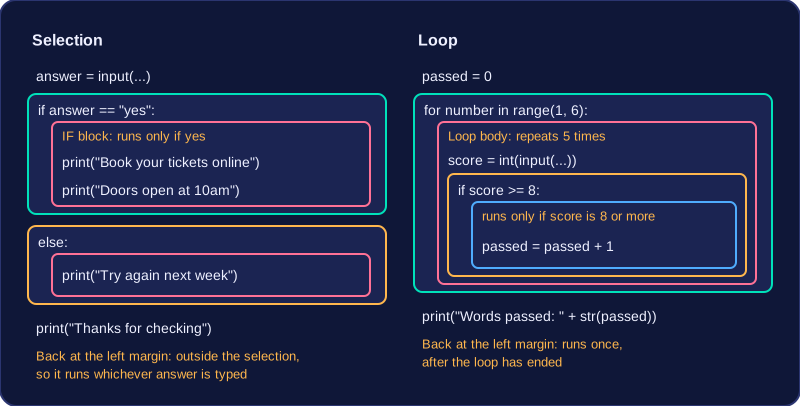
Nesting adds another level
When one construct sits inside another, the inner block is indented further than the outer one. In the program, the lines inside the for loop are indented once, and the two lines inside the if are indented twice. That extra level shows Python which lines belong to the if and which belong only to the loop.
Coming back to the left
The final print(points) is not indented, so it is not inside the loop. It runs once, after every lap has been processed. If it were indented to match the loop's block, it would run after every lap instead. Indentation is how you show which lines are inside which construct.
A condition can test two comparisons at once by joining them with and or or. The joined condition is True or False as a whole, and the if uses that single result to choose a path.
and is true only when both comparisons are true, so one false side makes the whole condition false. or is true when at least one side is true, and is false only when both sides are false. That makes and the stricter choice: use it when every requirement must be met, and or when any one of them is enough.
| First comparison | Second comparison | Joined with and | Joined with or |
|---|---|---|---|
| True | True | True | True |
| True | False | False | True |
| False | True | False | True |
| False | False | False | False |
Each side in full
Each side of and/or must be a complete comparison that repeats the variable, so the computer knows what to test twice. For a weekend check you might write day == "Saturday" or day == "Sunday": each half would make sense on its own. Writing day == "Saturday" or "Sunday" leaves out the variable after or. It runs, but the second half is not a comparison, so the day is never checked against "Sunday" and the condition can give the wrong result. Using a different variable by accident changes the meaning just as badly.
Worked example
A weather station issues an extreme warning if the temperature is below 0 or above 35, and a cold warning if it is between 0 and 10 inclusive. The first check needs or, because either extreme qualifies; the second needs and, because a cold warning needs the temperature to be inside both limits.
temperature = int(input("Temperature: "))
if temperature < 0 or temperature > 35:
    print("Extreme weather warning")
elif temperature >= 0 and temperature <= 10:
    print("Cold weather warning")
else:
    print("Normal weather")
Output when the user types 40:
Temperature: 40
Extreme weather warning
Typing 40 makes temperature < 0 false but temperature > 35 true, so the or condition is true and the extreme warning prints. For 5 both sides of the first condition are false, so it moves on: 5 >= 0 and 5 <= 10 are both true, giving the cold warning.
A for loop with range() is count-controlled: it repeats a block of code a set number of times, decided before the loop starts. The loop variable takes a new value on each pass, and the indented lines underneath run each time.
range(start, end) includes its start value but stops before its end value. So range(1, 5) runs four times: the loop variable is 1, then 2, then 3, then 4. The number of iterations is the difference between the end and start values, 5 - 1 = 4. If you write one value, such as range(5), Python starts at 0 and stops before 5, so it runs five times with values 0, 1, 2, 3 and 4.
For example, the program below prints a shelf number for a library display. It repeats once for each shelf from 1 up to, but not including, 5.
for shelf in range(1, 5):
    print("Shelf", shelf)
Output:
Shelf 1
Shelf 2
Shelf 3
Shelf 4
To count iterations, subtract: range(2, 9) runs 7 times (2, 3, 4, 5, 6, 7, 8), and range(4) runs 4 times (0, 1, 2, 3). The end value is not produced, so planning a loop means choosing the end value one higher than the last value you want.
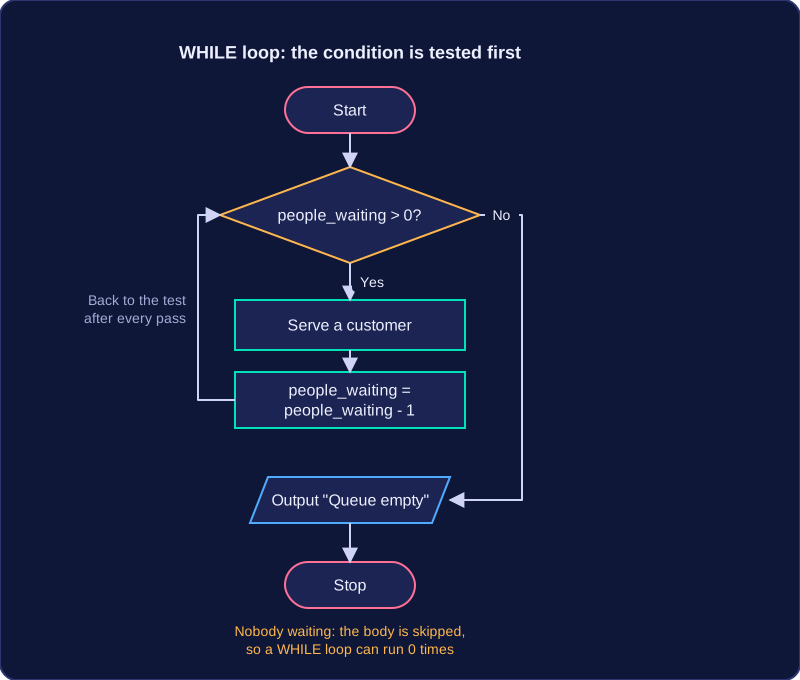
A while loop repeats a block of code and is condition-controlled: it tests a condition before every pass and runs the block only while that condition is true. Because the test comes first, a while loop can run zero times. If the condition is false when it is first checked, the indented block is skipped completely and the program continues with the first line after the loop.
Testing the condition on every pass
The condition follows the word while and is tested each time, usually a comparison such as temperature < 200. Every pass follows the same order:
- The condition is tested at the start of the pass.
- If it is true, the indented block runs once.
- The program returns to the while line and tests the condition again.
- When the test is false, the loop ends and the lines after it run.
temperature = 20
while temperature < 200:
    print("Heating:", temperature)
    temperature = temperature + 50
print("Oven ready at", temperature)
Output:
Heating: 20
Heating: 70
Heating: 120
Heating: 170
Oven ready at 220
Starting at 20, the test 20 < 200 is true, so the loop runs and the oven heats to 70 before going back to the top. The test succeeds again at 70, 120 and 170, and the loop ends once the temperature reaches 220. Had the temperature started at 200, the test would have been false straight away and the block would never have run.
Making the loop end
For a while loop to finish, something inside the block must change a value used in the condition. Here, temperature = temperature + 50 moves the temperature towards 200, so the condition eventually becomes false. If no line changed it, the condition would stay true and the loop would never end. A loop that can never finish is called an infinite loop (also called an endless loop).
A flag variable is a variable that records whether something has happened. It usually holds True or False. You set it before a loop, change it inside the loop when the event happens, and check it in the loop's condition or afterwards to decide what happens next.
Running a loop at least once
A while loop checks its condition before the first pass, so it might not run at all. If a loop must run at least once, you can use a flag that starts as True. The condition is true the first time, so the loop always runs. Inside the loop, when the job is finished, set the flag to False. The condition then becomes false and the loop stops.
The flag must be changed inside the loop. If it stays True, the condition never becomes false and the loop never ends.
playing = True
while playing:
    guess = int(input("Guess a number from 1 to 10: "))
    if guess == 7:
        playing = False
        print("You found the lucky number!")
Output when the user types 3, 7:
Guess a number from 1 to 10: 3
Guess a number from 1 to 10: 7
You found the lucky number!
In this example, playing is the flag. It starts as True, so the loop asks for a guess at least once. When 7 is guessed, playing is set to False inside the loop, which ends it.
Nesting means placing one programming construct inside another. For instance, an if statement can be written as part of a loop body, one loop can be placed within another loop, or an if statement can sit inside a second if statement. The inner construct belongs to the outer one, and in Python the indentation shows this: the inner block is written further to the right.
When a loop is nested inside another loop, the outer loop controls the main passes. On each pass, the inner loop starts again and runs all the way to its end. The outer loop does not move on until the inner loop has finished. In the same way, an if placed inside a loop is tested on every pass, so each value can be checked and acted on separately.
A worked example
This program prints a label for every player in three teams. The outer loop chooses the team and the inner loop chooses the player.
for team in range(1, 4):
    for player in range(1, 3):
        print("Team " + str(team) + ", player " + str(player))
Output:
Team 1, player 1
Team 1, player 2
Team 2, player 1
Team 2, player 2
Team 3, player 1
Team 3, player 2| Outer loop pass | Inner loop runs | Labels printed |
|---|---|---|
| team = 1 | player = 1, then player = 2 | 2 |
| team = 2 | player = 1, then player = 2 | 2 |
| team = 3 | player = 1, then player = 2 | 2 |
The inner loop runs twice for each of the three outer passes, so the printing line runs 3 × 2 = 6 times. In general, if the outer loop runs m times and the inner loop runs n times for each outer pass, the inner block runs m × n times.
Interpreting an algorithm means saying in plain words what it does, what it outputs for particular inputs, and how many times each loop runs. Saying what it outputs means stating the result it produces, such as a total it prints or a message it displays. A computer works through the lines in order, one at a time, so you can do the same: take each line in turn and write down the value of every variable afterwards.
Work through it line by line
Choose test values for any inputs, then follow the lines in order. Replace each variable name with the value it currently holds, carry out the step, and note any change before you move on. Writing down each new value as you go stops you losing track of where the algorithm has got to.
The algorithm below adds 15 tokens to a jar each round until the jar holds 60, and counts the rounds it took.
tokens = 0
rounds = 0
while tokens < 60:
    tokens = tokens + 15
    rounds = rounds + 1
print(rounds)
Output:
4| Stage | tokens | rounds | tokens < 60 |
|---|---|---|---|
| Before any pass | 0 | 0 | True |
| After pass 1 | 15 | 1 | True |
| After pass 2 | 30 | 2 | True |
| After pass 3 | 45 | 3 | True |
| After pass 4 | 60 | 4 | False |
The test is checked before every pass. After the fourth pass tokens holds 60, so the test at the top gives False, the indented block is skipped and the loop stops, leaving rounds at 4, the value in the last row. In one sentence, the algorithm counts how many rounds of 15 tokens are needed to fill the jar to 60.
Working out how many times a loop runs
For a for loop the answer comes from the start and end values: range(1, 6) repeats for 1, 2, 3, 4 and 5, so five passes. For a while loop you cannot tell from the line alone, so follow the changing variable until the condition becomes false. Check the very first test as well, because a while loop whose condition is already false runs no passes at all.
Where the algorithm asks for input, use the value given in the question, follow it through the lines and state the output it produces. A different input can mean a different output and a different number of passes.
Correcting an algorithm means finding the errors in given pseudocode or program code and suggesting fixes. You are not rewriting it from scratch: you keep the intended purpose and repair each fault.
Follow a reliable method
First read what the algorithm is meant to do, including what it should input, calculate and output. Then choose test values and work through the algorithm line by line, tracking every variable. Compare what actually happens with what should happen; each difference is a fault. Fix one fault at a time and check again with the same values, because a fix can create a new problem.
For example, a homework reward program should give 5 points for every piece of homework handed in, plus a bonus of 10 points once 8 or more pieces have been handed in. Test with 3 pieces: the expected total is 15 points. If it outputs 8, the program has added the points rate to the number of pieces instead of multiplying them. Then test 8 pieces: the expected total is 50 (8 × 5 + 10). That boundary value catches a condition such as more than 8 instead of 8 or more.
Name the line and give the fix
State the line number and a precise correction. The correction must remove the fault without introducing another. For instance, if an input value is used in arithmetic or compared as a number, cast it to an integer or float; if a condition uses =, change it to ==; if a loop stops too early, increase the range end or adjust the comparison. Check your correction against the intended purpose and test values, including a boundary value.
A syntax error is a mistake that breaks the rules of Python, so the program cannot run. You need to find and correct punctuation, spelling and indentation mistakes in code.
Punctuation and layout
Every if, elif, else, for and while line must end with a colon. The colon tells Python that an indented block follows. Lines inside that block must be indented, and every line in the same block must line up. If one line is indented differently, Python cannot tell which block it belongs to.
Every opening bracket needs a closing bracket, and text must have quotation marks at both ends. To join two strings into one, put + between them; without it Python cannot build the combined string. Multiplication uses *, not x: 9 x 4 is invalid because Python does not treat x as a multiplication sign.
score = 8
if score > 5
    print("Well done")
Output:
SyntaxError: expected ':' (line 2)Keywords and names
The keywords used in these constructs are lower case and must be spelt exactly. Write elif as one word, not else if; it is followed by a condition, while else is used when there is no condition to test. A keyword typed with the wrong letters, such as fro instead of for, is not recognised.
Python is case sensitive: total, Total and TOTAL are three different names. If you store a value in total but later print Total, Python stops when it reaches that line because Total has no value.
A logic error is a mistake in the thinking behind a program: the code is valid Python, so it runs, but it produces the wrong result or says the wrong thing.
One frequent logic error is an off-by-one error in range(). range(1, 5) starts at 1 and stops before 5, so it gives 1, 2, 3, 4: four values, not five. To repeat five times you need range(1, 6). The same kind of mistake happens with comparison operators: if 45 points should meet the target, points > 45 leaves 45 out, while points >= 45 includes it.
Conditions can also be in the wrong order. In an if/elif chain, the first true condition wins. If a broad check such as points >= 0 comes before points >= 45, the broad check catches every value and the later target check is never reached. Check the narrow or most important case first.
Other logic errors are easy to spot only by tracing values. You might use the wrong operator, such as area = length + width when you meant length * width, or the wrong variable, such as multiplying price by price instead of by quantity. A counter, running total or flag may never be updated inside a loop, or the line that updates it may sit outside the loop because of wrong indentation. If a while loop’s counter or flag is never changed, the loop can run endlessly. A program may also overwrite a value supplied in the question instead of using it, for example replacing a given budget with a new number before testing it.
total = 0
for lap in range(1, 5):
    print("Lap:", lap)
print("Total laps:", total)
Output:
Lap: 1
Lap: 2
Lap: 3
Lap: 4
Total laps: 0
Here, range(1, 5) gives four laps if five were intended, and total is never updated, so it stays 0.
Output can be wrong in two ways: the message may not match the required wording, or it may be printed on the wrong path. A line placed after an if/else runs whichever path was taken, so “Please charge now” can appear even when the battery level is fine.
battery = 80
if battery >= 20:
    print("Battery OK")
else:
    print("Low battery")
print("Please charge now")
Output:
Battery OK
Please charge nowCompleting an algorithm means filling the missing lines, or missing parts of lines, in an algorithm that is partly written. The description of the problem tells you what each gap must do, so read it closely before you write anything.
Use the description to work out the job of each gap. A gap might need an input, a condition, a calculation, a counter update or an output. For example, a print shop charges 6p per page. Orders of 100 pages or more are charged at 5p per page. The condition gap must test the variable pages and must include 100, so the completed line uses the greater-than-or-equal-to operator. The calculation gap must work out the cost using the lower rate, and the output gap must print the final cost. A gap that is only part of a line might be just the operator or the variable name, so choose that part from the wording of the description.
The completed line must keep the style of the surrounding lines. Use the same keywords, the same variable names and the same indentation. If the surrounding code uses if and indents the branch by four spaces, your line does the same. Do not add steps the description did not ask for, and do not rewrite lines that are already correct.
After all the gaps are filled, test the finished algorithm with values. Include boundary values — the values at the edge of a condition — because they show whether the condition includes or excludes the right value. For the print shop rule, test 99, 100 and 120. Check that 100 gets the lower rate, 99 does not, and 120 is also charged at the lower rate.
pages = int(input("Enter number of pages: "))
cost = pages * 0.06
if pages >= 100:
    cost = pages * 0.05
print("Final cost:", cost)
Output when the user types 100:
Enter number of pages: 100
Final cost: 5.0To refine an algorithm is to improve it: making it more efficient, or modifying or editing it to meet new requirements. A refined version must still solve the same problem, but with fewer unnecessary steps or with new rules built in.
Replace repeated lines with a loop
If an algorithm contains several lines that do the same job and only a value changes, a loop does the job in one place. That makes the algorithm shorter and easier to update: the loop body is written once, so a change to it affects every repetition. The program below prints three warm-up steps from a list rather than using three separate print lines.
steps = ["jog", "stretch", "sprint"]
for step in steps:
    print(step)
Output:
jog
stretch
sprint
Use if, elif and else so only one branch runs
Separate if statements are each tested, even after one has already matched. Replace them with if, elif and else when only one branch should run. Once a condition matches, the later checks are skipped, which is more efficient and prevents two messages being output for the same input.
Add validation and use constants
Validation rejects invalid input and asks for it again. Put the input inside a condition-controlled loop, and include the input line again inside the loop; otherwise the same invalid value is tested for ever. A constant stores a value that never changes while the program runs. Write its name in capital letters, such as MAX_HOURS, and set it once at the top. If the limit later changes, you edit one line rather than searching for every copy of the number.
The next program uses a constant for the maximum hire hours, rejects values outside 1 to 5, and then chooses one message with if, elif and else.
MAX_HOURS = 5
hours = int(input("Hours? "))
while hours < 1 or hours > MAX_HOURS:
    print("Invalid")
    hours = int(input("Hours? "))
if hours == 1:
    print("Short hire")
elif hours <= 3:
    print("Half day")
else:
    print("Full day")
Output when the user types 0, 3:
Hours? 0
Invalid
Hours? 3
Half day