Writing and Refining Algorithms
Input and Output in Python

Programs often need information from the user, and a way of showing the result. In Python, input() handles the way in and print() handles the way out.
Getting text in and out
input() shows a message on the screen, called a prompt, and waits for the user to type something. Whatever they type is returned by the function, and you normally store it in a variable so you can use it later. The prompt is just a message for the user, so make it say clearly what you want them to type.
print() outputs values and messages to the screen. You can print a piece of text on its own, or a mix of text and variables separated by commas.
input() always hands back a string
Even if the user types 21, input() returns the text "21", not the number 21. A string is a sequence of characters, so the digits are stored as characters with no numerical value. To use what was typed as a number, cast it with int() for a whole number or float() for a number that may have a decimal point. Only then can you do arithmetic with it, or compare it with a number using < and >.
lapLength = float(input("Length of one lap in km: "))
lapCount = int(input("How many laps? "))
totalDistance = lapLength * lapCount
print("Total distance:", totalDistance)
Output when the user types 0.4, 5:
Length of one lap in km: 0.4
How many laps? 5
Total distance: 2.0
Wrapping input() in int() casts the text the moment it arrives, so lapCount holds a real whole number and * multiplies properly. The lap length needs float() because it can include a decimal part.
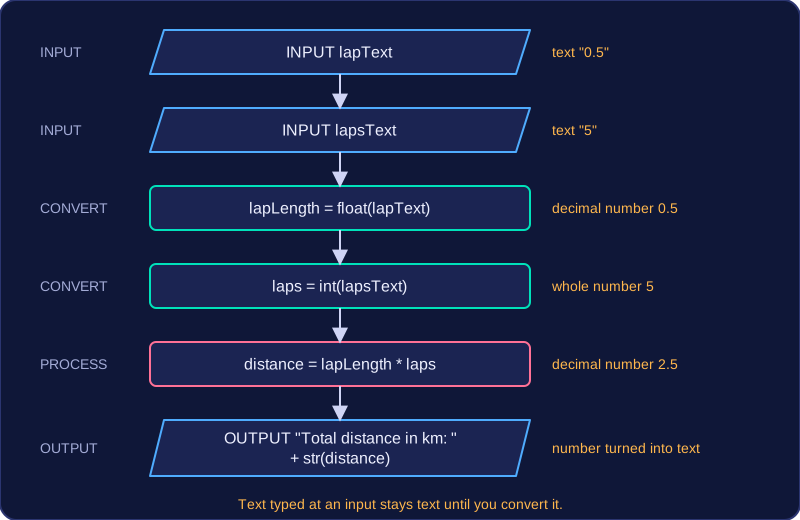
What happens without a cast
score = input("Score: ")
newScore = score + 4
print(newScore)
Output when the user types 21:
Score: 21
TypeError: can only concatenate str (not "int") to str (line 2)
score holds the text "21", not the number 21. Python will not add the number 4 to a string, so the program stops with a TypeError. Joining two inputs with + does not add them either: the text is placed side by side. To do arithmetic, cast first.
Using text and a number together in a calculation or a comparison always stops the program in the same way. A calculation such as amount + 5, or a comparison such as score > 80, stops with an error, because Python will not quietly turn text into a number for you.
| Situation | Without casting | With casting |
|---|---|---|
| Joining two entered values | The pieces of text are joined end to end, so digits sit side by side | The two numbers are added |
| Comparing an entered value with a limit | Program stops with an error | The comparison is carried out as numbers |
Practise this
OCR GCSE Computer Science · Writing and Refining Algorithms
OCR GCSE Computer Science · Relational Operators
OCR GCSE Computer Science · Casting
OCR GCSE Computer Science · Input