Flowcharts
Flowcharts and Python

A short flowchart and a Python program can describe the same algorithm. You can turn the flowchart into code step by step, and you can sketch a program as a flowchart using the same steps, decisions and loops.
Sequence and decisions
Steps that follow one another down the flowchart become statements written in the same order. An input/output parallelogram becomes input() or print(), and a process rectangle becomes an assignment. Keep the same variable names in both so you can match each symbol to its line of code.
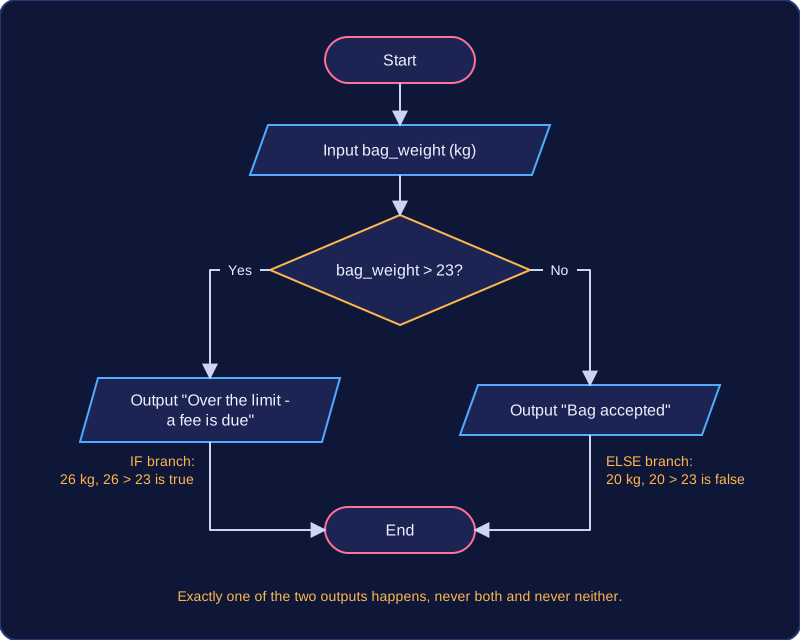
A decision diamond has two labelled exits, so it becomes an if statement: the “yes” exit is the if branch and the “no” exit is the else branch. Only one branch runs.
weight = float(input("Enter bag weight in kg: "))
if weight <= 10:
    print("Cabin bag allowed")
else:
    print("Check bag into the hold")
Output when the user types 7.5:
Enter bag weight in kg: 7.5
Cabin bag allowed
Here the input is stored in weight; the decision tests it against the 10 kg cabin limit, then each exit prints a different message.
Loop arrows
If a decision has an arrow back to an earlier step, that is a condition-controlled loop: the test happens again after each pass, so write it as a while loop. Something inside the loop must change the value being tested, otherwise the condition never becomes false.
raised = int(input("How much sponsorship have you collected? "))
while raised < 50:
    print("Keep collecting")
    raised = raised + int(input("More sponsor money: "))
print("Target reached")
Output when the user types 12, 20, 25:
How much sponsorship have you collected? 12
Keep collecting
More sponsor money: 20
Keep collecting
More sponsor money: 25
Target reached
The arrow back matches the while loop returning to its condition. Each pass adds to raised, so the condition eventually becomes false and the loop can end.
When a counter changes by a fixed step towards a known end value, the same idea becomes a count-controlled for loop with range(). For example, a counter that starts at 0, is tested to stay below 10 and goes up by 2 each time matches a for loop over range(0, 10, 2), which supplies 0, 2, 4, 6 and 8 in turn. Use while when you cannot tell in advance how many repeats are needed.
Practise this
OCR GCSE Computer Science · Flowcharts