Truth tables
Deriving Boolean Expressions from Truth Tables
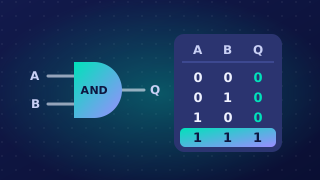
A truth table usually starts with a Boolean expression and works out the output. You can use it in reverse: start with the output column and work out an expression that produces it. Compare the pattern of 1s and 0s with the rules for AND, OR and NOT.
A column that is 1 only where both inputs are 1 matches the AND of those inputs. A column that is 1 where either input, or both, is 1 matches the OR of those inputs. A column that is the opposite of an input matches NOT applied to that input.
Match the pattern
| A | B | Q1 | Q2 | Q3 |
|---|---|---|---|---|
| 0 | 0 | 0 | 1 | 1 |
| 0 | 1 | 0 | 1 | 0 |
| 1 | 0 | 1 | 0 | 0 |
| 1 | 1 | 0 | 1 | 0 |
Q1 is 1 only where A is 1 and B is 0, so Q1 = A AND (NOT B). Q2 is 0 only where A is 1 and B is 0; it is 1 whenever B is 1 or A is 0, so Q2 = (NOT A) OR B. OR is inclusive, so it still gives 1 when both parts are true. Q3 is 1 only when both A and B are 0, so Q3 = NOT (A OR B). If either input is 1, A OR B is 1, so NOT makes the output 0.
Check every row
Do not stop once you have matched the rows containing 1. Test your expression on every row, including those where the output is 0. A wrong expression often agrees on the 1s but fails on a 0.
For example, you might guess Q1 = A because Q1 is 1 on the row A=1, B=0. But Q1 is 0 on the row A=1, B=1, and A alone would give 1 there. Checking the 0 rows has ruled out the wrong expression and shown that Q1 must also require B to be 0, so Q1 = A AND (NOT B).
Practise this
Edexcel GCSE Computer Science · Truth tables