User Interfaces
Menu-Based Interface

A menu-based interface gives you a short list of options to choose from instead of typing an instruction. The choices are often split across several screens, so choosing an option on one menu opens the next menu down.
How it works
Each screen shows a few options, each with a highlight or a number. You move the highlight with a button and confirm, or press the matching number key. Choosing an option either carries out an action or opens a menu one level deeper.
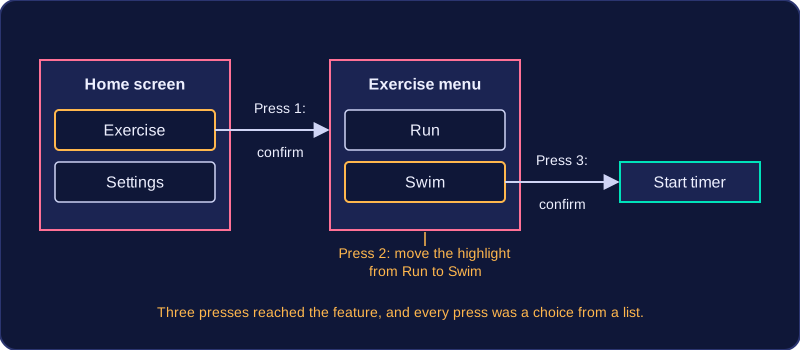
For example, a fitness tracker with a small screen and two buttons might open with Exercise and Settings. With Exercise highlighted, confirm opens a second menu: Run and Swim. Move to Swim and confirm to start the timer. Three presses reached the feature, and every press was a choice from a list.
You find this style on devices with a small screen or few buttons, such as set-top boxes, cash machines, older mobile phones and the settings screen of a camera.
Advantages
- Nothing to remember — the options are on screen, so a first-time user can work the device out without learning commands.
- Only valid choices — the designer decides what appears, so you can only pick options the device is designed to handle, which reduces mistakes.
- Works with a few buttons — no keyboard or mouse is needed, which keeps a small device cheap and simple to build.
Disadvantages
- Slow to reach an option — a feature three levels down takes several presses, which becomes tedious for someone who uses it many times a day.
- Only the designer's choices — if the job you want is not listed, you cannot do it at all.
- Poor for complex tasks — anything open-ended, such as writing a report or editing a photo, would need too many combinations of choices, so a graphical interface suits it better.
A menu-based interface is not the same as a GUI. A GUI uses windows, icons and a pointer; here the whole interaction is picking from lists.