Software Basics
What is Software?

Software is the name for all the programs and data that tell a computer what to do. The hardware on its own can only switch and store; without software it has nothing to follow. Software splits into two broad groups: system software, which runs the computer itself, and application software, which does a job for you such as editing a photo or playing a game.
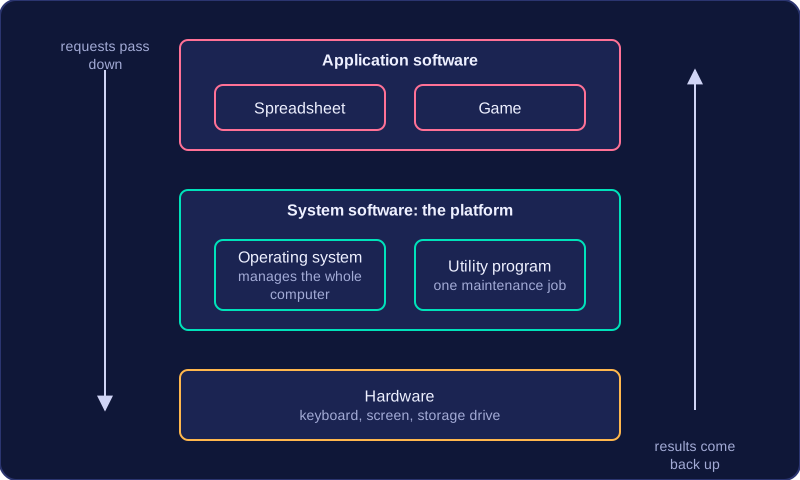
System software provides a platform
System software is the ground everything else stands on. When you open a spreadsheet, it does not talk to the keyboard, the screen and the storage drive directly. It asks the system software, which passes the requests on to the hardware and hands back the results. That is what makes system software a platform: it provides the services other software needs in order to run at all. Application software depends on it, because a game on a computer with no system software could not read its own files or draw anything on the screen.
Two types of system software
System software is not one single thing. It covers two kinds of program:
- An operating system is the main system software. It manages the hardware, the files, the running programs and the users, and it loads and runs the applications you choose.
- A utility program is a smaller system program that carries out one maintenance job on the computer, such as making a second copy of your files in case the originals are lost.
Both count as system software because both work on the computer system itself rather than on a task such as writing an essay. A utility does not manage the hardware the way an operating system does: it performs one focused job that keeps the system working well.
| Question | Operating system | Utility program |
|---|---|---|
| What is it for? | Managing the whole computer system | Carrying out one maintenance task |
| Could the computer run without it? | No, it loads and controls everything else | Yes, the computer still works |
| Example | The software that starts the computer up and lets you log in | The software that repairs a damaged photo file |
Practise this
Edexcel GCSE Computer Science · Software Basics