File Management
Directory Hierarchy

An operating system organises files and folders using a hierarchy: layers where each level sits inside the level above it. Every folder and file has a place in this layered structure, so storage stays orderly and predictable.
The hierarchy can be shown as a tree structure. The top of the tree is the root directory, and branches lead downwards from it. Each position in the tree can be a folder or a file. The root directory is a folder, not a file, and everything else sits somewhere beneath it.
A folder can contain files and subfolders. A subfolder can itself contain more subfolders and files, so nesting can carry on for as many levels as needed. A directory is another name for a folder, and a subdirectory is a folder contained within another folder. A subdirectory is therefore never at the top of the tree.
Grouping related files together keeps storage tidy. Instead of scrolling through hundreds of unrelated items, you move down the branches that relate to the file you want, making files easier to locate.
A worked example
Imagine a school music department. The root directory is at the top. Inside it is a folder called Music. Inside Music are two subfolders, Orchestra and Choir. Inside Orchestra are the files rehearsal.mp3 and instruments.txt. Inside Choir is a file called rehearsal.mp3 and a subfolder called Recordings.
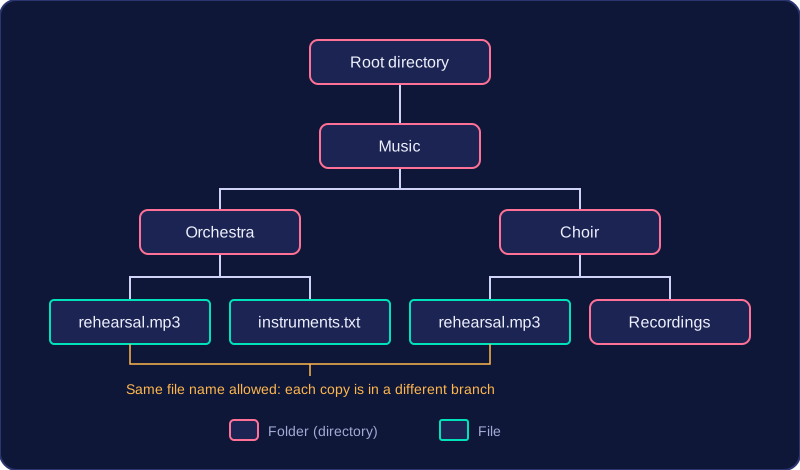
The name rehearsal.mp3 appears in both Orchestra and Choir. That is allowed because each copy sits in a different branch of the tree and so has its own place in the hierarchy.
Practise this
Edexcel GCSE Computer Science · File Management