Programming Languages
Low and High Level Languages
Contents
An instruction set is the collection of instructions that a particular processor can execute. Each instruction does one tiny job, such as adding two values, comparing two values or jumping to a different part of a program. The processor can carry out nothing that is not in its own set, so the set is the limit of what the hardware can do. A small processor inside a car park barrier might have an instruction set of a few dozen entries, while the processor in a laptop has hundreds.
Processors from different manufacturers often have different instruction sets, so a low-level program is written for one particular processor. Languages are classified by how close their instructions sit to that set.
Low-level languages are close to the processor
Low-level languages are close to the hardware, because their instructions relate almost one for one to the instructions the processor already knows. Machine code is made of binary instructions from that set, and assembly language gives each instruction a short name (a mnemonic) so a person can read it. Writing in a low-level language means choosing from the instruction set yourself, which is why you need to understand how the processor works.
High-level languages are further away
High-level languages are further from the processor. A statement written in one of these languages says what you want to happen rather than which instructions to use, so it usually has to be broken down into several instructions from the set before it can run. For example, a single high-level line that adds ten points to a player's score does three low-level jobs: read the score from memory, add ten to it, and write the new value back.
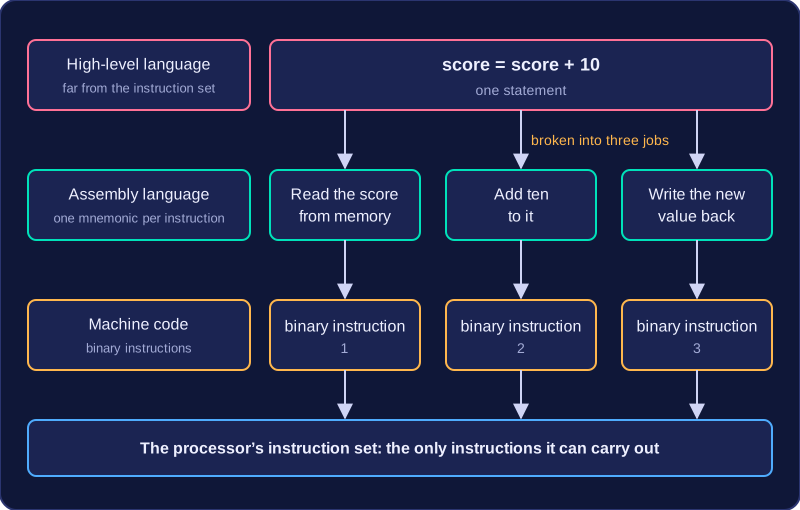
| Language level | Distance from the instruction set | Typical unit of code |
|---|---|---|
| Machine code | Uses instructions from the set directly | One binary instruction |
| Assembly language | One step away: one short name per instruction | One mnemonic, with or without operands |
| High-level language | Far away: each statement usually becomes several instructions | One statement, such as an assignment |
Machine code is the set of binary instructions that a CPU can carry out directly. Each instruction is stored as a pattern of 1s and 0s, and the processor needs no translation step before acting on it. Machine code is a low-level language because it matches the processor's own instructions. Binary on its own can just be data; it is machine code when the bit pattern is arranged as an instruction the processor recognises.
Every machine-code instruction does one very small, specific job. For example, one instruction might copy a value from memory, another might add two values, and another might store a result back in memory. Working out the average of three quiz scores therefore takes a sequence of instructions: bring in each score, add them, divide by three, then save the answer. No single instruction carries out the whole calculation.
Why writing machine code is difficult
Writing a program directly in machine code means choosing the exact binary pattern for every one of those small steps. You have to remember the pattern for each instruction and which bits hold the values, and a single misplaced bit can change what the CPU does. Long programs contain huge numbers of instructions, so writing them by hand is slow and tiring.
This also makes machine code hard to read and check. Even a short section can be difficult to follow because you are reading binary patterns rather than meaningful words. The difficulty is not that the CPU struggles with it - machine code is exactly what the CPU is built to run - but that people find it awkward to produce and maintain.
Assembly language belongs to the low-level group of languages, sitting just above raw machine code. Rather than typing rows of 1s and 0s, you write short codes called mnemonics, each of which stands for an instruction the processor can carry out. That keeps you close to the hardware while making the code far easier to read, write and remember than binary.
Mnemonics map to single instructions
A mnemonic is a short, human-readable label for one machine-code instruction. For example, MOV might mean "move a value into a register" and CMP "compare two values". You can guess what each line does from its mnemonic, which is impossible with a line of binary.
The match is close to one-to-one: each line of assembly language usually becomes exactly one machine-code, or CPU, instruction.
| Assembly line | What it tells the processor | After translation |
|---|---|---|
MOV R3, 5 | put the value 5 into register 3 | one machine-code instruction |
CMP R3, R4 | compare the values in registers 3 and 4 | one machine-code instruction |
Written for one processor
Assembly language is processor-specific. The mnemonics available, the registers and the way values are handled all belong to one processor family or architecture, so a program written for one chip will not run on a different one. Assembly code is therefore not portable: moving it to another processor means rewriting it.
Translated before it runs
A program written in assembly language cannot be executed as it stands. An assembler translates it into machine code first, turning each mnemonic into the matching binary pattern. The mnemonics are there to help you; the processor still needs the binary.
Assembly language also lets you work with the hardware directly. You can name a memory location and store a value in it, read and change the contents of a register, or send signals to hardware features yourself, rather than leaving it to a high-level language's translator to manage memory for you.
A low-level language is a programming language that sits close to the processor and the hardware. Its instructions have a small, predictable effect, which gives you fine control over what the computer does and makes it possible to reduce wasted processing time and memory use.
Direct control and efficiency
With a low-level language you can work directly with hardware such as registers, memory addresses and input/output ports. You decide exactly where values are stored and which operations happen, rather than relying on layers of built-in features. This means a program can be optimised: written to run quickly and to use as little memory as possible.
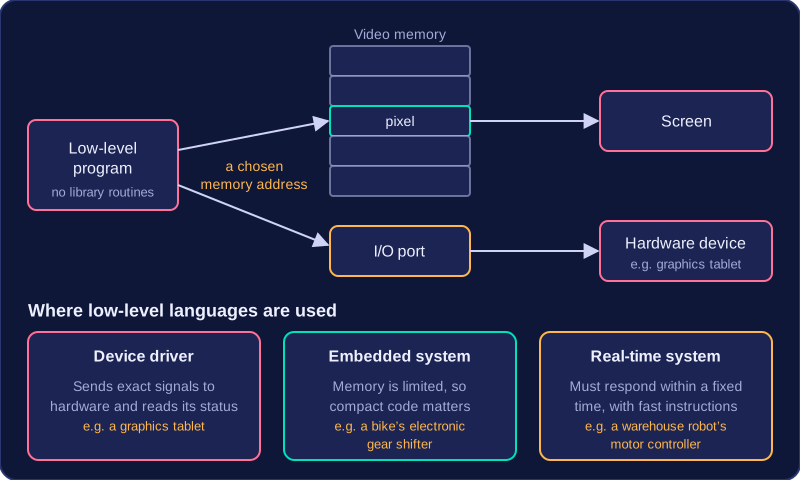
For example, a handheld games console can draw a sprite by writing each pixel straight into video memory at a chosen address. No drawing library routines are needed, so the frame is ready in time for the screen refresh and the routine stays tiny.
Where they are used
Low-level languages are chosen when hardware control or efficiency matters more than easy programming. Three common uses are shown below.
| Use | Why a low-level language suits it |
|---|---|
| Device driver | Software that lets the operating system communicate with a piece of hardware, such as a graphics tablet. It needs to send exact signals and read hardware status directly. |
| Embedded system | A small computer built into another device, such as a bike's electronic gear shifter. Memory is limited, so compact code matters. |
| Real-time system | A system that must respond within a fixed time, such as a warehouse robot's motor controller. Predictable, fast instructions help it meet deadlines every time. |
A high-level language lets you write instructions using words and symbols that look like English or maths. For example, you can give a variable a meaningful name and write a condition that checks whether a score is above a target. This makes programs easier to learn, write, read, understand and debug than low-level code. The processor cannot run these statements directly; they need translating first.
Closer to English, with ready-made help
High-level languages provide data structures such as arrays and records, so you can store and organise groups of values without building the storage yourself. They also provide libraries: ready-made subprograms and tools for tasks such as generating random numbers, doing maths or drawing graphics. Using these speeds up development because you reuse tested code instead of writing every detail. Some high-level languages are designed for a particular type of problem, and many include features that make solving problems easier.
import random
prices = [3, 5, 2]
discount = random.randint(1, 3)
total = 0
for price in prices:
    total = total + price
print(total - discount)
Output:
8In this program the list holds the prices, the random library supplies the discount, and a loop adds the prices together. The statements are short and readable, and the list and library save the programmer time.
Translated before it runs
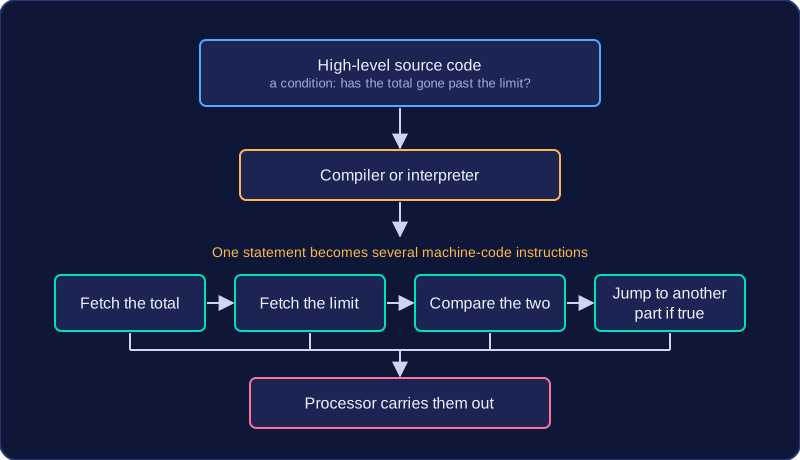
High-level source code must be translated into machine code, object code or executable code by a compiler or interpreter. One statement usually becomes several machine-code instructions. For instance, a condition that tests whether a total has gone past a limit can become a fetch of the total, a fetch of the limit, a comparison of the two, and a jump to another part of the program when the test is true. High-level code is machine-independent (portable): the same source code can run on different processors with few or no changes, provided a suitable translator exists. Different processors need different translators, but the source code itself often stays the same. These benefits make high-level languages a common choice for application software, where faster development and easier maintenance matter.
Choose a language by asking what the program must do. A low-level language is a good fit when you need direct hardware control, speed or memory efficiency. A high-level language is a good fit for applications, portability and rapid development.
For example, a bike computer that reads a wheel sensor and updates the speed on screen may need low-level code so it can respond quickly and use little memory. A revision quiz app with menus, scores and saved progress is better suited to a high-level language: you can build it quickly and run it on a laptop or tablet with little rewriting.
What you trade away
| Choice | Why it suits the job | Trade-off |
|---|---|---|
| Low-level language | Direct hardware control; speed; memory efficiency | Harder to learn, write, read and debug; less portable |
| High-level language | Applications; portability; rapid development | May be less efficient; less direct control over hardware |
The trade-offs are connected. Low-level code gives precise control, but it is written for one type of processor, so moving it to different hardware means rewriting it. High-level code lets you build a working program sooner than you could in a low-level language, but the finished program may use more memory or run more slowly than a carefully optimised low-level version. The right choice is the one whose strengths matter most for that program, and whose weaknesses you can accept.