Programming Languages
Translators
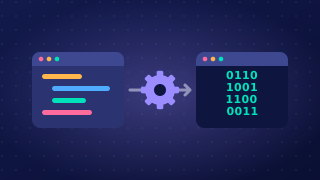
A translator is a program that converts source code into machine code so that a processor can carry out the instructions. You write in a language that suits a person: meaningful names such as pupil_total, and English-like words such as if and while. A processor, however, only carries out machine code, which is a pattern of binary instructions. Code that has not been translated cannot run at all, which is why every program you write must be translated before it can run.
The three translators
| Translator | What it takes in | What it produces |
|---|---|---|
| Compiler | High-level source code, translated as a whole program in one go | Machine code, saved as an object code file that can be run later |
| Interpreter | High-level source code, taken one line at a time | No saved file: each line is translated and then run straight away |
| Assembler | Assembly language, a low-level language written one instruction per line | Machine code |
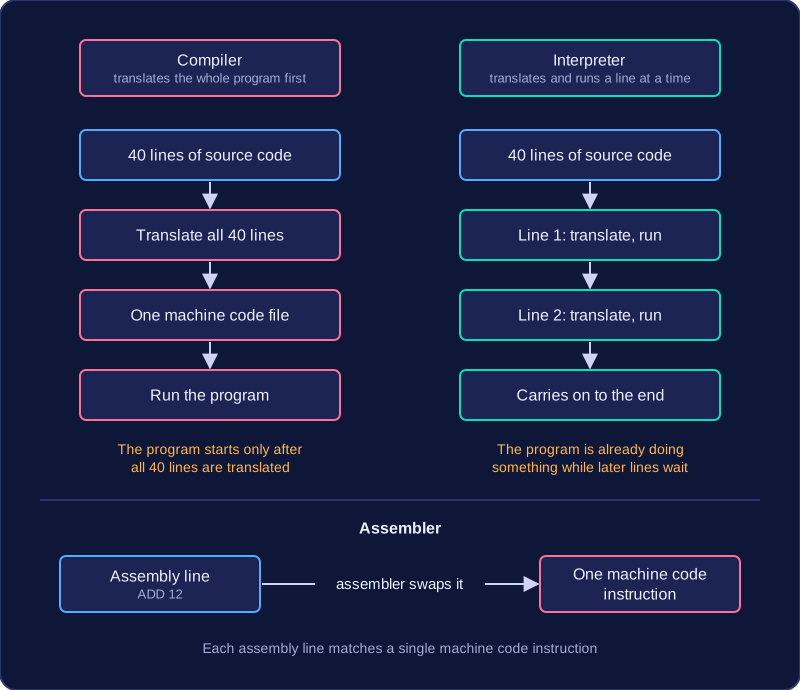
A compiler and an interpreter both start from the same thing, high-level source code, and both produce machine code instructions for the processor. The difference is the order in which they work. A compiler translates the entire program first, and only then is the finished program run. An interpreter translates the first line, runs it, translates the second line, runs it, and carries on like that to the end.
Picture a program of 40 lines. A compiler works through all 40 lines, produces one complete machine code file, and the program starts afterwards. An interpreter turns line 1 into machine code and carries it out at once, then does the same for line 2, so the program is already doing something while the later lines are still untranslated.
The third kind of translator is the assembler, and it is different again because of what it starts with. Assembly language sits close to the processor: one line, such as ADD 12, matches a single machine code instruction, so the assembler swaps each line for the matching binary instruction without any restructuring.
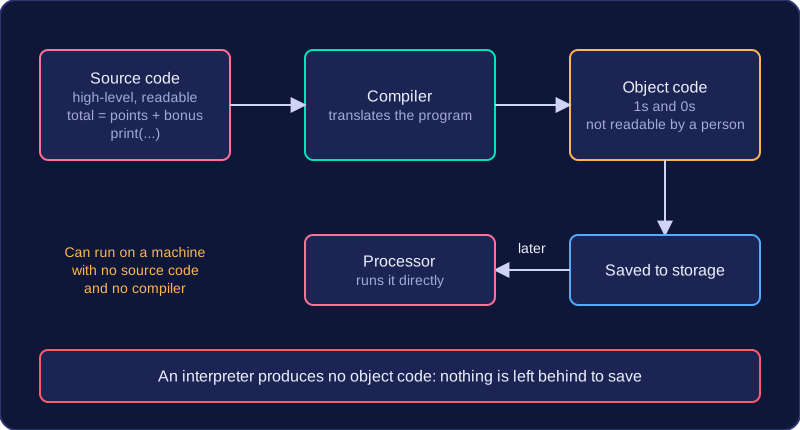
Source code and object code are the two forms a program takes either side of translation. Source code is what a programmer writes; object code is what the processor runs.
Source code
Source code is the high-level code written by a programmer. It is built from English-like statements, such as a print() call or an assignment, so a person can read it, follow the logic and change it. It is stored as a text file that can be opened and edited whenever you like.
This short program is source code: every line can be read and understood by a person.
# A short program written in source code
level = 2
bonus = 50
points = 120
total = points + bonus
print("Level " + str(level) + ": " + str(total) + " points")
Output:
Level 2: 170 pointsObject code
Object code is the machine code produced from that source code by a translator. It is a pattern of binary instructions, 1s and 0s, that the processor can act on directly. Because it is written for the processor rather than for a person, you cannot make sense of it or edit it by hand. You may also see object code called machine code, an executable or a binary.
| Source code | Object code |
|---|---|
| Written by a programmer | Produced by a translator |
| High-level, English-like statements | Binary machine instructions |
| Readable and editable | Not readable or editable |
| Must be translated before it can run | Run directly by the processor |
A compiler produces object code, and that object code can be saved to storage and run later, so a program can be used on a machine that holds neither the source code nor the compiler. An interpreter produces no object code at all, so there is nothing left behind to save. That is the difference the terms are really about: source code is the form a person writes and edits, while object code is the binary form the processor runs.
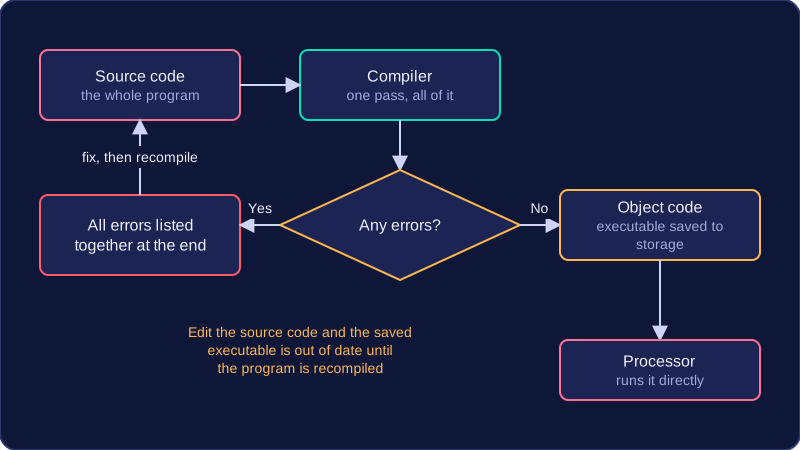
A compiler is a translator that converts a whole program into machine code in one go, before any part of that program is run. You hand it the source code you wrote, it translates all of it in a single pass, and then it stops.
What comes out of a compiler
The compiler's output is object code. You may also see this called machine code, an executable or a binary — those names all describe the same thing: instructions that a processor can carry out directly. Because object code is a file, it can be saved to storage and run later, on a computer that has no compiler installed. Once a program has been compiled, the person using it only needs the executable.
Why compiled programs run quickly
All the translation work has already been finished, so when the executable is opened the processor simply carries out instruction after instruction. Nothing has to be converted while the program is running. A compiled drawing app, for example, responds the instant you drag the mouse, because the job of turning the source code into instructions happened earlier, not now.
Errors, processors and edits
A compiler reports nothing until it has translated the entire program, then lists every error it found together at the end. Nothing can be run until the program compiles with no errors, so you fix them all and compile again.
Object code is written for one type of processor. A program compiled on a laptop with one kind of processor will not necessarily run on a tablet with a different one — it has to be compiled again for that machine.
Any edit to the source code means the program must be recompiled before the change takes effect. Until you do, the saved executable still contains the old version of the program.
A linker is a program that joins pieces of object code together into a single executable file. You rarely write a large program as one giant file, so the linker is what turns the separately translated pieces into one program that the computer can load and run.
A linker is not a translator. Every file it receives has already been translated into object code by a compiler, and the linker never reads or converts source code. Linking happens after compilation and before the program is run, and it is the last thing that happens to the object code a compiler produces: object code cannot run until it has been linked.
Why a program is split into files
Writing a big program as several smaller source code files keeps it organised and lets different programmers work on different parts at the same time. Take an app for booking lanes at a bowling alley, written as three source files: one for the lanes, one for payments and one for printing receipts. Each file is compiled on its own, producing three separate object code files. None of them can run alone, because each calls routines held in the others.
The linker joins all three object code files into one. It also adds any library routines the program uses, such as a ready-made routine for displaying text on the screen, so those routines do not have to be written from scratch. The result is one executable file.
When linking fails
The linker checks that everything the program refers to can actually be found. If an object code file is missing, or a routine is called but no file or library supplies it, the linker reports an error and no executable is produced, so the program cannot be run until the problem is fixed.
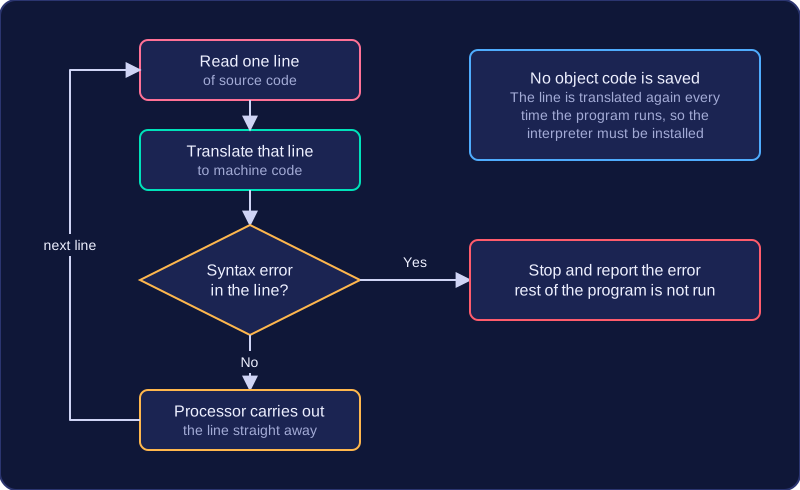
An interpreter is a translator that turns high-level source code into machine code one line at a time, while the program is running. It reads a line, translates that line, and the processor carries out the instruction straight away before the interpreter moves to the next line.
The interpreter does not produce object code, so there is no executable file to save and run later. Translation and execution happen together, which is why the interpreter itself must be installed on the computer: without it, the source code cannot be turned into instructions the processor understands.
Errors and speed
When the interpreter reaches a line containing a syntax error, it stops at that line, reports the error immediately and does not run the rest of the program. This is useful while you are writing, testing and debugging a program, because a mistake is revealed as soon as the faulty line is reached rather than after the whole program has been checked.
An interpreted program usually runs more slowly than a compiled one. Every line has to be translated again each time the program runs, whereas a compiler translates the whole program once and saves the object code. The interpreter starts running sooner, but the program itself takes longer.
Portability
A strength of interpreted code is portability: the same source code can run on any computer that has a suitable interpreter installed. You do not need a separate executable for each type of processor. For example, a short quiz program stored as one source file could be opened on a laptop at home and on a desktop in school, provided both machines have an interpreter that can read that language.
When you get a piece of software, the files you receive depend on how it was translated. A compiled executable contains machine code only. The original source code is not included, so you cannot read the programmer's instructions or change them to suit yourself. You can run the program, but you cannot see how it works or adapt it.
Interpreted programs are usually supplied as source code. You can open the file, read the lines the programmer wrote and edit them. That might mean changing a setting, fixing a mistake or adding a feature. For example, a small quiz game might be sold as an executable that only runs, while a similar quiz shared as a Python file can be opened and changed so the questions are about your own topic.
| What you receive | Can you read it? | Can you adapt it? | Who benefits? |
|---|---|---|---|
| Compiled executable | No, machine code only | No | Developer: the source code is hidden, so it is harder to copy or tamper with the code |
| Interpreted program as source code | Yes, high-level code | Yes | Users and learners: they can understand, change and learn from it |
Whether the source code can be seen is a separate benefit or drawback from how the translator itself works. Hiding the source code protects the developer's work, while supplying it lets other people understand, adapt and learn from the program, and neither arrangement is automatically better. An advantage about a program being closed or open is a point about what you receive, not about the steps the translator took.