Topologies
Wireless Mesh

A wireless mesh is a set of nodes that pass data to each other using radio signals, so one network can cover a large area such as a holiday park spread over several fields. Each node is a wireless access point. A device joins the node with the strongest signal, usually the nearest, and the nodes relay data between themselves.
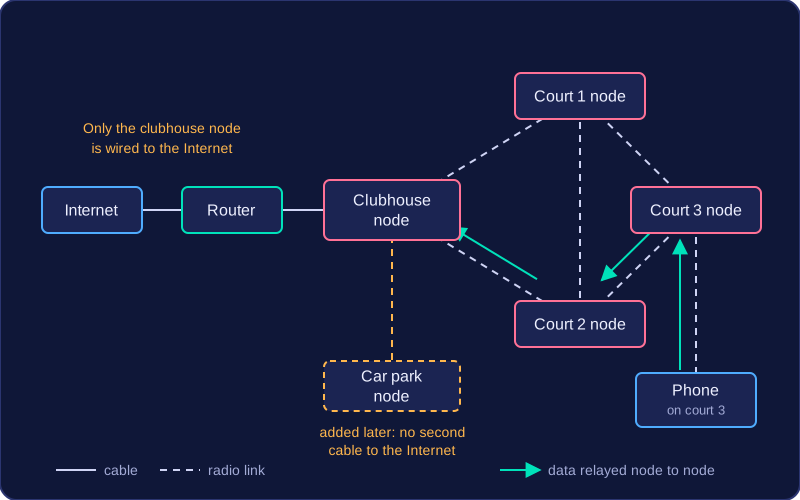
Only one node needs a wired connection to the Internet. That node connects to a router with a cable. Every other node reaches the Internet by passing data from node to node until it arrives at that wired node. This saves running a cable to every access point.
Why adding nodes helps
- More routes for data: with more nodes there are more paths across the mesh, so if one route is busy or not working, data can be sent another way and devices stay connected.
- More bandwidth: bandwidth is the maximum amount of data the network can carry in a given time. Each node handles the devices around it, and different nodes can send data at the same time, so the mesh as a whole can carry more traffic.
- Stronger signal strength: radio signals get weaker as they travel. Placing nodes closer to the devices, and closer to each other, gives a stronger signal, so devices disconnect less often and transfers are faster.
For example, a tennis club puts its wired node in the clubhouse and adds one node by each of its three courts. A phone used on the far court connects to that court's node, which relays the data from node to node back to the clubhouse. Adding a node in the car park later extends the Wi-Fi there without a second cable to the Internet.
Practise this
Edexcel GCSE Computer Science · Topologies