Topologies
Topologies

A network topology is the arrangement of the devices and the connections between them in a network. It describes the pattern the network follows — which device links to which, and how the cables or wireless links are laid out — rather than the make of the hardware or how large the network is.
Network designers choose a topology before anything is built, because the arrangement affects how much cabling is needed, how data travels to the right device, and what happens when a link stops working. Two networks can contain exactly the same computers and printers yet behave very differently if their topologies differ.
The three topologies
| Topology | How the devices and connections are arranged |
|---|---|
| Bus | Every device taps into one shared main cable running through the network, with each end of that cable closed off so signals stop there. |
| Star | Each device has its own connection to a single central device, which sits in the middle and passes data on. |
| Mesh | Devices connect to several other devices rather than to one centre, so data can take more than one route. |
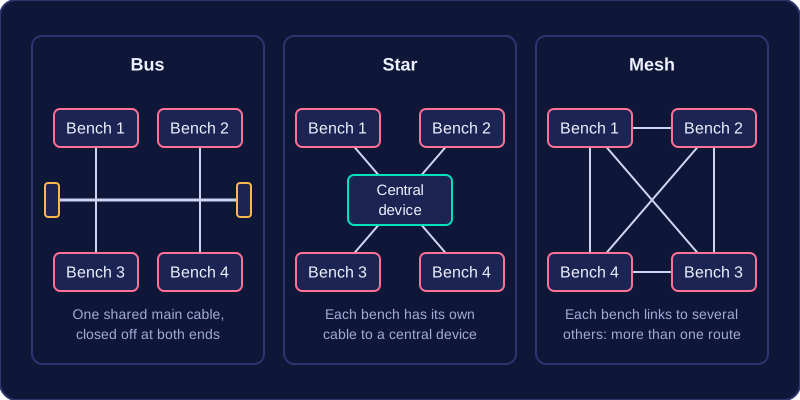
Look at the difference in shape. Bus and star both rely on one item at the heart of the arrangement — a main cable in one case, a central device in the other — while a mesh spreads its connections around, so the network does not hang on any single device or link. For example, a small bike repair workshop could run one shared cable past the workbenches, give each bench its own cable to a central box, or connect each bench to several of the others; the benches are identical, but each arrangement is a different topology.
Practise this
Edexcel GCSE Computer Science · Topologies