File Handling
CSV Files
A CSV file (comma separated values) is a plain text file that stores data in a table-like form. Each line of the file holds one record, and the fields inside that record are separated by commas.
Here is a file listing members of two after-school clubs:
| Line in the file | Record it holds |
|---|---|
Zara,14,Chess | name Zara, age 14, club Chess |
Milo,15,Robotics | name Milo, age 15, club Robotics |
Priya,14,Chess | name Priya, age 14, club Chess |
Nothing in the file states what each field means. The order of the fields does that job, so every line has to use the same order and the same number of fields — the first field is always the name, the second always the age, and so on. That fixed layout is what turns three separated pieces of text into a record you can make sense of.
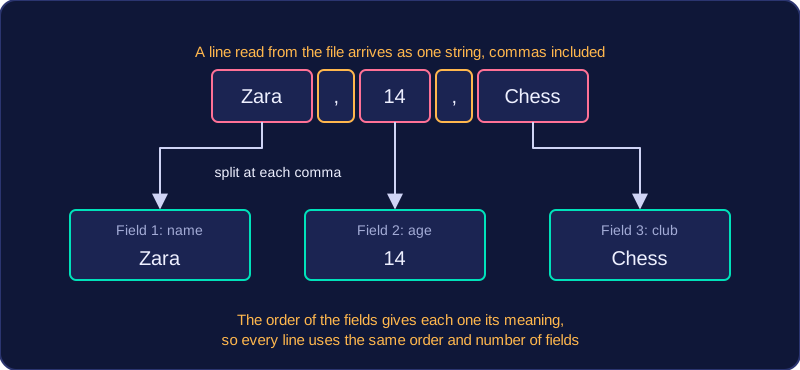
A CSV file often uses the .csv extension, but it can use .txt just as well, because an extension is only part of the file's name and does not change what is inside. The file is opened and read in exactly the same way as any other text file. The comma has no special meaning to the computer: it is just a character sitting in the text. When a line is read into a program it arrives as one long string with the commas still inside it, so the program has to split each line on the comma to recover the individual fields.
CSV files are useful because they are simple and readable — you can open one in a text editor and see the data straight away. They are also a common exchange format: a spreadsheet or a database can save its table as a CSV file, and the program you write can then read that file without knowing anything about the software that made it, so data passes easily between different programs and systems.