Hardware
Stored Program Computers
Contents
The central processing unit (CPU) is the component that carries out processing in a computer system. It does this by executing the instructions of a program.
A computer system has five main hardware components: the CPU, main memory, secondary storage, input devices and output devices. Main memory is separate from the CPU, not inside it. The CPU is the part that processes; the other components provide instructions and data, store programs and files, or handle input and output.
The parts of the CPU
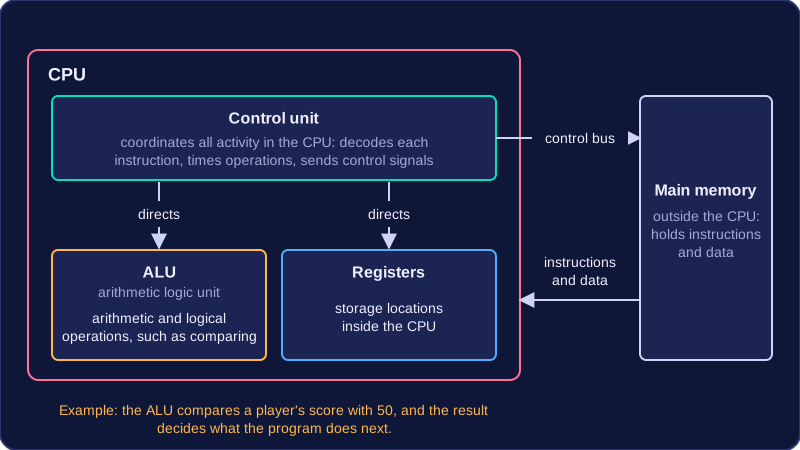
The CPU contains the control unit, the arithmetic logic unit (ALU) and registers.
- The control unit coordinates and controls all activity inside the CPU. It decodes each instruction and directs the other components so that the instruction is carried out. It also manages the timing of operations and sends control signals along the control bus to coordinate reads from and writes to memory.
- The arithmetic logic unit (ALU) performs arithmetic operations such as addition, subtraction, multiplication and division. It also performs logical operations: it compares data items and carries out Boolean logic, which supports decision making in a program.
- Registers are storage locations contained inside the CPU.
For example, if a program checks whether a player's score is at least 50, the ALU compares the score with 50. The result of that comparison is used to decide what the program does next. If the score is 50 or more, the program might unlock the next level; otherwise it might ask the player to try again.
Main memory, also called RAM (Random Access Memory), is the store that holds the instructions and data the processor is using at that moment. If you are editing a podcast in an audio app, the app's instructions and the recording you are trimming are held in RAM so the processor can work on them quickly. Main memory sits outside the CPU: the processor fetches what it needs from RAM while it works.
RAM holds only what is currently in use. Programs and files you are not using stay in longer-term storage, such as a hard drive or SSD, until you open them, which keeps RAM focused on the job in hand.
Why RAM is volatile
Volatile means RAM needs power to keep its contents. Switch off the computer, or lose power suddenly, and everything in RAM is lost. This is why an unsaved spreadsheet disappears in a power cut: the changes were in RAM but had not been copied to storage. Saving writes a copy to storage, which keeps its contents without power.
The stored program concept means that a program's instructions and the data it works on are both held in main memory. The computer works through the stored instructions one at a time, using the data also held in memory.
Before this idea, computers could hold data in memory but not their instructions. Each instruction had to be supplied to the machine separately, so changing what the computer did meant setting it up again, often by rewiring or resetting switches. That made computers expensive and inflexible.
Why it matters
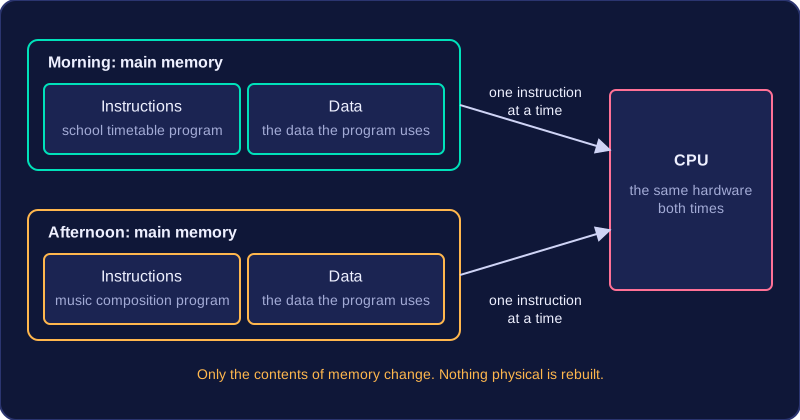
When instructions are stored in memory, loading a program just means placing its instructions into memory. The same computer can run a school timetable program in the morning and a music composition program in the afternoon. Nothing physical has to be rebuilt; only the contents of memory change.
This makes a general-purpose computer possible. One machine can do many different jobs because the job is defined by the program it is running, not by its physical design. A program can be loaded and run, and a different program can be loaded later, without changing the hardware.
| Before stored programs | With stored programs | |
|---|---|---|
| What memory holds | Data only | Instructions and data |
| To change the task | Reconfigure the hardware | Load a different program |
| Type of machine | Set up by its hardware for a task | General-purpose |
Von Neumann architecture is a design for a computer in which a program's instructions and the data those instructions work on are held together in the same main memory. This idea is called the stored program concept.
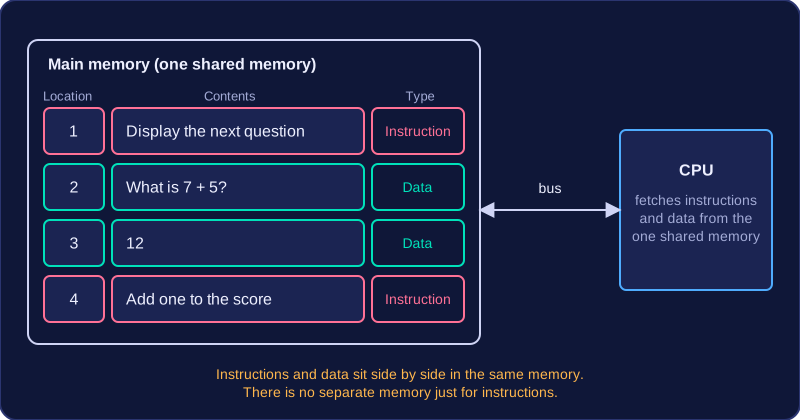
When a program runs, its instructions are loaded into main memory, and the data it is using is kept there too. For example, a quiz program's instructions sit in the same memory as the player's current score and the text of each question. There is no separate memory just for instructions: when the CPU needs an instruction or a data value, it fetches it from this one shared main memory.
| Memory location | Contents | Type |
|---|---|---|
| 1 | Display the next question | Instruction |
| 2 | What is 7 + 5? | Data |
| 3 | 12 | Data |
| 4 | Add one to the score | Instruction |
Because instructions and data share one main memory, a computer does not need its circuits changing to run a different job. You can close a photo editor, load a music player, and the same hardware will run the new program. The change is in what is stored in main memory, not in the hardware itself.
The clock is a component inside the CPU that sends a regular series of pulses, or ticks, like a metronome keeping a band in time. These pulses synchronise and regulate the actions of the CPU, so its components work together in the correct order and at the right moments.
Each step of the fetch-decode-execute cycle is triggered by a pulse from the clock. For example, a pulse marks the moment the CPU stops fetching an instruction and starts to decode it. The pulse carries no instruction or data: it is a timing signal telling the CPU when to move on to the next step. The clock never stores data or does calculations — it only times the CPU's work.
Clock speed
Clock speed, also called clock frequency, is the number of clock cycles that happen each second, where one cycle is one complete pulse. A faster clock produces more pulses each second, so the CPU is prompted to work through its steps more often.
Units of clock speed
Clock speed is measured in hertz (Hz), where one hertz means one cycle per second. Each unit is one thousand times larger than the one before it:
| Unit | Symbol | Cycles per second |
|---|---|---|
| hertz | Hz | 1 |
| kilohertz | kHz | 1,000 |
| megahertz | MHz | 1,000,000 |
| gigahertz | GHz | 1,000,000,000 |
So 1 MHz is 1,000 kHz and 1 GHz is 1,000 MHz, which means the units are not close in size at all.
Why a higher clock speed matters
A higher clock speed means more cycles each second, so more instructions are processed in a given time. For example, a 2.4 GHz processor completes 2,400,000,000 cycles every second and a 3.2 GHz processor completes 3,200,000,000, so the faster chip has an extra 800,000,000 cycles each second to spend fetching, decoding and executing. It can usually work through more instructions in the same time.

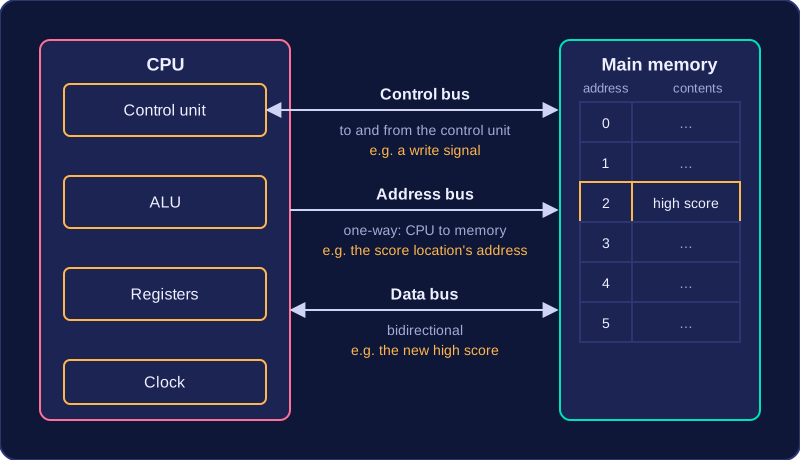
A bus is a set of parallel connections that carries signals between two or more components of a computer. Each wire in the set carries one bit at a time, so a wider bus moves more bits together in a single transfer. The CPU uses the system buses to exchange instructions and data with main memory.
The three system buses
| Bus | What it carries | Direction |
|---|---|---|
| Address bus | The address of a memory location the CPU wants to read from or write to | One-way, from the CPU to memory |
| Data bus | Data and instructions, travelling between the CPU, main memory and input/output controllers | Bidirectional |
| Control bus | Control signals such as read and write signals and clock pulses | Carries signals to and from the control unit |
The address bus is one-way because the CPU alone decides which location it wants, and memory simply responds. An address never needs to travel back to the processor.
The data bus is bidirectional because information moves both ways: an instruction can be fetched into the CPU, and a result can be written back out to memory. Instructions travel on the same bus as data because, in a stored program computer, an instruction is just a binary pattern held in memory like any other value.
The control bus carries the signals that coordinate and time what happens, telling memory whether a read or a write is wanted and keeping every component in step with the clock.
Because a bus is shared, only one device can transmit along it at any one time. To see all three buses working together, picture a game saving a player's new high score. The CPU puts the address of the memory location that will hold the score on the address bus, places the score itself on the data bus, and sends a write signal on the control bus. Three jobs that together make one write operation.
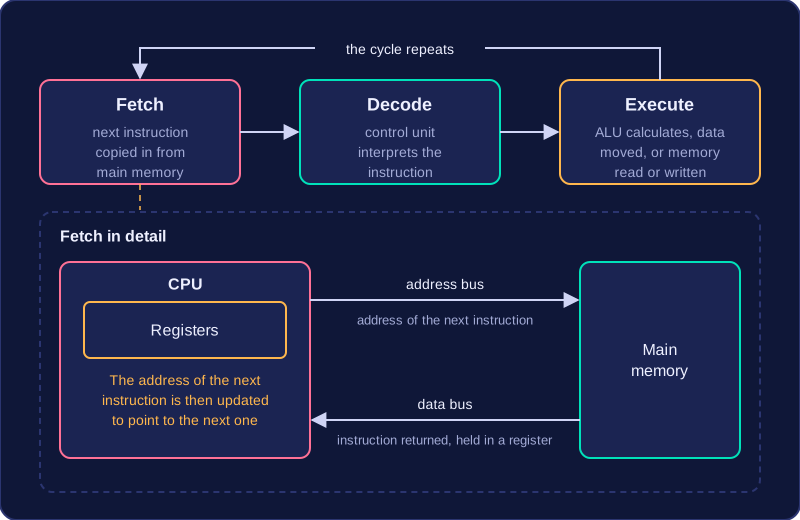
The fetch-decode-execute cycle is the continuous process a CPU uses to run a program: it takes one instruction at a time from main memory, works out what it means and carries it out. Under the stored program concept, the CPU fetches each instruction from main memory in this way.
Fetch
During fetch, the CPU keeps the address of the next instruction in one of its registers, small and very fast stores inside the CPU. That address is sent along the address bus to main memory, and the control bus carries the signal to read it. The instruction stored at that address travels back along the data bus and is placed in a register in the CPU, while the stored address is updated to point to the next instruction.
Decode and execute
During decode, the control unit interprets the fetched instruction to work out what must happen. During execute, the CPU carries the instruction out: the arithmetic logic unit (ALU) may perform a calculation, data may be moved between registers, or main memory may be read from or written to. Any result produced is stored in a register or written back to main memory.
The cycle repeats
The three stages form a continuous loop. Once one instruction has been executed, the CPU fetches the next instruction from the address it has stored, and the cycle starts again. Each cycle is extremely short, so a processor can complete many millions of cycles every second while a program is running.