Data Storage and Compression
Compression
Contents
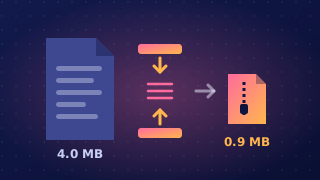
Compression is the process of reducing the size of a file using an algorithm. The data is stored using fewer bits, so the compressed file usually takes up less space than the original.
Compression is not the same as encryption. Encryption scrambles data so that other people cannot read it, while compression only makes a file smaller. Anyone who has a compressed file can unpack it and read what is inside, so compressing a file does not keep it safe.
Getting the data back
Decompression is the reverse process: it turns compressed data back into a usable state. A compressed file has to be decompressed before the data inside it can be used normally. For example, a phone might store a photo in a compressed form to save space on its storage card. When you tap the photo, the app decompresses the stored version into memory so the screen can show the whole picture. The file on the card stays small, and the version you are looking at is the unpacked one.
Two types
There are two main types of compression. Lossy compression permanently removes some data, so the original can never be rebuilt exactly. Lossless compression keeps every piece of data, so decompression restores the original exactly.
Compression is used most often on sound, image and video files, because these are usually among the largest files people handle and they can be squeezed a long way. A single uncompressed photo or song can be several megabytes, and packing it often shrinks it to a small fraction of that size.
File sizes are measured in bytes, or in kilobytes and megabytes for larger files, so you can work out the space saved as a percentage of the original size.
Compression is the process of shrinking a file using an algorithm. Files are compressed because almost everything you do with data — storing it, sending it, playing it — costs less when there is less data to handle.
Less storage, quicker transfer
A smaller file takes up less storage space, so a memory card, phone or hard drive holds more before it fills up. Size also decides how long a file takes to move: sending a 60 MB folder across a slow school connection takes far longer than sending the same content compressed to 12 MB. Shorter transfers mean less waiting and less time connected to the network.
A lighter load on networks
Compressed files mean less data travelling across a network, so overall internet traffic falls and less bandwidth is needed — bandwidth that other users can then share, especially at busy times. Files are split into packets, each carrying a limited amount of data, so a smaller file needs fewer packets to get there. Fewer packets means less work for the network and less extra header data wrapped around the content.
Compression makes streaming practical. A player shows video at a steady rate — several megabytes every second — so the file has to arrive at least that fast. When a file is too big for the connection to carry it at that rate, the player runs out of data part-way through; a compressed version keeps pace and plays from start to finish.
Fitting inside limits
Compression also lets a file squeeze under a limit it would otherwise break. Email services set a maximum attachment size, so a file larger than that limit cannot be sent until it is compressed — waiting longer makes no difference. Backups work the same way: compress files before copying them and more of them fit on the same backup disk or tape.
Lossy compression reduces a file's size by permanently removing some of its data. The removed data is thrown away, so decompressing the file gives you an approximation of the original, not an exact copy.
It works because not every piece of data in a photo, sound recording or video matters equally to your eyes and ears. A lossy compressor targets data that is least noticeable or least important to human perception. For example, in a recording of a school choir, very quiet sounds masked by the singing might be discarded. The singing still sounds normal, but those quiet sounds can never be recovered.
Because it removes data rather than only storing it more cleverly, lossy compression can reach a high compression ratio. A file can become a small fraction of its original size, which saves storage space and makes downloading or streaming quicker.
The trade-off is that heavy lossy compression can introduce artefacts — visible blocks or patches in an image, or a watery, buzzing sound in audio. These appear because detail has been removed for good. The file is now an approximation, not the original.
Lossy compression suits images, audio and video, where small losses often go unnoticed. It is not suitable for text or program code: a missing letter can change a word, and a missing instruction can stop a program working correctly.
Lossless compression reduces a file's size without permanently removing any data. Nothing is thrown away, so when the file is decompressed every byte is restored and you get a copy identical to the original.
That makes it the right choice for text, program code and any other data where exact reconstruction matters. Change one character in a program and it may stop working; change one character in a text file and its meaning can change. Lossless compression carries no such risk because the data is stored more cleverly, not discarded.
It works well on files that contain repeated data or patterns. An attendance file might repeat the same class name on dozens of rows, and lossless compression can record that repetition in a shorter form instead of writing it out in full every time. Decompression then rebuilds the complete file exactly.
A compression ratio compares the compressed size with the original size. Lossless compression usually gives a lower ratio than lossy compression. The file still gets smaller, but often not as much, because the method must keep enough information to rebuild the original perfectly.
So the choice depends on the data and whether exact reconstruction is needed. When it is, use lossless compression; when a small, unnoticed loss is acceptable, lossy compression can shrink the file much further, but its original can never be recreated exactly.
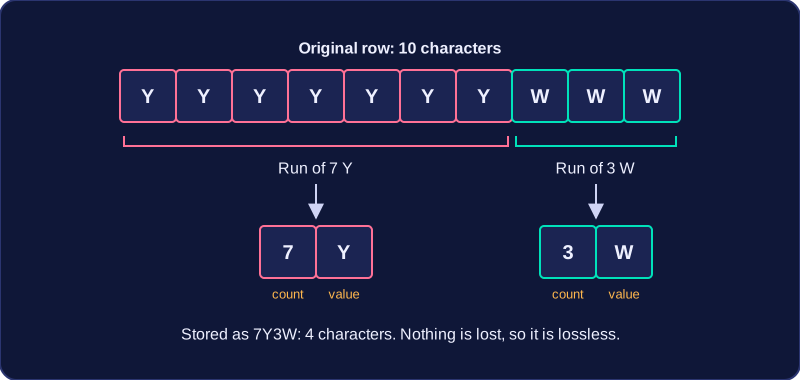
Run length encoding is a lossless compression method. Instead of writing a value out again and again, it writes the value once and then records how many times it repeats. Because nothing is thrown away, decompressing gives back exactly the original data.
That makes it a good fit for data with long runs of the same value. A plain white background in a picture, a row of identical pixels in a logo, or a long stretch of silent samples in an audio file all contain lots of repetition, so run length encoding shrinks them a great deal.
How it works
A run is a group of the same value repeated one after another. Picture a row of pixels, each one stored as a colour letter. Without compression the row might be:
GGGGGGGGRRRR— 12 characters stored
With run length encoding, each run is written as a count plus the value. The same row becomes:
8G4R— 4 characters stored
You have gone from 12 characters to 4, and no information has been lost, because 8G followed by 4R can only mean the original row.
When it helps and when it does not
The saving depends entirely on how much repetition the data contains. Data made of short, constantly changing runs can actually get bigger, because each single value now needs its count written next to it as well.
| Data | Encoded as | Characters stored |
|---|---|---|
YYYYYYYYYYWWWW | 10Y4W | 5 |
YBYBYBYBYB | 1Y1B1Y1B1Y1B1Y1B1Y1B | 20 |
So run length encoding suits simple graphics with large flat blocks of colour, and it is a poor choice for a detailed photograph where neighbouring pixels are nearly all different.
A program can carry out the idea in a few lines.
pixels = "YYYYYYYWWW"
encoded = ""

count = 1
for position in range(1, len(pixels)):
    if pixels[position] == pixels[position - 1]:
        count = count + 1
    else:
        encoded = encoded + str(count) + pixels[position - 1]
        count = 1
encoded = encoded + str(count) + pixels[len(pixels) - 1]
print("Original: " + pixels)
print("Encoded:  " + encoded)

# rebuild to show nothing was lost
rebuilt = ""
for position in range(0, len(encoded), 2):
    rebuilt = rebuilt + encoded[position + 1] * int(encoded[position])
print("Rebuilt:  " + rebuilt)
Output:
Original: YYYYYYYWWW
Encoded:  7Y3W
Rebuilt:  YYYYYYYWWW
Notice that the encoded text starts with the number of repeats, so the original ten letters become four characters. The check at the end rebuilds the text to prove that the decompression is exact, which is what lossless means.
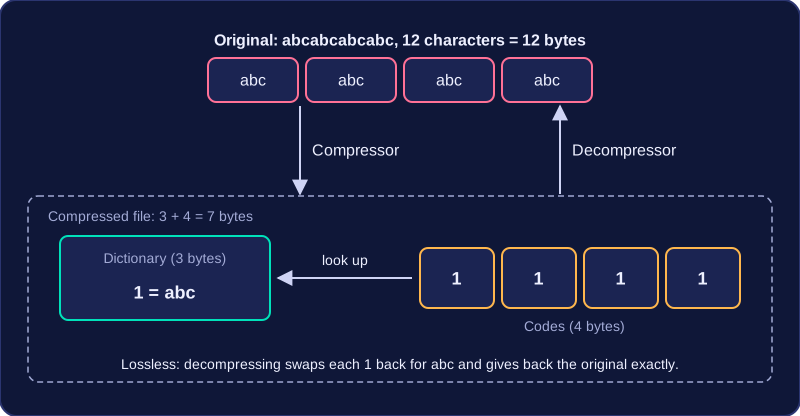
Dictionary compression is a lossless compression method. It searches the data for patterns that repeat, stores each pattern once in a dictionary, and replaces every occurrence with a short code. A pattern can be any length, from a few characters to a whole word. The dictionary is stored with the compressed data, so a decompressor can swap each code back for its pattern and rebuild the original exactly, with nothing lost.
Worked example
A text file contains the repeated pattern:
abcabcabcabc
The pattern abc appears four times. The compressor stores abc once in the dictionary as code 1, and the data becomes 1 1 1 1. The original is 12 characters, so 12 bytes with one byte per character. The compressed version needs 3 characters for the dictionary entry plus 1 byte for each of the four codes, which is 7 bytes, so the file is smaller. To decompress, each code 1 is swapped back for abc, giving the original string.
When it helps
Dictionary compression works best when the data contains lots of repeated patterns, because one dictionary entry can then serve many codes. If there is very little repetition, the dictionary and codes can take up as much space as the original, so the file may not get smaller at all. Dictionary compression is lossless, but it does not always reduce file size.