Images
Resolution

Resolution is the density of pixels in an image, which means how many pixels are packed into a given area. It is usually stated as the image's width and height in pixels, for example 600 × 400.
You can work out the number of pixels in the image by multiplying the width by the height. A 600 × 400 image has 600 × 400 = 240,000 pixels. The unit is pixels: this is the image's size in pixels, not its file size.
Higher resolution
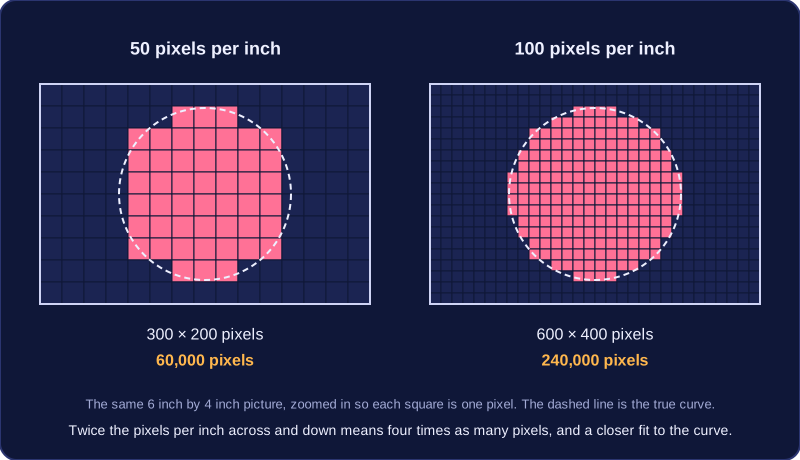
When two images are shown at the same physical size, the one with more pixels per inch (PPI) has the higher resolution. Its pixels are smaller, so they can follow the edges of shapes and small details more closely. With fewer pixels per inch, each pixel covers more of the picture, so curves can look jagged and thin features can be lost.
For example, a 6-inch by 4-inch picture at 50 pixels per inch is 300 × 200 pixels, or 60,000 pixels. The same picture at 100 pixels per inch is 600 × 400 pixels, or 240,000 pixels. The 100 PPI version has twice as many pixels per inch across and down, which is four times as many pixels in total, so it shows the scene in more detail.
Practise this
Edexcel GCSE Computer Science · Images