Images
Bitmap Images

A bitmap image, also called a raster image, stores a picture as a rectangular grid of tiny squares arranged in rows and columns. Each square holds a single colour, so the whole picture is built up square by square rather than as smooth outlines.
Every square is a pixel, short for picture element, and it is the smallest identifiable area of the image. Zoom in far enough on any bitmap and you stop seeing a scene and start seeing separate blocks.
A computer cannot store a colour directly, so each pixel's colour is held as a binary value — a pattern of bits. The image file and the software that displays it follow agreed rules saying which pattern stands for which colour. One pattern might mean sky blue and another sand yellow; the patterns mean nothing until the rules fix them.
Seeing one pixel change
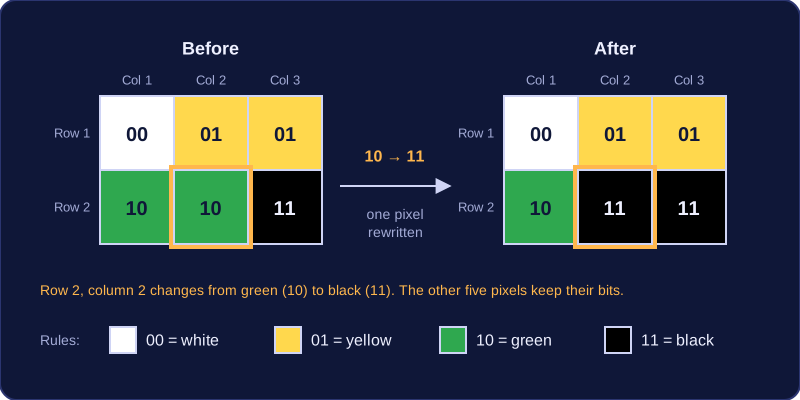
Picture a tiny 3 × 2 pixel image in which each pixel is stored using two bits, with the rules 00 = white, 01 = yellow, 10 = green and 11 = black.
| Pixel position | Stored value | Colour shown |
|---|---|---|
| Row 1, column 1 | 00 | white |
| Row 1, column 2 | 01 | yellow |
| Row 1, column 3 | 01 | yellow |
| Row 2, column 1 | 10 | green |
| Row 2, column 2 | 10 | green |
| Row 2, column 3 | 11 | black |
Now change the pixel in row 2, column 2 from 10 to 11. That one pixel flips from green to black, and every other pixel stays exactly as it was, because each pixel's bits are stored separately from its neighbours. This is what a pencil or fill tool in a drawing app does: it rewrites the binary values of the pixels you touch and leaves the rest alone.
palette = ["white", "yellow", "green", "black"]
pixels = [0, 1, 1, 2, 2, 3]
for value in pixels:
    print(palette[value])
pixels[4] = 3          # row 2, column 2 becomes black
print("after the change:")
print(palette[pixels[4]])
Output:
white
yellow
yellow
green
green
black
after the change:
black
Each position in the list is one pixel, counting from 0 as Python does, so position 4 is row 2, column 2. The program reads each stored value and looks up the colour it stands for; changing a value to 3 changes what is displayed for that pixel and nothing else. The image's resolution and its colour depth both build on this grid of independent pixels.
Practise this
Edexcel GCSE Computer Science · Images