Binary
Binary to Denary Conversion
Contents
To convert a binary pattern to denary you work out what each bit is worth and add up the bits that are set to 1. Binary is a positional number system: what a bit is worth depends on where it sits, not just on the digit itself, and the base of the system tells you how much each step to the left is worth.
Each position is a power of 2
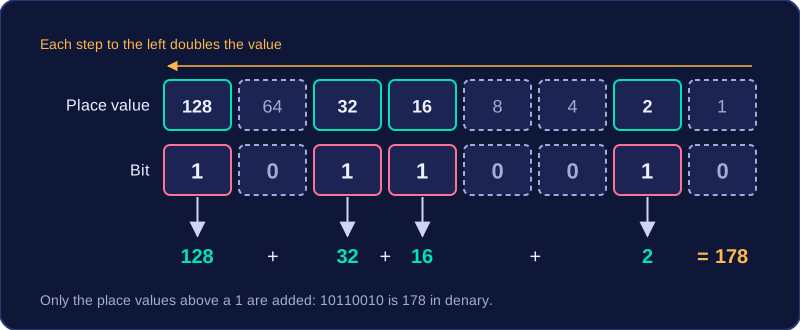
Binary is base 2, so every position is worth a power of 2. The rightmost position is worth 1, and each step to the left doubles the value. In an 8-bit pattern the place values from left to right are 128, 64, 32, 16, 8, 4, 2 and 1, so the leftmost bit carries the largest value and the rightmost bit carries the smallest.
Using the place values
Line every bit up with its place value, then add only the place values where the bit is 1. Take 10110010:
| Bit | 1 | 0 | 1 | 1 | 0 | 0 | 1 | 0 |
|---|---|---|---|---|---|---|---|---|
| Place value | 128 | 64 | 32 | 16 | 8 | 4 | 2 | 1 |
| Count it? | yes | no | yes | yes | no | no | yes | no |
The bits set to 1 are worth 128, 32, 16 and 2: 128 + 32 + 16 + 2 = 178, so 10110010 is 178 in denary. The order you add them in does not change the answer, but each place value must stay in line with its own bit, or the total will be wrong.
The full range
If all eight bits are set to 1, every place value counts. Adding the place values from the leftmost (128) down to the rightmost (1) gives 255. So an unsigned 8-bit pattern represents denary values from 0 (00000000) up to 255 (11111111).
To convert an unsigned 8-bit binary number to denary, you work out the value that the eight bits stand for. Each bit has a place value — a power of 2 — with 128 on the left and 1 on the right. Write the place values above the bits, then add up only the place values that sit under a 1.
Take the pattern 10110100. The table shows each bit with its place value and what it contributes.
| Place value | 128 | 64 | 32 | 16 | 8 | 4 | 2 | 1 |
|---|---|---|---|---|---|---|---|---|
| Bit | 1 | 0 | 1 | 1 | 0 | 1 | 0 | 0 |
| Contributes | 128 | 0 | 32 | 16 | 0 | 4 | 0 | 0 |
The bits holding a 0 — the 64, 8, 2 and 1 columns — add nothing, so they are ignored. Adding the rest gives 128 + 32 + 16 + 4 = 180. That is the same as multiplying each bit by its place value and adding the results: 1×128 + 0×64 + 1×32 + 1×16 + 0×8 + 1×4 + 0×2 + 0×1 = 180.
Do not read a binary pattern as though it were a denary number. 10110100 is not the denary number 10,110,100 — each bit must be matched to its place value first.
Leading zeros are the zeros sitting to the left of the first 1 in a binary pattern. They add nothing to the value, so 00101100 and 101100 mean exactly the same amount. Even so, an 8-bit pattern is normally written out in full with all eight bits, so that every bit keeps its correct place value.
Why the full eight bits are kept
A binary pattern only makes sense when each bit is matched to a place value, and a bit's position is what gives it its worth. Writing to a fixed width of eight holds every bit in its own column and stops bits drifting into the wrong column. A number stored in a computer is held in a fixed number of bits anyway, so those extra zeros at the front are just empty space.
Converting a pattern that starts with zeros
Work through all eight bits in the usual way: line them up under 128, 64, 32, 16, 8, 4, 2 and 1, then add only the place values where a 1 appears. A zero bit contributes 0 × its place value, so each leading zero brings nothing to the total.
| 128 | 64 | 32 | 16 | 8 | 4 | 2 | 1 | Denary |
|---|---|---|---|---|---|---|---|---|
| 0 | 0 | 1 | 0 | 1 | 1 | 0 | 0 | 32 + 8 + 4 = 44 |
Keeping the bits in place
Dropping zeros from the left only works when every remaining bit keeps its place relative to the right-hand end. If a bit slides one column to the left it doubles, so treating 00101100 as 01011000 gives 88 rather than 44. Adding zeros is the same: a zero added on the right doubles the value, while one added at the front changes nothing.
The rightmost bit of a binary number decides whether the whole value is odd or even. A final 0 means the number is even, and a final 1 means it is odd.
Why the rightmost bit decides
Binary place values from the right are 1, 2, 4, 8, 16 and so on. Every place value except the first is an even number. Adding any selection of even numbers always gives an even total, so all the bits to the left of the rightmost bit can only build an even part. The rightmost bit (the least significant bit) has place value 1. When it is 0 it adds nothing, so the total stays even. When it is 1 it adds one, which makes the even total odd.
The rightmost bit does have an effect: it is worth 1 when it is set, and it is the only bit that can change whether the result is odd or even. In 00001010 the rightmost bit is 0, so the number is even: the bits set to 1 are worth 8 and 2, giving 10. In 00001011 the left bits are the same but the rightmost bit is 1, so the number is odd: 8 + 2 + 1 = 11.
| Binary | Rightmost bit | Odd or even |
|---|---|---|
| 00000101 | 1 | Odd |
| 00001010 | 0 | Even |
| 00010011 | 1 | Odd |