Binary and Hexadecimal Basics
Binary
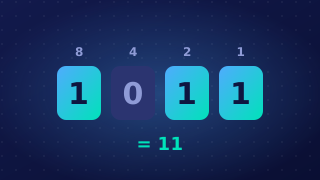
Binary is the number system that computers use to store and process data. It is a base-2 system, so it uses only two digits: 0 and 1. Denary, the number system you use every day, is base 10 and uses the ten digits 0 to 9.
Why computers use binary
Digital circuits use components that can reliably hold one of two stable states: a high voltage or a low voltage, which you can think of as on or off. These two states are easy to tell apart even when the voltage wobbles slightly, so the machine rarely misreads a value. The states are written as 1 and 0. If a circuit had to distinguish ten different voltage levels, a small change would be enough to turn one digit into another and the stored data would become unreliable.
Bits, nibbles and bytes
A bit is a single binary digit: one 0 or one 1. Groups of bits are given their own names:
- A nibble is 4 bits.
- A byte is 8 bits, which is exactly two nibbles.
Before a computer can work on anything, it must be converted into binary. Numbers, text, sound, graphics and the program instructions themselves are all stored as patterns of bits, so a piece of music and a photograph are handled in the same way once they are in memory.
Place values
Denary place values grow by powers of 10 from right to left: 1, 10, 100 and so on. Binary place values grow by powers of 2 from right to left: 1, 2, 4, 8, 16, because every step to the left doubles the value. To read a pattern, add the place values wherever there is a 1 and ignore the places holding a 0.
| Place value | 8 | 4 | 2 | 1 |
|---|---|---|---|---|
| Bits | 1 | 0 | 1 | 1 |
| Value | 8 | 0 | 2 | 1 |
Adding the values gives 8 + 2 + 1 = 11, so the nibble 1011 is 11 in denary.
Practise this
Edexcel GCSE Computer Science · Binary and Hexadecimal Basics
Edexcel GCSE Computer Science · Binary to Denary Conversion
Edexcel GCSE Computer Science · Denary to Binary Conversion
Edexcel GCSE Computer Science · Denary to Hexadecimal Conversion
Edexcel GCSE Computer Science · Adding Binary Numbers