Operating systems
Operating Systems

An operating system is the main type of system software: a set of programs, not a physical part of the computer. It runs and manages the computer, keeping its parts working together. Application software is different: it is the software you choose to use to carry out a task, such as a drawing app, a quiz program or a revision planner.
Three purposes
The operating system has three main purposes:
- Manage the hardware and resources: it coordinates parts such as the processor, memory, storage, screen and speakers, deciding which program can use them and when.
- Provide a platform for application software: it supplies the services that applications need to run, so each app does not have to be written separately for every model of computer.
- Let the user interact with the computer: it takes the user's input and shows output, so you can open programs, change settings and see what is happening.
Why applications need the operating system
Application software does not control the hardware directly. Instead, it asks the operating system to carry out hardware operations on its behalf. For example, a drawing app that saves a picture does not command the storage device itself; it asks the operating system to save the file. The operating system then handles the hardware and tells the app when the job is done.
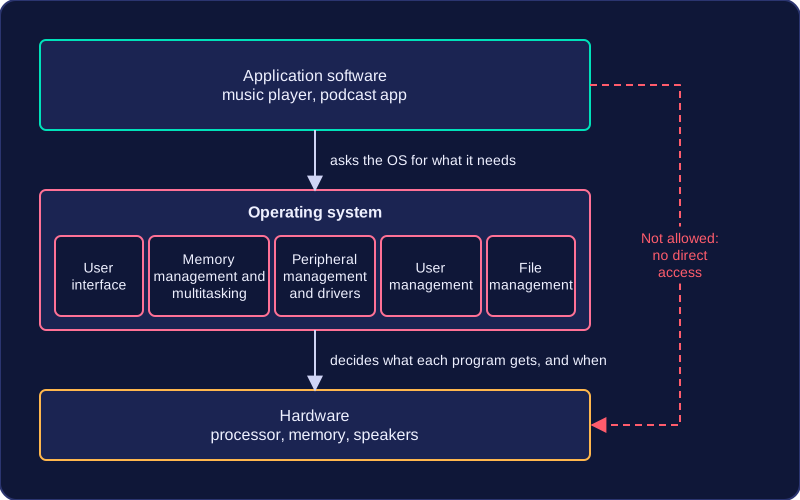
This keeps applications simpler and safer. An app can concentrate on its own task, while the operating system makes sure programs share the computer's resources without interfering with each other.
Practise this
OCR GCSE Computer Science · Operating systems