SQL
Working Out a Query Result

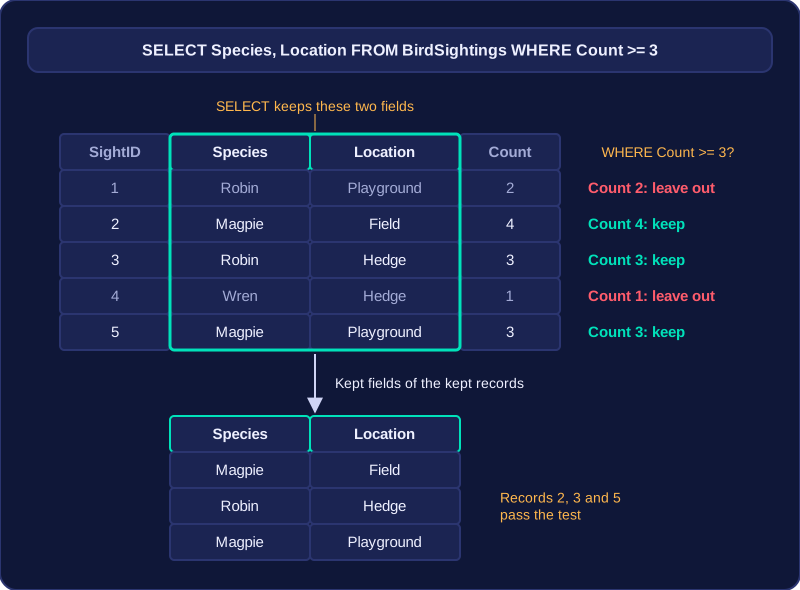
To work out a query result, apply the query to the table one record at a time. The SELECT clause decides which fields appear, and the WHERE clause decides which records appear.
Choose the fields first
The result shows only the fields named after SELECT, in the order given. Every other field still exists in the table but is left out of the result, even for records that match. If SELECT lists Species and Location, the result has exactly those two columns.
Take a table called BirdSightings:
| SightID | Species | Location | Count | Meets Count >= 3? |
|---|---|---|---|---|
| 1 | Robin | Playground | 2 | No |
| 2 | Magpie | Field | 4 | Yes |
| 3 | Robin | Hedge | 3 | Yes |
| 4 | Wren | Hedge | 1 | No |
| 5 | Magpie | Playground | 3 | Yes |
The last column is a check you work out, not a field stored in the table.
Test every record
Suppose the query selects Species and Location where Count is greater than or equal to 3. Check each record against the condition: include it only when the count is 3 or more, and exclude it when the condition is false. A non-matching record does not appear at all.
| Species | Location |
|---|---|
| Magpie | Field |
| Robin | Hedge |
| Magpie | Playground |
Records 1 and 4 fail the test because their Count values are 2 and 1, which are below 3. Records 2, 3 and 5 pass, so only those records appear. The result also leaves out SightID and Count because SELECT did not list them, even though Count helped you decide which records matched.
When there is no WHERE
Leaving out WHERE means no record is filtered out, so every record in the table is returned. On this table, the query would give five records, each showing only Species and Location.