Images
Interpreting Pixel Data

Interpreting pixel data means turning the binary stored for a bitmap image back into a grid of pixels, each showing its own colour. Each pixel's colour is stored as a binary code, and the colour depth tells you how many bits make up each code.
Split the binary into pixel codes
The colour depth is the number of bits assigned to each pixel, so it also sets the length of each group when you split the binary. For a 2-bit image, split the bit string into groups of two. For a 3-bit image, use groups of three. Every group is exactly one pixel's colour code. Splitting in the wrong place gives the wrong colours, so the groups must follow the colour depth exactly.
Match each code to a colour
Use the colour code table given with the data. Match each binary group to the colour it represents. Do not invent colours or swap a code for one you think looks better: the table is the only mapping.
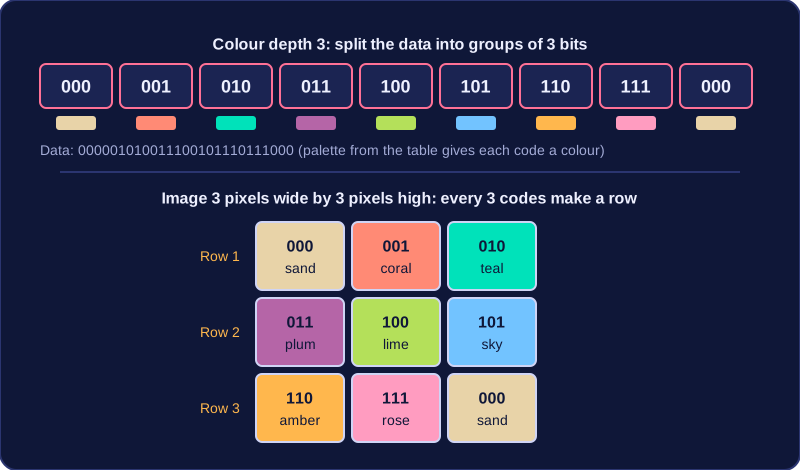
For example, a palette gives 000 as sand, 001 as coral, 010 as teal, 011 as plum, 100 as lime, 101 as sky, 110 as amber and 111 as rose. The data is 000001010011100101110111000 and the image is 3 pixels wide by 3 pixels high. Splitting into 3-bit groups gives:
| Row | Codes | Colours |
|---|---|---|
| 1 | 000 001 010 | sand, coral, teal |
| 2 | 011 100 101 | plum, lime, sky |
| 3 | 110 111 000 | amber, rose, sand |
Place the pixels in order
The stored width tells you how many pixels are in each row, and the height tells you how many rows there are. Place the decoded codes in the stated pixel order, usually starting at the top-left and moving across each row. A width of 3 means the first three pixel codes form row 1; the next three form row 2; the last three form row 3. The height of 3 confirms there are three rows. Following this process turns the sequence of binary codes back into the bitmap image.
Practise this
OCR GCSE Computer Science · Images