Images
Image File Size

The file size of a bitmap image depends mainly on two things: how many pixels it has, and how many bits are used to store each pixel's colour. These are combined by multiplying them together to give a size in bits.
The formula
File size in bits = colour depth × image height in pixels × image width in pixels
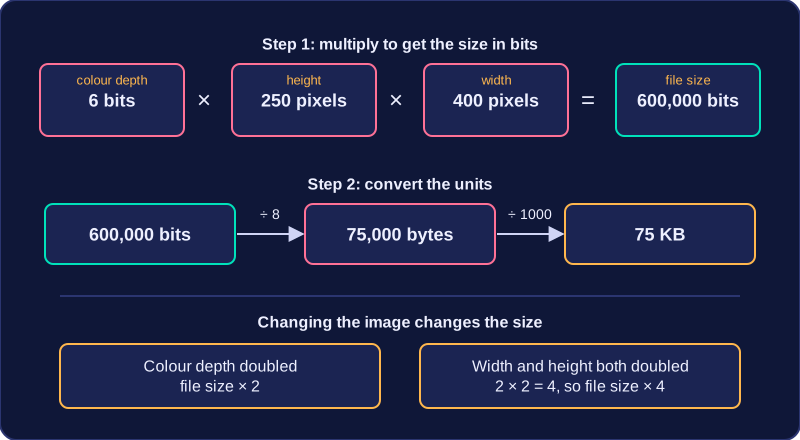
Height × width gives the number of pixels, and colour depth is the number of bits per pixel, so the result is the total number of bits needed to store every pixel's code. For example, an image 400 pixels wide by 250 pixels high at a colour depth of 6 bits has 400 × 250 = 100,000 pixels, so its size is 6 × 250 × 400 = 600,000 bits.
Converting the units
Always do the multiplication first, then convert, because a question may ask for the answer in bits, bytes, kilobytes (KB) or megabytes (MB).
- bits ÷ 8 = bytes, because eight bits make one byte
- bytes ÷ 1000 = kilobytes
- kilobytes ÷ 1000 = megabytes
So 600,000 bits ÷ 8 = 75,000 bytes, and 75,000 ÷ 1000 = 75 KB. Write each step of the working down, so it is clear how the final value was found.
More images, larger sizes
For several images, find the size of one image and multiply by how many there are. A web page uses four banner graphics, each 120 pixels wide by 30 pixels high at a colour depth of 3 bits. Each banner uses 3 × 120 × 30 = 10,800 bits, so four banners use 4 × 10,800 = 43,200 bits, which is 43,200 ÷ 8 = 5,400 bytes.
If the colour depth is doubled, each pixel needs twice as many bits, so the overall file size also doubles. If the width and the height are both doubled, the pixel count is multiplied by 2 × 2 = 4, so the file size becomes four times as large.