Algorithms
Sorting Algorithms

Contents
A sorting algorithm puts every item in a list into an order you choose. It works by comparing items and moving any that are in the wrong place, repeating until nothing is left out of order. The sorted list holds exactly the same items as before — nothing is added or lost, they are just rearranged. The three standard sorts are bubble sort, merge sort and insertion sort.
There are two orders to know:
- Ascending — smallest first (12, 35, 60) or A to Z (ash, birch, cedar).
- Descending — largest first (60, 35, 12) or Z to A (cedar, birch, ash).
Numbers are sorted into numerical order; words, names and other text are sorted into alphabetical order, decided letter by letter — badger comes before beetle because both start with b, so the second letters decide it, and a comes before e. Dates and times can be sorted into chronological order too, because any one of them can be compared with another.
| Unsorted | Ascending | Descending |
|---|---|---|
| 41, 8, 27 | 8, 27, 41 | 41, 27, 8 |
| mango, apple, lime | apple, lime, mango | mango, lime, apple |
One algorithm, two orders
You never need a second algorithm to go the other way. Each algorithm decides where items go by comparing a pair of them, so reversing the comparison reverses the finished list. For ascending order you treat the smaller of a pair as coming first; for descending order you treat the larger as coming first. Only the comparison changes — < becomes > — while the steps, the loops and the list stay exactly the same.
Take the scores 73, 58, 91. Comparing pairs and always keeping the smaller value ahead builds 58, 73, 91; keeping the larger value ahead builds 91, 73, 58. Decide the order before you start, then apply that one rule to every comparison the algorithm makes.
Bubble sort is a sorting algorithm that repeatedly compares neighbouring items in a list and swaps any pair that is in the wrong order. It keeps making passes through the list until a whole pass goes by with no swaps at all.
What happens in one pass
Start at the first item and compare it with the second. If they are the wrong way round, swap them. Then move one place along and compare the second item with the third, and so on to the end of the list, so each pass walks through the list one place at a time.
The biggest item in the unsorted section is swapped rightwards every time it meets something smaller, so after a pass it sits in its final position at the end, and later passes never need to swap it again. A pass that makes no swaps at all means the list is already in order, which is how the algorithm knows to stop.
Worked example
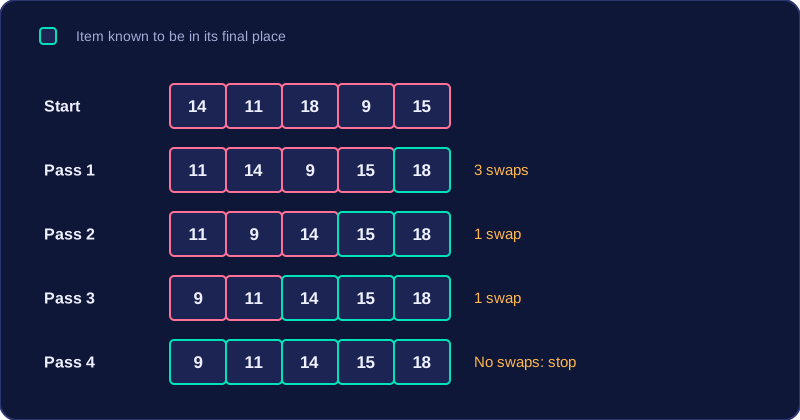
Sorting five sunflower seedling heights, in centimetres, into ascending order: 14, 11, 18, 9, 15.
| Pass | Comparisons and swaps | List after the pass |
|---|---|---|
| 1 | Swap 14 and 11; keep 14 and 18; swap 18 and 9; swap 18 and 15 | 11, 14, 9, 15, 18 |
| 2 | Keep 11 and 14; swap 14 and 9; keep 14 and 15; keep 15 and 18 | 11, 9, 14, 15, 18 |
| 3 | Swap 11 and 9; keep 11 and 14; keep 14 and 15; keep 15 and 18 | 9, 11, 14, 15, 18 |
| 4 | No swaps at all, so the list is sorted and the algorithm stops | 9, 11, 14, 15, 18 |
For descending order you use exactly the same method, but reverse the comparison, so a pair is swapped when the left item is smaller than the right one.
A program can use a flag to remember whether a pass swapped anything, and stop once a pass makes no swaps:
scores = [6, 2, 9, 4]
swapped = True
# keep going while the last pass changed something
while swapped:
    swapped = False
    for position in range(len(scores) - 1):
        if scores[position] > scores[position + 1]:
            held = scores[position]
            scores[position] = scores[position + 1]
            scores[position + 1] = held
            swapped = True
print(scores)
Output:
[2, 4, 6, 9]Merge sort is a sorting algorithm that works in two phases: it splits the list into smaller and smaller pieces, then merges those pieces back together in order.
Splitting keeps halving the list until every sub-list holds a single item. A single item cannot be out of order, so every one-item list already counts as sorted — that is the starting point the merges work from.
Splitting
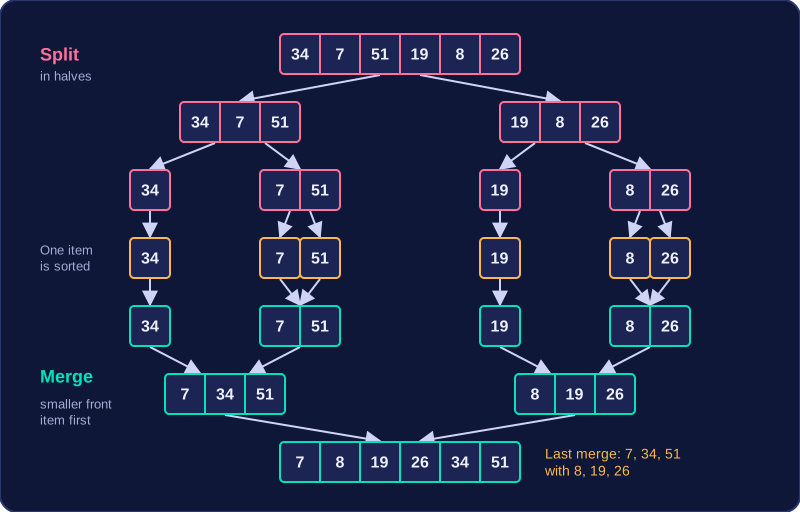
Each sub-list is halved again and again. When a sub-list has an odd number of items, one half simply takes the extra item. A list of six items, [34, 7, 51, 19, 8, 26], first becomes [34, 7, 51] and [19, 8, 26], then [34], [7, 51], [19] and [8, 26], and finally six lists that hold one item each.
Merging
Merging two sorted lists means comparing their front items and taking the smaller one into a new list. This repeats until one list is empty, then the remaining items of the other list are added to the end. Merging [7, 34, 51] with [8, 19, 26]:
| Front items compared | Item taken | New list so far |
|---|---|---|
| 7 and 8 | 7 | [7] |
| 34 and 8 | 8 | [7, 8] |
| 34 and 19 | 19 | [7, 8, 19] |
| 34 and 26 | 26 | [7, 8, 19, 26] |
| one list empty | 34, then 51 | [7, 8, 19, 26, 34, 51] |
Merging in order is what does the sorting — nothing is sorted afterwards. Because each list is already sorted, its front item is the smallest value it has left, so taking the smaller front item always drops the next smallest value into the right place.
Up to one list, and descending order
Merged lists are then merged with other merged lists: one-item lists form sorted pairs, pairs form larger sorted lists, and so on until a single sorted list remains. For descending order the splitting never changes; you simply take the larger front item at each comparison instead.
Insertion sort builds a sorted list one item at a time. The left part of the list is treated as sorted and the right part as unsorted; to begin with, the sorted part is just the first item, because a list of one item is always in order.
Inserting the next item
Pick out the next item from the unsorted section; this is the current item. Look back through the sorted section, starting at its right-hand end. Any item that is bigger than the current item moves one place to the right, opening up a gap. When you reach an item that is smaller than the current item, or you run out of items to check, put the current item into the gap. Keep going until the unsorted section is empty.
The inner loop that does the shifting is condition-controlled: it repeats while there is still an item to the left and that item is larger, because you cannot know in advance how many shifts a particular item will need.
Worked example: putting books in page-count order
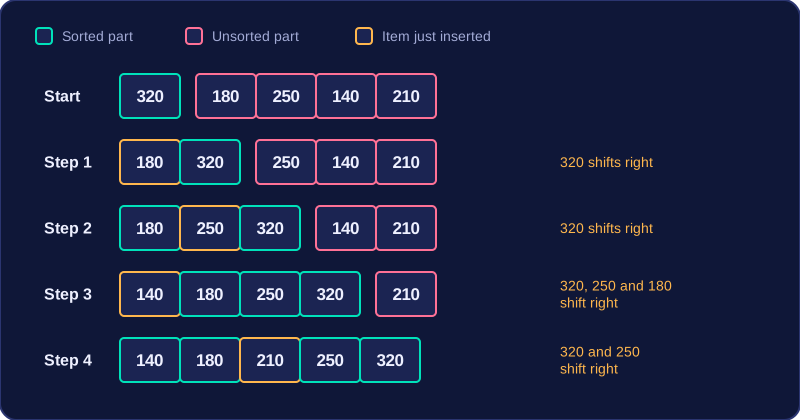
Suppose five books have page counts 320, 180, 250, 140 and 210. We want them on the shelf from fewest pages to most pages.
| Step | Page count inserted | Shifts | Sorted part | Unsorted part |
|---|---|---|---|---|
| Start | none | none | 320 | 180, 250, 140, 210 |
| 1 | 180 | 320 shifts right | 180, 320 | 250, 140, 210 |
| 2 | 250 | 320 shifts right | 180, 250, 320 | 140, 210 |
| 3 | 140 | 320, 250 and 180 shift right | 140, 180, 250, 320 | 210 |
| 4 | 210 | 320 and 250 shift right | 140, 180, 210, 250, 320 | empty |
The same steps written in Python, working on the five page counts from the table: each item is held in a variable while the larger items shuffle right, then dropped into the gap.
pages = [320, 180, 250, 140, 210]
for next_index in range(1, len(pages)):
    held = pages[next_index]
    gap = next_index - 1
    while gap >= 0 and pages[gap] > held:
        pages[gap + 1] = pages[gap]   # shift the larger page count right
        gap = gap - 1
    pages[gap + 1] = held             # put the held page count into the gap
print(pages)
Output:
[140, 180, 210, 250, 320]For descending order you use exactly the same algorithm and reverse the comparison, shifting items that are smaller than the current item.
A sorting algorithm is a process, so applying one to a data set means recording every stage it goes through, not just the sorted list at the end. The intermediate lists are the evidence that the method has been followed correctly.
For merge sort, show every split down to single items and every merge back up. Each merged list must be in order, because merging the lists in order is what does the sorting. A record for four numbers could look like this:
| Stage | Lists |
|---|---|
| Start | [34, 7, 21, 15] |
| Split once | [34, 7] [21, 15] |
| Split again | [34] [7] [21] [15] |
| Merge pairs in order | [7, 34] [15, 21] |
| Merge final lists | [7, 15, 21, 34] |
For bubble sort, record each pass and each swap within it, then show the pass where no swaps happen, because that is how the algorithm knows to stop. For insertion sort, show the sorted part and the unsorted part after every insertion, including any items shifted right to make room.
Every stage you write must be a list the algorithm really produces, in the order it produces it. A final list on its own does not show which algorithm was used or whether its steps were followed.
Descending order does not change which stages you record: the same algorithm runs with the comparison reversed, so you still show every pass and swap, split and merge, or insertion.
You can often recognise a sorting algorithm from the shape of its code, even when the variable names differ. Look at how items are compared and moved rather than memorising exact lines.
| Code clue | Algorithm | What the code is doing |
|---|---|---|
Neighbouring items are compared and swapped using a temporary variable, and a swapped flag repeats the passes. An outer loop repeats the passes while the flag shows a swap happened, and an inner loop compares neighbouring pairs; using len() minus one stops it before the final position. | Bubble sort | Each pass compares adjacent pairs and swaps only those in the wrong order. The flag records whether any swap happened, so the sort can stop after a pass with no swaps. |
| The list is split into left and right parts, then sorted lists are merged by comparing their front items into a result list. | Merge sort | The ordered merging is what sorts the data. The lists are not merged unsorted and sorted afterwards. |
| An item is taken from the next unsorted position, larger items shift right in an inner while loop, then the item is placed into the gap. | Insertion sort | The outer loop starts at the second item because the first item is already a sorted list of one item. The inner while loop is condition-controlled: the number of shifts is not known in advance. |
In the bubble sort program, the temporary variable keeps a value safe before its position is overwritten. It stores a value, not an index. The swapped flag starts as True: each pass sets it to False, and any swap sets it back to True, so the while loop stops as soon as a whole pass makes no swaps.
heights = [152, 138, 171, 129]
swapped = True
while swapped:
    swapped = False
    for k in range(len(heights) - 1):
        if heights[k] > heights[k + 1]:
            hold = heights[k]
            heights[k] = heights[k + 1]
            heights[k + 1] = hold
            swapped = True
print(heights)
Output:
[129, 138, 152, 171]In the insertion sort program, the outer loop starts at the second item and the inner while loop shifts larger items right until there is a gap for the current item.
queue = [23, 9, 17, 4, 11]
for i in range(1, len(queue)):
    held = queue[i]
    gap = i - 1
    while gap >= 0 and queue[gap] > held:
        queue[gap + 1] = queue[gap]
        gap = gap - 1
    queue[gap + 1] = held
print(queue)
Output:
[4, 9, 11, 17, 23]You do not need to memorise these programs. Match the clues instead: neighbouring compare-and-swap with a flag, splitting and ordered merging, or shifting right before inserting.
Comparing sorting algorithms means judging each one by its main steps, how easy it is to write, how fast it is on large lists, how fast it is on lists that are almost in order, and whether it needs extra memory.
Main steps
Bubble sort repeatedly compares neighbouring items and swaps any pair that is in the wrong order, making passes until a complete pass makes no swaps. Insertion sort treats the left part of the list as sorted and inserts the next item into its correct place, shifting larger items right. Merge sort splits the list into halves until each sub-list has one item, then merges sorted sub-lists in order until one list remains. Merging the lists in order is what sorts the data; merge sort does not merge unsorted lists and sort them afterwards.
Comparing the three sorts
| Feature | Bubble sort | Insertion sort | Merge sort |
|---|---|---|---|
| Main steps | Swaps neighbouring pairs | Inserts one item at a time | Divides, then merges sorted sub-lists |
| Ease of writing | Simple to understand and write | Simple to write | More complex to write |
| Speed on large lists | Slow: many comparisons and swaps | Slower than merge sort | Much quicker than both |
| Speed on nearly sorted lists | Can be quick: stops after a pass with no swaps | Can be quick: few shifts needed | No such shortcut |
| Extra memory | No extra lists | No extra lists | Uses extra memory for temporary lists |
Bubble sort and insertion sort are simpler to write because each uses a small number of loops and comparisons. Insertion sort is quick on short lists, and it also copes well when only a few items are out of place because it needs few shifts. Bubble sort is slow on large lists because it makes many comparisons and swaps. Merge sort handles large lists far faster, but writing it is harder and it requires additional memory for the temporary sub-lists it builds.
These comparisons use the main steps of each algorithm; formal efficiency measures such as best-case and worst-case analysis or Big O notation, and built-in sorting functions, are not part of this comparison.