Software Basics
User Management

User management is the operating system function that manages user accounts, login details and access rights (also called permissions). It controls who can use the computer and what each person is allowed to do after they log in. It is not about supervising the people themselves; it is about managing their accounts and what those accounts can access.
Accounts and login details
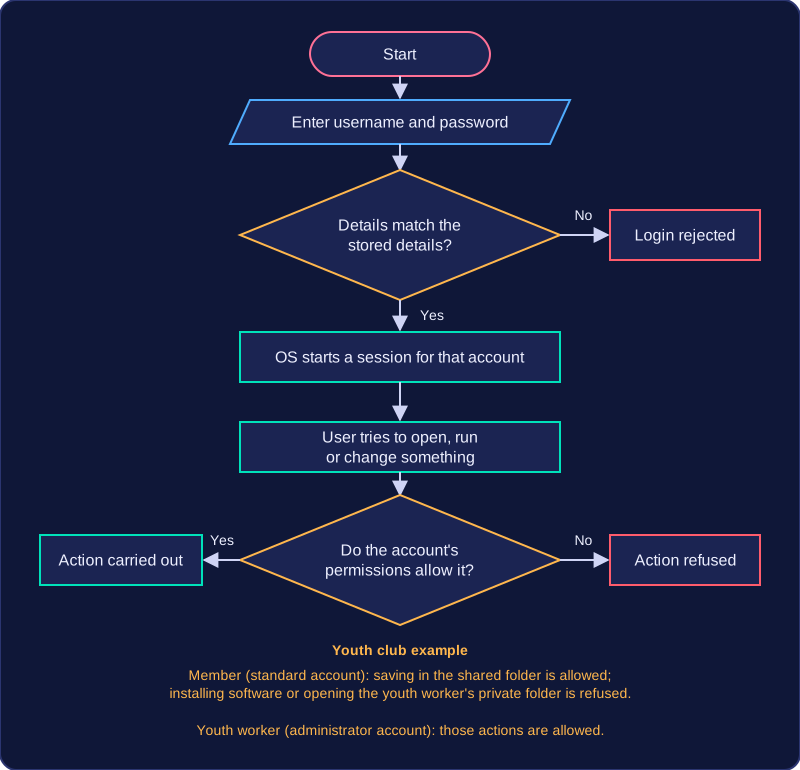
Each person who uses a computer can have their own user account. The operating system stores each account's username and password (passwords are kept encrypted) and checks them when someone logs in. If the details match, the OS starts a session for that account. An administrator can also create new accounts, reset a forgotten password and remove accounts that are no longer needed. This means one computer can be shared safely: each user has their own files and settings, kept apart from everyone else's.
Permissions
Permissions are the rules that say what an account may do. A standard account might be allowed to open and save files in its own folder but not delete another user's files or change important system settings. An administrator account can install software, change settings and manage other accounts. The OS applies these rules every time a user tries to open a file, run a program or change a setting, so it protects data and stops accidental or deliberate damage.
On a shared computer at a youth club, the youth worker has an administrator account and the members have standard accounts. When a member logs in, the OS applies that account's permissions: they can save their project in the club's shared folder but cannot install new software or open the youth worker's private folder. When the youth worker logs in, the administrator permissions allow those actions. The OS decides this from the account that is logged in, not from who is sitting at the keyboard.
Practise this
Edexcel GCSE Computer Science · Software Basics
Edexcel GCSE Computer Science · User Management
Edexcel GCSE Computer Science · Purpose & Function of Operating Systems