Software Basics
Process Management

Process management is the operating system function that controls the programs that are running. A running program is called a process. The operating system starts processes when they are needed and stops them when they finish, freeing the processor for other work.
Sharing the processor
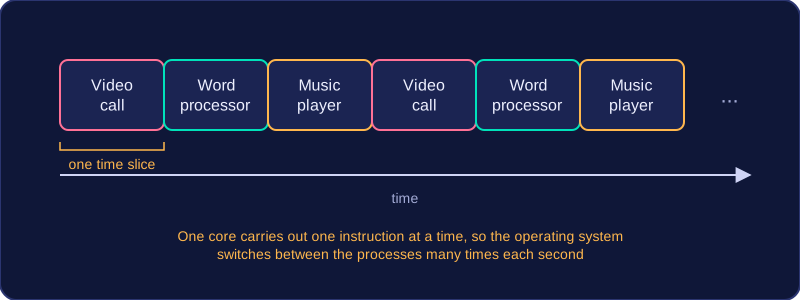
A computer usually has more processes wanting to run than it has processor cores. Process management allocates processor time so that each process gets a turn. The operating system switches between processes very quickly — many times each second — giving each one a short time slice. This makes it look as though several programs are running at once, even when one core can only carry out one instruction at a time.
For example, a student might have a video call open, a word processor and a music player. The operating system creates a process for each one and schedules them in turn. The video call keeps your voice flowing, the word processor still responds when you type, and the music keeps playing. Without process management, one program could take over the processor and the others would freeze.
Starting and stopping
When you open an app, the operating system loads it and starts a process. When you close the app or it finishes its job, the operating system stops the process and reclaims its resources. It can also stop a process that is no longer responding, so one faulty program does not stop the whole computer from working.
A process is not the same as the program file saved on disk. The file holds the instructions; the process is those instructions being carried out, along with the data and resources it is using while it runs.
Practise this
Edexcel GCSE Computer Science · Software Basics
Edexcel GCSE Computer Science · Purpose & Function of Operating Systems