Software
Robust Software

Robust software keeps working correctly when it receives input it did not expect, such as text typed where a number was needed or a value far outside the normal range. It does not crash, lose data or behave unpredictably: it either carries on safely or refuses the input with a clear message. Simply staying open is not enough — a program that quietly stores nonsense is not robust either.
Software should be made robust, and free from vulnerabilities, before it is released. A fault found during development is a job for the team. The same fault found by users is an incident: work stops, a fix is rushed out, and the damage may already be done.
Why robustness matters
Weaknesses in released software can harm far more than the program itself:
| Consequence | What it could look like |
|---|---|
| Data loss | A school's recycling reward points are wiped when a strange value is entered and the program crashes mid-save. |
| Security breach | An attacker gets into a museum's audio guide app and reads visitors' booking details. |
| Harm to users | A faulty reading from a weather station is used to send an outdoor club out in dangerous conditions. |
| Damage to reputation | A bakery's order form fails on the busiest day, and customers go elsewhere. |
| Legal or financial consequences | A theatre's ticket page charges the wrong amount for a group booking, leading to refunds and a fine. |
Each of these costs someone money, trust or safety, so known weaknesses should be designed out and checked for before release rather than left for users to discover. Validation and exception handling help a running program cope with bad input, but neither can repair a weakness built into the design.
Imagine a club booking lanes at a pool. The programmer expects a whole number from 1 to 6, but the secretary types "four". A fragile program stops with an error, the booking is lost and the pool sorts it out by hand. A robust program keeps running and tells the user what to enter instead. Finding that fault in a test session costs a few minutes; finding it on a busy Saturday costs the pool trust and money.
A vulnerability is a weakness in software that an attacker could exploit or that could make the software fail. Not every vulnerability is a security problem: some cause crashes, incorrect results or data loss.
Sources inside the code
Programming bugs are errors in code that make it behave incorrectly. A bug can be harmless, but it can also create a way in. For example, a bug that skips an account check could let a user reach data they should not see.
Some vulnerabilities are specific to a programming language. If a language lets a program manipulate memory directly, code that reads or writes outside its memory may corrupt data, crash or expose information. Languages that manage memory for you reduce this risk, but do not remove every vulnerability.
Security vulnerabilities are weaknesses that could allow unauthorised access, data theft or damage to a system. They may come from bugs, weak design or code written by someone else.
Design, testing and practice
Weak design can create vulnerabilities even when each section of code is correct. The parts may fit together badly, or a step may be missing. For example, a game might trust a score sent from the player's device; editing the score before it is sent allows cheating.
Insufficient testing means bugs and vulnerabilities may still be there when software is released. If no one tries unusual or invalid situations, problems stay hidden until a user or attacker finds them.
Bad programming practices, such as not following coding standards, make vulnerabilities more likely. Coding standards are agreed rules for writing code clearly and consistently, so mistakes are easier to spot and risky shortcuts are avoided.
Code from outside
Third-party libraries are ready-made code that you add to your program. Using one without checking it can bring in vulnerabilities from code you did not write. A library might be out of date, contain known bugs or come from an untrusted source. Check its origin, version and reputation before you rely on it. Following coding standards and checking libraries before use are practical ways to reduce vulnerabilities.
A code review is the examination of source code by another programmer or by an automated tool, looking for errors, vulnerabilities and poor practice. It happens before the software is released, so problems are found and fixed while they are still easy to put right, and the suggestions a review produces raise the quality of the code.
Reviewing by hand or by tool
| Method | Strength | Drawback |
|---|---|---|
| A programmer reads the code | The reviewer understands what the code is meant to do, so they can question the whole approach, asking for example why a quiz game keeps every player's password as ordinary text, and suggest a safer structure. Judgement of that kind is beyond a rule-following tool. | Someone has to be found and taken away from their own work, so the release can slip, and a tired reader can skim past a fault. Spotting a flaw in the design also takes experience that a newer member of the team may not have. |
| An automated tool checks the code | It sweeps through every file in seconds and applies the same rules each time, so a banned command or a familiar bad pattern is flagged at once, and the result does not depend on the mood of the person checking. | It has no idea what the code is for. It reacts only to the patterns built into its rule set, so it catches the well-known problems it was built to look for and stays silent about everything else. |
Finding a weakness is not the same as removing it. Until validation or exception handling is added, the program still cannot cope with unexpected or incorrect input, so a review moves software towards being robust rather than making it so on its own.
An audit trail is a record of code changes that stores what was changed, who made each change and when it happened. Each entry might include the date and time, the file or section affected, the person responsible and a short description of the change. Think of it as a logbook for the code: a school quiz app team changes how scores are calculated, and later users report strange scores. The audit trail shows that the score formula was edited by a named team member on a particular afternoon, so the team has a starting point for its investigation.
Why it helps
An audit trail provides a history that can be used to trace when a vulnerability or error was introduced. It supports accountability, because every change is linked to a person, and it helps a team review, reverse or investigate changes. For example, if a score display stops working after an update, the team can find the relevant entry and use it to work out what changed and what to reverse. The trail helps the team find the problem, but it does not repair the code by itself.
Audit trail, version control or change log?
An audit trail is not the same as version control or a change log. Version control keeps different versions of files, and a change log lists changes. The term audit trail is needed when the record specifically shows who made each change and when. The records may overlap in practice, but the accountability detail is the key idea.
Costs and limits
Keeping an audit trail takes time to write and maintain each entry, and storage to keep the history. An audit trail records changes; it does not remove a vulnerability or fix a bug. A team still has to act on what the trail shows.
Input validation is the process of checking the data a user enters against a set of rules before the program accepts and uses it. Anything that fails the rules is rejected, so the rest of the program only ever works with sensible data.
Why validation makes software robust
Robust software keeps working correctly whatever it is given. If validation is inadequate, invalid, unexpected or harmful data gets into the system and is stored, passed on or used in calculations — that is a vulnerability. A score field that accepts 9000 ruins a leaderboard, an empty name breaks a printout, and a quote mark typed into a search box can change the instruction a database receives. Catching the problem as the data is entered is far cheaper than repairing bad records later.
Criteria to validate against
Validation compares the input with criteria — the specific rules the data must meet.
| Criterion | What it checks | Example |
|---|---|---|
| Type | that the data is the right kind: whole number, decimal or text | a ticket quantity must be a whole number |
| Range | that a number sits between a lowest and highest allowed value | a quiz answer must be from 1 to 4 |
| Length | that there are not too few or too many characters | a PIN must be exactly 4 digits |
| Format | that the characters follow a set pattern | a school email must end with the school's domain |
| Presence | that something has been entered at all | a delivery address box is not left empty |
A username is checked for presence, then length, then format. Only when all three checks pass is it accepted.
username = input("Choose a username: ")
if username == "":
    print("You must enter a username.")
elif len(username) < 3 or len(username) > 12:
    print("Use between 3 and 12 characters.")
elif not username.isalnum():
    print("Use letters and numbers only.")
else:
    print("Username accepted.")
Output when the user types jamie99:
Choose a username: jamie99
Username accepted.
Parsing input to spot security problems
Software can also be programmed to parse user input: to work through it piece by piece looking for suspicious characters or patterns. Angle brackets, semicolons and quote marks are harmless in ordinary writing but can change the meaning of a command or a database query, so a program may block them, or reject text far longer than expected, before the data is used.
display_name = input("Enter a display name: ")
blocked = ["<", ">", ";"]
found = False
for symbol in blocked:
    if display_name.find(symbol) != -1:
        found = True
if found:
    print("Display name rejected: it contains a blocked symbol.")
else:
    print("Display name saved.")
Output when the user types Riley;99:
Enter a display name: Riley;99
Display name rejected: it contains a blocked symbol.
Validation checks input against criteria before it is used; exception handling deals with unexpected events while the program runs.
Exception handling is a programming technique that lets software deal with unexpected events while a program is running, instead of crashing. The code that deals with the error is often called an error handling routine. Software that copes with these events and keeps working is more robust.
How it works in Python 3
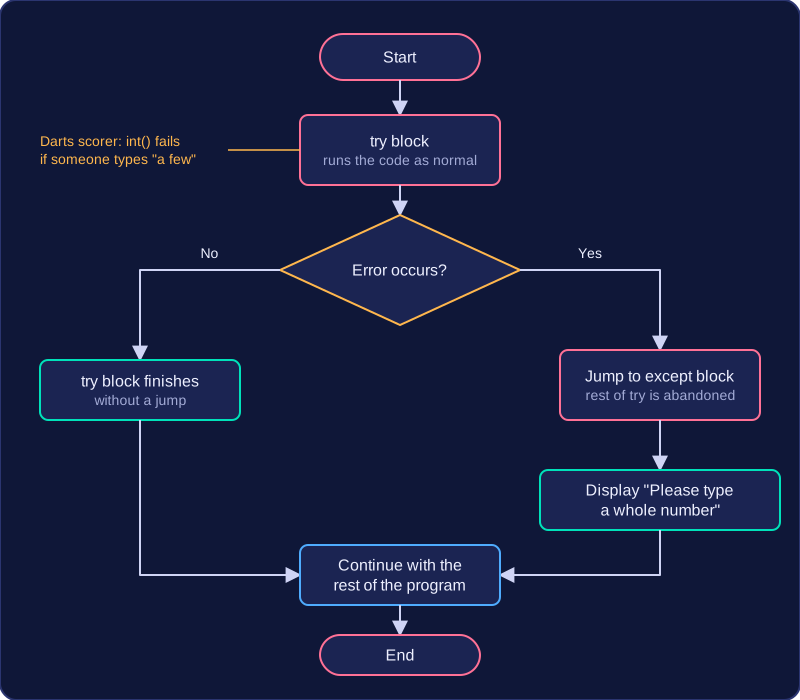
The code that might fail is placed inside a try block, and Python runs it as normal. If an error occurs, Python abandons the rest of that block, jumps to the matching except block and runs the instructions there. Without it, the program stops at the error and an error message and traceback are shown.
The except block is where you make the program behave sensibly. It can print a clear message, ask the user to enter the value again, or use a sensible default so the rest of the program still works. For example, a darts scorer might ask how many darts were thrown and use int() to turn the answer into a whole number. If someone types a few, the conversion fails, but an error handling routine can display "Please type a whole number" and carry on scoring. Dividing by zero is another realistic case: if the program works out an average by dividing total points by the number of legs played, and no legs have been played yet, the division fails and the routine can display 0 instead of closing the program.
Exception handling and validation
Validation and exception handling are not the same thing, and robust software often uses both. Validation checks data against criteria before it is used, so bad input is stopped at the door. Exception handling deals with errors that actually occur while the program runs, including ones that validation could not predict, such as a file that has been deleted.
| Method | When it acts | What it does |
|---|---|---|
| Validation | Before data is accepted or used | Compares input with rules, such as a booking date that must not be in the past, and rejects anything that fails |
| Exception handling | When an error occurs during execution | Catches an error that has already happened and lets the program continue |