Networks
LANs & WANs

A computer network is two or more devices connected together so that they can communicate and share data or resources. The connection could be a cable, a wireless link or a mixture of both. What makes it a network is that the devices can pass information to each other instead of each one working completely alone.
For example, a phone and a laptop in the same house could be joined by a wireless link. Once they are connected, a photo taken on the phone can be opened on the laptop within seconds, and either device can send a file to a friend. Before they were connected, each device could only use what was stored on it or plugged directly into it.
A stand-alone computer is a computer that is not connected to a network or to the internet. It runs on its own, so it cannot directly share data or resources with other devices: nothing it stores is available to another machine over a connection, and it cannot use another machine's hardware. A stand-alone computer is not completely cut off from the outside world, though, because you can still move a file onto it using a USB flash drive. That is copying by hand, not networking, because there is no connection between the devices.
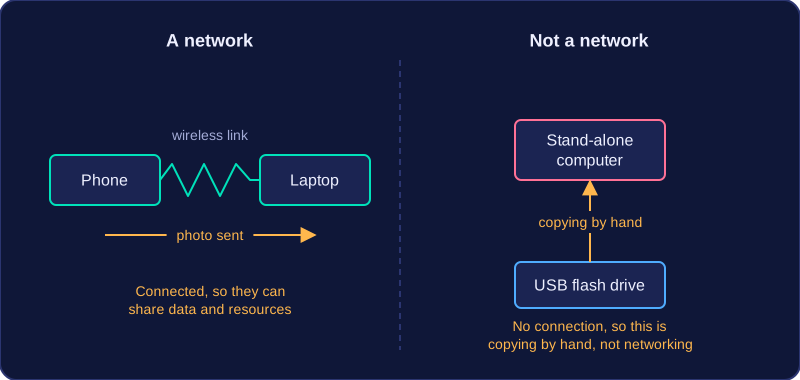
Two devices are already enough to make a network, so the word does not only describe big systems covering many rooms or buildings. What matters is that the devices are connected and that the connection lets them communicate or share something.
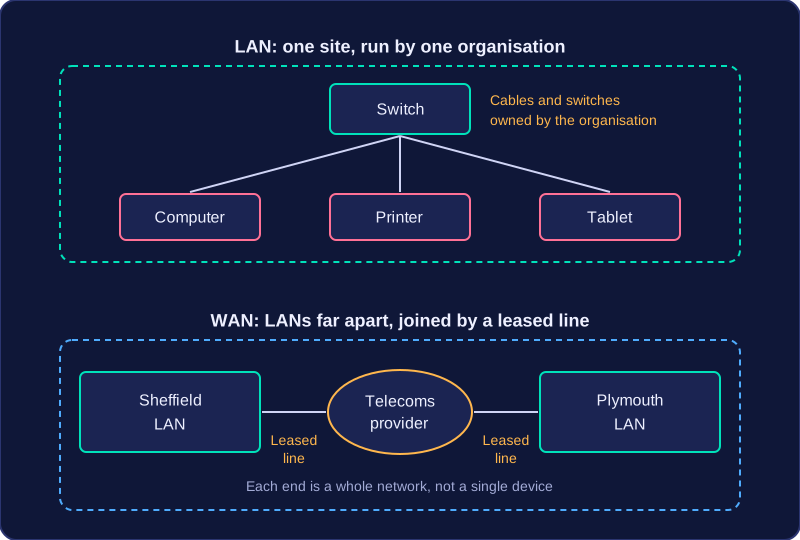
LAN stands for Local Area Network. It is a network that covers a small geographical area, usually a single site such as one building, and it connects individual devices — computers, printers, tablets — within one organisation.
Because everything sits on one site, it is practical for the organisation to own and control the infrastructure itself: the cabling, switches and wireless access points are its own equipment, and its own staff decide who gets access. A village hall where the booking office, main hall and kitchen all link together is running a LAN.
Wide Area Networks
WAN stands for Wide Area Network. It covers a large geographical area and joins two or more networks or LANs at distant locations, so it links whole networks together rather than plugging individual devices straight into each other.
A WAN usually relies on third-party communication links, such as leased lines rented from a telecommunications provider, because running your own cable between distant towns is rarely practical or affordable. A chain of climbing centres with sites in Sheffield and Plymouth could link each site's LAN into one WAN. The internet is a global WAN that connects many separate networks.
A WAN is not only the internet — an organisation can run a private WAN between its own sites. Equally, Wi-Fi covering a single site is not a WAN, because wireless links can sit inside a LAN.
LAN or WAN?
| Feature | LAN | WAN |
|---|---|---|
| Geographical area | Small, usually one site | Large, with locations far apart |
| Who owns the infrastructure | The organisation that runs it | Often a third party, such as a telecoms provider |
| What it connects | Individual devices | Separate networks or LANs |
| Example | The booking office, main hall and kitchen of the village hall | The climbing chain's sites joined together |
So a LAN suits a single site, while a WAN is needed once sites are far apart — and the difference is about area, ownership and what is being connected, not simply the number of devices.
The main reason organisations connect their devices into a network is so that shared resources can be used by everyone, instead of buying and storing a copy for every machine. A device that joins the network can use resources held elsewhere on it, such as a printer in another room.
Sharing resources
- Peripherals such as printers, scanners and 3D printers are shared by every connected device, so one good laser printer can do the work of ten cheap ones.
- Software can be installed once on a server and run by many users, instead of buying a copy for each computer.
- Files and data are kept in one shared place, so people open the same up-to-date version instead of passing copies around on memory sticks.
- One internet connection is shared by the whole network, so it is paid for once rather than in every room.
A small recording studio with three edit rooms shows the saving: one printer, one copy of the editing software on the server and one broadband connection are shared by all three rooms, which costs far less than three printers, three software licences and three broadband lines.
Talking and working together
Communication covers email, messages and video calls between users. Collaboration goes further: several people edit the same shared document at once, or book a slot on a shared calendar, without swapping copies. Work carries on even when people are in different rooms or different buildings.
Managing everything from one place
Because files and accounts sit on central machines, one technician can look after the whole network:
- Backups are run on the server rather than on each computer in turn.
- Security settings, passwords and permissions are set once for everyone.
- Software updates are installed centrally and reach every device.
- User accounts are created, changed and removed in one place, so one account can be switched off the day a person leaves.
Central storage also means files can be opened from any connected device, so you can log on at a different workstation and carry on where you left off.
A network brings sharing and communication, but it also brings costs and risks that a group of stand-alone computers does not have. The three main drawbacks are the cost of the network hardware, the difficulty of managing a large network, and how easily malware can spread between connected devices.
Cost of network hardware
Every device that joins the network needs a way to connect, so you need a network interface card in each one, plus cables, switches, wireless access points and on many networks a server for central storage. The more devices you connect, the more hardware you buy, and someone has to be paid to install and configure it all.
For example, a bakery opening a second shop wants its two tills to share stock records. It needs cable runs in both buildings, a switch in each shop, a wireless access point and a server, plus an installer's time. The bill can be far higher than the price of simply buying two separate tills, so the network only pays off if the sharing really saves enough work.
Managing a large network
Someone must create user accounts, set permissions, run backups, install software updates and fix faults. On a big network that is a job for trained technicians or a paid support company, and it never stops. Faults also hit many people at once: if a switch fails, everyone plugged into it loses access to shared files, while a single stand-alone computer breaking down only affects its own user.
Malware spreading
Because the devices are connected, malware can travel. Malware that gets onto one machine can spread to other devices and to central storage, where other users then open the infected files. On separate stand-alone computers the infection would stay on the device it started on.
For example, a worker plugs an infected memory stick into a reception computer. The malware reaches the shared drive, and every computer that opens those files is infected too. The connection between the devices is exactly what the malware uses as its route.