Images
Limitations of Binary Representation for Images

A bitmap stores each pixel's colour as a binary value, and the number of bits set aside for each pixel — its colour depth — decides how many different colours you can possibly record. If an image contains more colours than the bits allow, the computer has to approximate.
Fewer bits means fewer colours
With just one bit per pixel a value can only be 0 or 1, so only two colours exist — typically black and white. A monochrome design such as a simple school crest works well this way, but a photo of a fox standing among autumn leaves does not.
Allow five bits per pixel instead and each extra bit doubles the choices, so you have 2 × 2 × 2 × 2 × 2 = 32 colours to play with. Every shade of orange in that fox photo must now be swapped for the nearest of those 32 colours. The software has not failed; there is simply no binary value left to describe anything else.
The image becomes a less accurate copy
Matching colours to the nearest available one loses accuracy. Smooth shading turns into flat patches, and two neighbouring shades that once looked different merge into one, so fine detail vanishes. What is stored is only an approximation of the original picture.
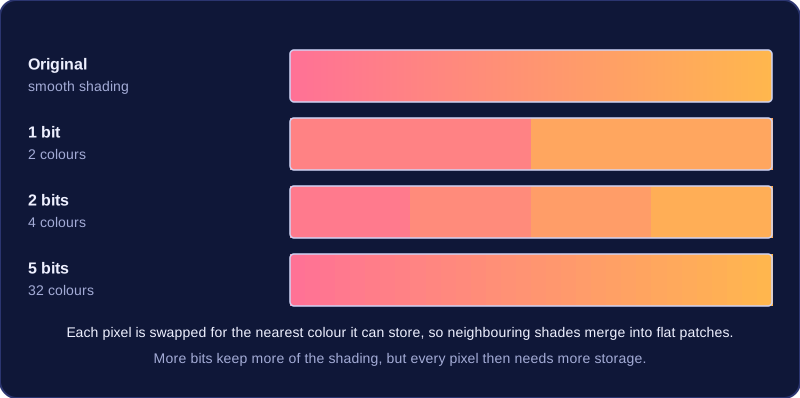
Bits per pixel is not the same as resolution. Resolution is how many pixels the image has across and down; the bits per pixel control how many colours each of those pixels can hold. Too few bits makes a colourful image look wrong, with flat patches of colour; blockiness, by contrast, comes from low resolution.
Quality against file size
More bits per pixel gives a truer image, but every pixel then needs more storage. A tablet with little space left, or a game that has to load quickly, may be limited to a small number of bits. That creates a compromise: fewer colours and a smaller file, or a more faithful image that takes up more room and takes longer to process.
Practise this
Edexcel GCSE Computer Science · Images