Data Representation
Character Sets

Contents
Everything a computer stores or processes is a binary pattern, a sequence of 0s and 1s. Text is no different: a computer does not store the shapes of letters, so the letters, digits and symbols you type have to be turned into binary patterns before they can be saved, sent or printed.
What a character set is
A character set is a defined collection of characters that a computer can represent. It lists every character the system is able to handle: letters such as A and q, digits such as 4, punctuation such as ! and ?, and usually the space character too. Anything that is missing from the set cannot be represented at all, so the collection has to be chosen to cover everything the computer is expected to work with. Real character sets such as ASCII and Unicode work in exactly this way.
Every character gets its own code
Within the character set, each character is mapped to a binary code. The codes must be unique, meaning no two characters share the same pattern, because a pattern that could mean two different characters could never be decoded reliably. Here is a made-up character set for a lift display that can only show six characters:
| Character | Binary code |
|---|---|
| G | 000 |
| R | 001 |
| 2 | 010 |
| ? | 011 |
| (space) | 100 |
| # | 101 |
When the display is sent 010, the only possible match is 2, so it never shows the wrong thing. If both 2 and ? were stored as 011, the display would have no way of knowing which one you meant and the message would come out garbled. Punctuation and spaces need codes for the same reason: they are characters that have to be stored, so they cannot be left out of the set.
Finding the code in a program
Python can move between a character and its code: ord() returns the code for a character and chr() turns a code back into a character. Notice that each different character gives a different number, which is what makes the mapping unique.
ASCII stands for American Standard Code for Information Interchange. It is a character set: a standard list that gives every character a unique code. It is not a programming language or an encryption method. It was originally developed for the English alphabet and is used worldwide for representing text.
Standard ASCII uses 7 bits for each character, and every character code is the same length. With 7 bits there are 2 to the power of 7 = 128 possible codes, so standard ASCII can represent 128 different characters. These include uppercase letters, lowercase letters, digits, punctuation marks and the space character. A capital letter and its lowercase version are different characters with different codes. For example, the question mark ? has the code 63, which is 0111111 as a 7-bit pattern.
A string holds one ASCII code for each character, so you can work through it and look up every code in turn.
word = "Saturn"
for character in word:
    print(character + " has code " + str(ord(character)))
Output:
S has code 83
a has code 97
t has code 116
u has code 117
r has code 114
n has code 110
ASCII is effective because it is a standard: text data can be exchanged between different computer systems and manufacturers, and each system interprets the same code as the same character.
A version of ASCII that uses 8 bits for each character is called extended ASCII. It is a different character set from standard ASCII, which is always 7 bits per character, so an 8-bit code is not standard ASCII.
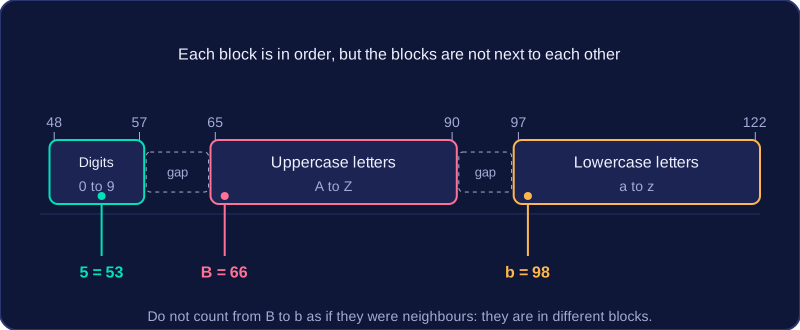
ASCII codes are numbers that stand for characters. The ASCII table puts letters and digits in blocks, so once you know one code you can work out others in the same block by counting.
Separate cases, consecutive letters
Uppercase and lowercase versions of a letter have different ASCII codes. For example, B has code 66 and b has code 98. The uppercase letters form one unbroken block, and the lowercase letters form another block later in the table. Within each case, letters are in alphabetical order and their codes are consecutive: W is 87, X is 88 and Y is 89. Do not count from an uppercase letter to a lowercase letter as if they were next to each other.
Digits and counting
The digit characters 0 to 9 are also consecutive. For example, 4 is 52, so 5 is 53 and 6 is 54. Because each block sits in order, you can find a code by counting forward or backward from a code you know. If q is 113, count forward three places: r is 114, s is 115 and t is 116. Count backward two places from q and o is 111.
Binary, denary and hexadecimal
Inside the computer an ASCII code is stored as a binary pattern. It is often written as a denary number because that is easier to read, and it can also be written in hexadecimal. These are three ways of writing the same code:
| Character | Denary | Binary | Hexadecimal |
|---|---|---|---|
B | 66 | 1000010 | 42 |
b | 98 | 1100010 | 62 |
5 | 53 | 0110101 | 35 |
When a computer stores text, it saves a string of characters as a sequence of ASCII codes — one code for each character, kept in the order you typed them. Each code is held as a binary pattern, because binary is the only thing the computer can store. So a short message becomes a short list of codes, and a long message becomes a long list.
Everything you type counts
A space is a character and has its own code, and so does every punctuation mark — commas, question marks, exclamation marks. Type Go, Sam! and you have stored eight characters, not five: G, o, comma, space, S, a, m and exclamation mark. Each one needs its own code and its own storage.
| Character | What it is | ASCII code (denary) |
|---|---|---|
| G | letter | 71 |
| o | letter | 111 |
| , | punctuation | 44 |
| (space) | space | 32 |
| S | letter | 83 |
| a | letter | 97 |
| m | letter | 109 |
| ! | punctuation | 33 |
Working out the storage size
In standard ASCII every character uses 7 bits, so the size of a string in bits is the number of characters multiplied by the number of bits per character. The eight characters of Go, Sam! take 8 × 7 = 56 bits. Leave out the space and the punctuation marks and you would get 5 × 7 = 35 bits, which is too small — the codes for those marks still have to be stored somewhere.
A digit character such as '6' is stored as its ASCII code, not as the number it looks like. The character '6' has ASCII code 54, written in 7 bits as 0110110. That code tells the computer which character to display. It is not the same as the integer value 6, which can be stored as the 4-bit binary pattern 0110.
Storing a number as a binary integer uses fewer bits and lets the computer do arithmetic with it. Storing the same number as ASCII characters uses more bits and does not allow arithmetic directly, because the computer is holding character codes rather than numeric values.
| What is stored | Example for 6 | Bits used | Can you do arithmetic directly? |
|---|---|---|---|
| Integer | Binary 0110 | 4 | Yes: 6 + 3 = 9 |
| ASCII character | Code 54, binary 0110110 | 7 | No: 54 + 53 = 107, the code for 'k' |
The character codes must be converted to numeric values before calculations can be carried out. In Python, int('6') gives the integer 6, and ord('6') gives the ASCII code 54. You can then use the value in a calculation.
symbol = '6'
code = ord(symbol)   # ASCII code for the character
value = int(symbol)  # integer value of the digit
print(code)
print(value + 3)
Output:
54
9
The program shows the difference: ord() returns the character's code, while int() returns the number you need for arithmetic.
Unicode is a character set built to cover characters from many written languages, plus symbols such as currency signs, maths signs and emoji. It exists because a small character set like ASCII simply runs out of room.
Standard ASCII uses 7 bits for each character, so it has only 128 different codes. Plenty of languages need letters ASCII never included: the Welsh ŵ, the French é, the Greek λ, the Hindi अ. A character set that holds more characters than there are available codes cannot be fully represented: once every bit pattern has been used, the extra characters have nowhere to go and are lost or replaced by a substitute symbol.
More bits, more room
The size of a character set is limited by the number of unique codes its bits can make. Add a bit and you double the number of unique codes, so twice as many characters can be represented: moving from 7 bits to 8 bits takes you from 128 codes to 256. Unicode uses more bits per character than ASCII (often 16 or 32), which gives it a code space big enough for more than 100,000 characters — far more than any single alphabet needs.
For example, a travel blog about Iceland wants to name Þingvellir, a national park. The letter Þ has no code in 7-bit ASCII, so the page can only be stored and displayed correctly if the file uses Unicode, where that letter does have its own code. Saving it as plain ASCII would leave the name with a missing or wrong character.
Unicode gives characters codes that go far beyond the ASCII range: the Greek capital omega is 937, not one of ASCII's 128 codes.