Unsigned Binary to Negative Binary Conversion
Alternative Two's Complement Method
There is a shortcut for turning a negative denary number into 8-bit two's complement. It skips the add-one step and produces exactly the same pattern as flip-every-bit-then-add-1, so both routes earn the marks.
The method
- Write the positive value of your number as 8 bits, padding with 0s on the left.
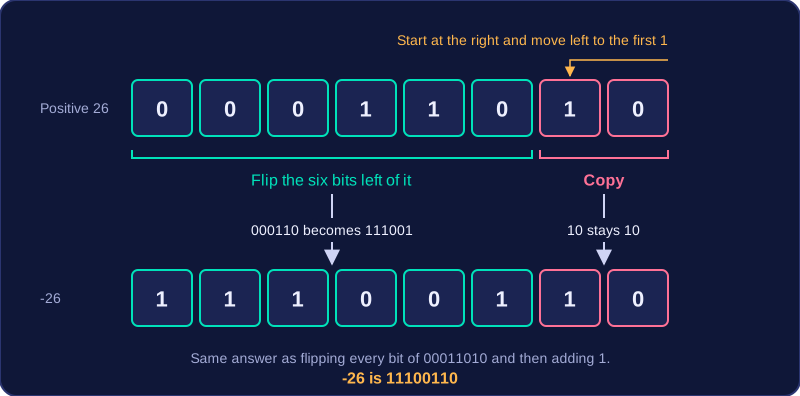
- Start at the right-hand side and move left until you reach the first 1.
- Copy every bit up to and including that 1 without changing it.
- Flip every bit to the left of it, turning each 1 into 0 and each 0 into 1.
Worked example: -26
Positive 26 is 00011010. Reading from the right, the first 1 is the second bit from the right, so you copy 10 as it stands. The six bits to its left, 000110, all flip to 111001. Joining the two parts gives 11100110, so -26 is 11100110. You can check it the long way: 26 flips to 11100101, and adding 1 gives the same answer.
Another quick one: positive 9 is 00001001, so you copy the final 1, flip 0000100 to 1111011, and -9 is 11110111.
| Step | Flip all bits, then add 1 | Copy to the first 1, then flip |
|---|---|---|
| Start with 26 | 00011010 | 00011010 |
| Do the change | 11100101, then add 1 | keep 10, flip 000110 to 111001 |
| Result for -26 | 11100110 | 11100110 |
It works because adding 1 to the flipped pattern carries through the run of trailing 1s, turning them to 0s and the first 0 to their left into a 1. That restores the bits you copied — the trailing 0s and the first 1 — while everything to the left stays flipped. Only use it when converting a negative value: a positive number such as 26 keeps its plain binary pattern 00011010, with nothing flipped at all.
Practise this
Edexcel GCSE Computer Science · Unsigned Binary to Negative Binary Conversion
Edexcel GCSE Computer Science · Denary to Negative Binary Conversion