Programming Fundamentals
Arithmetic Operations

Contents
An arithmetic expression combines values, variables and arithmetic operators, and is evaluated to produce one value. For example, if a swimmer completes 12 lengths of a 25 metre pool, an expression using the variables lengths and pool_length is evaluated to 300. The values and the multiplication are worked out together to give that single result.
Once an expression has produced a value, you can either store it in a variable or display it. Storing uses assignment: the result is placed in a named variable and can be used again later. Displaying uses output, such as print(), which shows the value on screen. Displaying a value does not store it. If you only display an expression, the program works out the value, shows it, then has no variable holding it.
This distinction matters when you need the result more than once. A stored result can be printed, used in another calculation, or changed later. A displayed result disappears once it has been shown, so you cannot refer to it by name. If you need the value again, assign the expression to a variable first.
lengths = 12
pool_length = 25
distance = lengths * pool_length
print(distance)      # stored result
print(lengths * 2)   # displayed only
print(distance)      # unchanged
Output:
300
24
300
The program stores the result of one expression and displays a different expression. The middle printed value is worked out and shown, but no variable holds it. The last line prints the stored result again, which is unchanged because displaying a calculation does not save its value.
Python evaluates arithmetic in a fixed order called precedence. It does not simply work from left to right, so knowing the order lets you predict a result and add brackets when you need a different one.
| Priority | Operators | How to work |
|---|---|---|
| 1 | Brackets ( ) | Innermost brackets first |
| 2 | Exponentiation ** | Before the operators below |
| 3 | Multiplication *, real division /, integer division //, modulo % | Left to right |
| 4 | Addition +, subtraction - | Left to right |
Multiplication, real division, integer division and modulo share the same priority, so work through them from left to right. For example, 48 // 5 * 2 is 9 * 2 = 18. Addition and subtraction also share a priority: 30 - 7 + 2 is 23 + 2 = 25.
Brackets override the normal order and make your intended order clear. Compare 9 + 4 * 5 ** 2 with (9 + 4) * 5 ** 2. The first gives 9 + 100 = 109, because exponentiation and multiplication happen before addition. The second gives 13 * 25 = 325.
To evaluate an expression for given values, replace each variable with its value and work one step at a time. If a = 20, b = 3 and c = 4, then a - b * c becomes 20 - 3 * 4, then 20 - 12 = 8. With brackets, (a - b) * c becomes (20 - 3) * 4 = 17 * 4 = 68.
Missing brackets can change the result, particularly when a total is shared out. Three friends split the cost of a takeaway: £14 for pizzas, £19 for burgers and £9 for drinks. The correct amount each is (14 + 19 + 9) / 3 = 42 / 3 = 14.0. Without brackets, 14 + 19 + 9 / 3 divides only the £9 by 3, giving 36.0, which is not a share of the bill at all. The brackets make sure all three amounts are added before dividing.
Integer division (//) gives the whole number of times one number fits into another. Modulo (%) gives what is left over. Together they answer how many complete groups there are and what remains.
Odd, even and multiples
For any whole number, number % 2 is 0 when the number is even and 1 when it is odd, because dividing by 2 leaves either nothing or one. You can use that result to decide what happens next with selection.
Modulo also tests multiples. If a % b is 0, then a is exactly divisible by b, so it is a multiple of b. For example, 84 % 7 is 0, so 84 is a multiple of 7; 85 % 7 is 1, so it is not.
Groups, leftovers and digits
Integer division gives complete groups and modulo gives the leftovers. With 29 eggs packed 6 to a box, 29 // 6 is 4 complete boxes and 29 % 6 is 5 eggs left. A nonzero remainder means you need one more box for those 5 eggs; if the remainder were 0, the complete boxes would hold everything. Use // here, not /: 29 / 6 gives about 4.83, which is not a whole number of boxes.
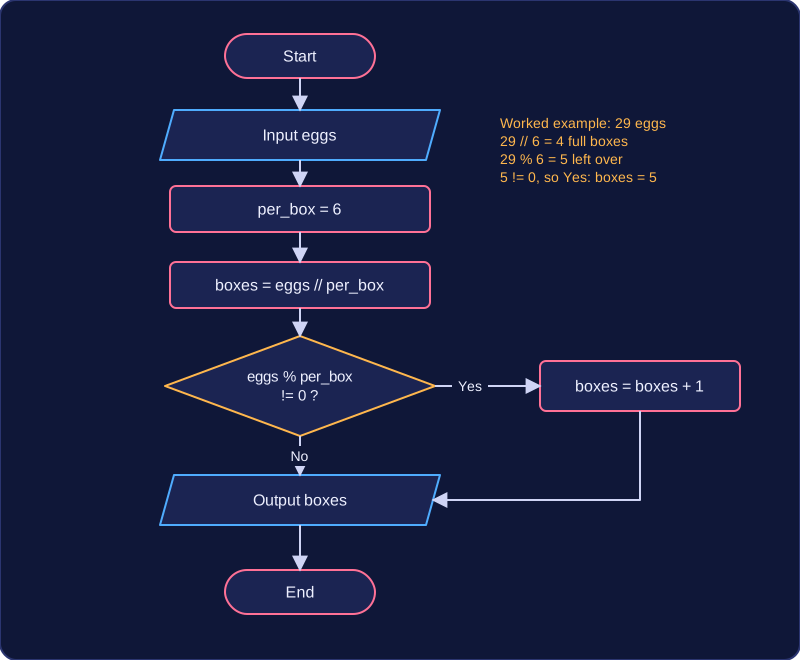
eggs = int(input("Number of eggs: "))
per_box = 6
full_boxes = eggs // per_box
left_over = eggs % per_box
print("Full boxes:", full_boxes)
print("Left over:", left_over)
Output when the user types 29:
Number of eggs: 29
Full boxes: 4
Left over: 5
To take digits from a whole number, number % 10 gives the last digit and number // 10 removes it. For 63, 63 % 10 is 3 and 63 // 10 is 6, so the tens digit is 6 and the units digit is 3.
Hours and minutes
A film lasts 158 minutes. 158 // 60 is 2 whole hours, and 158 % 60 is 38 minutes left over, so the film is 2 hours 38 minutes long.
Arithmetic operators are most useful inside a short program that solves a real problem: values come in, a formula is applied, and the answer is stored in a variable or displayed.
width = int(input('Poster width in cm: '))
height = int(input('Poster height in cm: '))
print('Poster area in cm squared:', width * height)

radius = float(input('Pond radius in m: '))
PI = 3.14159
print('Pond area in m squared:', PI * radius ** 2)
Output when the user types 60, 40, 2.5:
Poster width in cm: 60
Poster height in cm: 40
Poster area in cm squared: 2400
Pond radius in m: 2.5
Pond area in m squared: 19.6349375
The poster area multiplies width by height. The pond area uses exponentiation: radius ** 2 squares the radius, and Python works that out before multiplying by PI, because exponentiation has higher precedence than multiplication. So PI * radius ** 2 gives the right area, while (PI * radius) ** 2 would square the wrong thing. The power operator is always two asterisks, never ^.
celsius = float(input('Temperature in C: '))
fahrenheit = celsius * 9 / 5 + 32
print('Temperature in F:', fahrenheit)

price = float(input('Price before VAT: '))
vat_rate = 0.2
vat = price * vat_rate
print('Price with VAT:', price + vat)
Output when the user types 25, 40:
Temperature in C: 25
Temperature in F: 77.0
Price before VAT: 40
Price with VAT: 48.0
The temperature conversion multiplies by 9, divides by 5, then adds 32. Multiplication and division share the same precedence and run left to right, so celsius * 9 / 5 is worked out first and 32 is added to that result — the same as writing (celsius * 9) / 5 + 32. The VAT program stores a fixed rate of 20% in vat_rate, calculates the VAT on the price, then adds it to the original price to get the total.
Text in, numbers out
Anything typed at input() arrives as text, even when it looks like a number, and '12' * 5 would repeat the text rather than multiply it. A typed value must be cast before it is used in a calculation: int() when it must be a whole number, such as a count of items, or float() when decimals are possible, such as a measurement or a price.
Never divide by zero
If the divisor of a division or a modulo is 0, Python cannot work out an answer and stops the program with an error. Sharing a bill between a number of people typed in by the user will fail if that number is 0, so the divisor must always hold a sensible value before the calculation runs.