Producing Robust Programs
Testing

Contents
Testing means running a program, or part of a program, with data you have chosen, to check that it works. You pick the data on purpose so that the test has a point: you already know what the program should do with it.
The main purpose of testing is to find errors so that they can be fixed. A program with errors in it will cause problems for whoever uses it, so the sooner the errors are found, the better.
What testing checks
- It does the job it was written for. The program should do what it is intended to do and meet the user's requirements. If a school library program is meant to show when a book is overdue, testing confirms that it does.
- The output is correct. You give the program known data and check the result is what it should be. A program that converts minutes into hours should turn 150 minutes into 2 hours 30 minutes, not 2 hours 50 minutes.
- It copes with likely inputs. A program should keep working with the kinds of data it will really receive, and stay sensible when it gets unexpected input instead of crashing. A program that survives bad input and carries on is called robust.
- It is usable. Testing can also look at usability and user experience, such as whether the messages on screen make sense, and at performance, such as how quickly the program responds.
Why test before release?
Testing happens before the program is released so that the errors found can be fixed while there is still time to change the code. A test that fails is useful: it proves the program does not yet work as intended and gives you a place to start looking. You can then correct the code and run the same test again.
One thing testing cannot do is prove that a program has no errors at all. You can only try the data you think of, and an untested path through the program may still hide a problem. Testing finds errors so they can be fixed; it does not guarantee a perfect program.
Iterative testing is testing that happens during development, while a program is still being written. Rather than waiting until everything is finished, you test each module — one self-contained part of the program, such as a single function — as soon as you have written it.
It is also called incremental testing, because the program is built up one module at a time and each new piece is checked as it is added.
The repeated cycle
- Write a module.
- Test it with some chosen data.
- Fix any errors the test shows up.
- Retest to check the fix worked.
That cycle then repeats for the next module, and the next, until the program is complete.
Working this way means errors are found early, while the module is small and still fresh in your mind. A mistake inside ten lines is quick to spot and put right; the same mistake buried in a finished program of many hundreds of lines can take a long time to track down.
Testing a module, not the whole program
Iterative testing checks modules individually instead of testing the whole finished program — that is the key difference from final testing at the end of production.
For example, imagine a music app that stores the length of every song on a playlist in a list. One module, count_long_songs(), should return how many of those songs are longer than three minutes. The list holds 2.5, 4.0, 3.5, 2.0 and 5.0 minutes, so the answer should be 3. You write it, test it with that list, and it returns 2, because the loop stopped one item before the end of the list, so the last song was never checked. You change the loop so it runs all the way to the end of the list, retest with the same list, see 3, and only then start the module that adds up the total playing time. The error was caught in seconds, in code you had just written.
Final testing, also called terminal testing, happens at the end of production, once every part of the program has been written. The whole program is run and tested together rather than one module at a time.
What final testing checks
- That each part of the program passes the right data to the parts it works with, so the modules fit together.
- That the finished program produces the output its requirements asked for.
- That the program works when a real user moves from one part to another, for example entering an order and then seeing the total and the receipt.
Imagine a ten-pin bowling program built from three modules: one records each player's score, one works out the team average, and one displays the leaderboard. The score module passed its own test because it displayed each score correctly, but it stored the score as text. In final testing you play a whole game through the program and spot that the average module joins "12" and "18" into "1218" instead of adding them. The fault only appears when the modules are joined.
How it differs from iterative testing
| Iterative testing | Final testing |
|---|---|
| Carried out during development | Carried out at the end of production |
| Tests one module at a time | Tests the finished program as a whole |
| Finds errors early, while the module is being written | Finds errors caused by modules working together |
Both are needed. A module can pass every test on its own and still fail when it is joined to another module, because the two may expect different data or the wrong value may be passed between them. Final testing is the only stage that runs the complete program from start to finish, so it is the only stage that can show the program works as one piece.
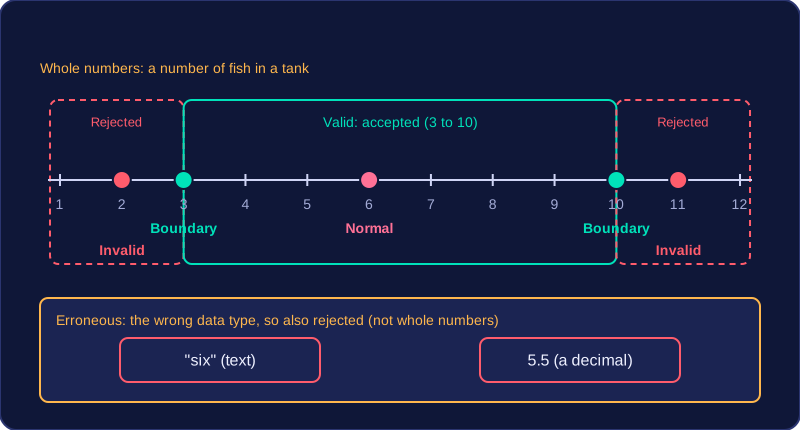
Test data is the data you choose to run a program with to check that it works. The four types are normal, boundary, invalid and erroneous.
Normal test data is typical, sensible data of the correct type. The program should accept it without causing an error. For a program that takes a whole number of fish in a tank and only accepts 3 to 10, normal data could be 6.
Boundary data
Boundary test data has the correct data type and sits on the very edge of being valid: it uses the two values right at the ends of the allowed range: the smallest and largest numbers the program should allow. For the fish tank, the boundary values are 3 and 10. Boundary data is valid, so it may also be described as normal data. Testing values just outside the valid edge is good practice: 2 and 11 are invalid data because they are the right type (whole numbers) but the wrong value (outside the accepted range). The program should reject them.
Invalid and erroneous data
Invalid test data is of the correct data type but should be rejected by the program. It has the right type but the wrong value, such as 2 or 11 above. Erroneous test data is of the incorrect data type and should also be rejected. It has the wrong type, such as "six" (text) or 5.5 (a decimal) when the program expects a whole number.
| Type | Example for 3 to 10 fish | Why |
|---|---|---|
| Normal | 6 | Typical whole number inside the range |
| Boundary | 3 or 10 | Valid edge whole number |
| Invalid | 2 or 11 | Whole number, but outside the range |
| Erroneous | "six" or 5.5 | Wrong data type |
Suitable test data must match the data type and valid range described in the scenario. Give actual values, not descriptions: 6 is test data, but "a number between 3 and 10" is not.
A test plan is prepared before any testing begins. It records every check you intend to make, which helps you cover all cases and remember to deal with any fault you uncover.
What each test records
- a test number, so you can refer to tests and rerun them later
- the purpose of the test — what it is checking
- the test data — the actual values that will be entered
- the type of test data — normal, boundary, invalid or erroneous
- the expected result — what should happen if the program works correctly
Writing the plan first forces you to think through every case in advance, instead of typing in whatever comes to mind once the program runs.
Expected and actual results
After each test is performed, write the actual result — what happens when the test is run — next to the expected one, then note whether it passed and anything that must be done. If the two results agree, the test has passed. If they do not, the plan identifies the test that failed so you can correct the fault and try again.
For normal and boundary data the expected result is usually that the data is accepted. For invalid and erroneous data the expected result is usually that the program rejects the data and may ask for it to be entered again.
| Test | Purpose | Test data | Type of test data | Expected result | Actual result |
|---|---|---|---|---|---|
| 1 | check a typical bike hire | 5 | normal | accepted, charged for 5 hours | 5 hours charged — pass |
| 2 | check the longest allowed hire | 12 | boundary | accepted, charged for 12 hours | 12 hours charged — pass |
| 3 | check a hire longer than allowed | 13 | invalid | rejected, asked to re-enter | 13 hours accepted — fail, fix needed |
| 4 | check text is rejected | blue | erroneous | rejected, asked to re-enter | rejected — pass |
Refining after testing means using a failed test to find an error, fixing the algorithm, then running the same test again. A test only helps if you compare the expected result with the actual result: when they differ the test has failed, and the difference points to where the error is likely to be.
For example, a cookery class takes bookings for groups of 2 to 6 people. A test with 7 people has the expected result "rejected", because 7 is outside the valid range. If the actual result is "accepted", the program accepts data it should reject. That failed test shows the upper limit in the condition is wrong.
people = int(input("Enter number of people: "))
if people >= 2 and people <= 8:
    print("Booking accepted")
else:
    print("Booking rejected")
Output when the user types 7:
Enter number of people: 7
Booking accepted
The code lets 7 through because its upper limit is 8. Refine the algorithm by changing the upper limit to 6, so the condition reads people >= 2 and people <= 6. Then run the same test again: this time 7 is rejected, which matches the expected result, so the error has really been fixed rather than just altered. Rerun the earlier tests too, such as 4 people, because an edit can break something that used to work; a pass on every test shows the algorithm has improved without spoiling what was already correct.