Data Types and Structures
Two-dimensional Arrays 2D Lists
A 2D list in Python is a list whose items are themselves lists. Each inner list is one row, and the outer list holds the rows in order. You create one with nested square brackets: the outer brackets hold the rows, and each row has its own brackets.
relay_teams = [
    ['Amir', 'Katie', 'Jo', 'Sam'],
    ['Dev', 'Mia', 'Ibrahim', 'Lucy'],
    ['Nia', 'Tom', 'Erin', 'Zak']
]
print(relay_teams[1][2])
relay_teams[0][3] = 'Ali'
print(relay_teams[0])
print(relay_teams[0][3])
Output:
Ibrahim
['Amir', 'Katie', 'Jo', 'Ali']
Ali
To reach one item, give two indexes in separate square brackets: the row (record) index first, then the column (field) index. The same notation reads a value or assigns a new one, so putting the two indexes before an equals sign replaces that item. Using only the row index returns the whole inner list, which is the whole record rather than one field.
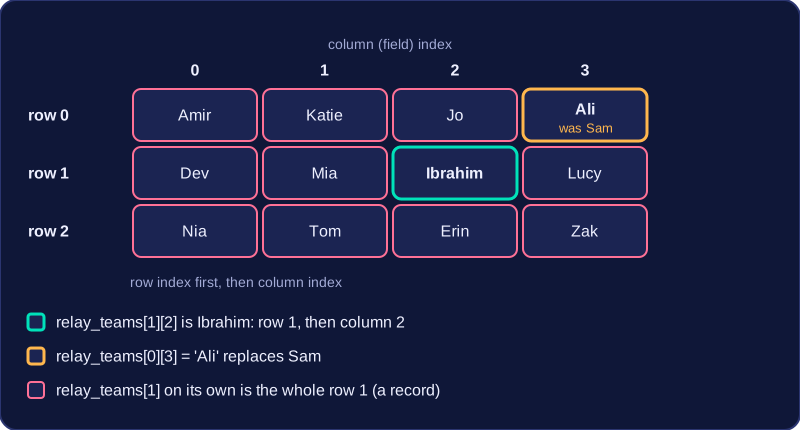
Indexes must be in the correct order. Both indexes count from 0, so the first row and the first field are both at index 0. If you reverse the two indexes, you may read a different item, or Python may raise an IndexError if one index is outside the range of the list. For example, asking for row 3 in a list with rows 0 to 2 fails before the column is used.
Building a 2D list in a loop
A 2D list can be built up inside a loop by creating a row list for each record and appending it to the outer list. Each new row is added at the end, so the rows stay in the order the loop runs.
scores = []
for match in range(3):
    home = int(input('Home score: '))
    away = int(input('Away score: '))
    row = [home, away]
    scores.append(row)
print(scores[1][0])
Output when the user types 3, 2, 1, 4, 0, 0:
Home score: 3
Away score: 2
Home score: 1
Away score: 4
Home score: 0
Away score: 0
1
Rows can be different lengths
A 2D list does not have to be a perfect rectangle. One row may hold three fields and the next only two. Code that assumes every row has the same number of fields, such as always using the third column, can fail with an IndexError on a shorter row. Check each row's length when the layout may vary.
Python has no built-in record type. A record groups items of information about one thing, called fields, held in a fixed order. In Python you imitate a record with a list, and put those lists inside an outer list to make a 2D list.
Rows are records, columns are fields
When a 2D list holds a table of records, each row is one complete record and each column position is one field. Here a collection of games stores the game name, how many players it needs and whether it needs a screen. The rows are the records; column 0 is always the name, column 1 the player count and column 2 the screen flag.
| Row index | Column 0: name | Column 1: players | Column 2: needs screen |
|---|---|---|---|
| 0 | "Dominoes" | 4 | False |
| 1 | "Quiz Clash" | 6 | True |
| 2 | "Dice Dash" | 2 | False |
To read one field you give two indexes, row first: row 1 then column 1 gives 6, the player count of Quiz Clash. Giving only one index returns the whole record, such as the whole row for Dice Dash.
Keep the field order fixed
Because position is the only link between a value and its meaning, the same column index must be used for the same field everywhere in the program. If you read the player count from column 1 in one place and from column 2 in another, the program silently uses the screen flag as a number of players and the results become nonsense. Python will not warn you, since every row is just a list of items.
This is also why a list is used rather than a simple array. A 2D array normally stores items of one data type, but a record can hold fields of mixed types: text for a name, an integer for a count and a Boolean for a flag. A Python list accepts all of these in one row, so one row can imitate one record exactly.
games = [["Dominoes", 4, False], ["Quiz Clash", 6, True], ["Dice Dash", 2, False]]

# column 1 always holds the player count
for game in games:
    print(game[0] + " needs " + str(game[1]) + " players")

print("Flag for row 2: " + str(games[2][2]))
Output:
Dominoes needs 4 players
Quiz Clash needs 6 players
Dice Dash needs 2 players
Flag for row 2: FalseA 2D list stores rows of related fields, and a nested loop can display every value in it: the outer loop visits each row and the inner loop visits each field in that row. Printing the values on their own is not enough, though. The user looking at the screen cannot see your list, so they have no way of knowing which number is the age and which is the score. Labelled output fixes this: each value is printed next to a word saying what it means.
Why labels matter
In a table of records, the column position fixes the meaning of a field: column 0 might be a name, column 1 an age and column 2 whether the member has paid. When you print the raw values, that ordering is invisible, and it becomes even harder to follow when a row mixes types, such as a string, an integer and a Boolean. Printing Name: before the value makes the output readable on its own.
A worked example
Suppose a school shop stores its stock as a 2D list, one row per item. A heading is printed once, before any loop, to name the table. Then, for each row, the inner loop prints each field beside its own label, joining the label to the value with the text + operator and converting the value with str(). The labels sit in a second list, so the same label is reused for the same column in every row.
stock = [['Pens', 24, False], ['Notebooks', 15, True], ['Calculators', 8, False]]
labels = ['Item', 'Quantity', 'Reduced']

print('School shop stock')
for row in stock:
    position = 0
    for field in row:
        print(labels[position] + ': ' + str(field))
        position = position + 1
    print('---')
Output:
School shop stock
Item: Pens
Quantity: 24
Reduced: False
---
Item: Notebooks
Quantity: 15
Reduced: True
---
Item: Calculators
Quantity: 8
Reduced: False
---
Because the labels sit inside the inner loop, every row produces the same three labelled lines in the same order, so the layout stays consistent from row to row. If a fourth row were appended to the list, the same code would label it too, with no changes needed.
Labelling without a second loop
When the field order is fixed and you only need one line per row, you can label each column directly inside the outer loop. The loop still visits every record; the labels do the explaining.
clubs = [['Chess', 14, 'Room 2'], ['Robotics', 9, 'Hall'], ['Drama', 21, 'Stage']]

print('Club enrolment')
for club in clubs:
    print('Club: ' + club[0] + ' | Members: ' + str(club[1]) + ' | Venue: ' + club[2])
Output:
Club enrolment
Club: Chess | Members: 14 | Venue: Room 2
Club: Robotics | Members: 9 | Venue: Hall
Club: Drama | Members: 21 | Venue: StageA linear search on a 2D list checks each row in turn. You compare the field that holds the search key — for example, the name column — with the value you want. Stop as soon as you find a match, because checking the remaining rows wastes time.
Keep a separate variable for the result, such as a found flag or the matching row index, instead of changing the stored values. The original 2D list should stay unchanged unless the task asks you to update it. If you only need to know whether a record exists, one match is enough. If you need every match, still make just one pass over the rows and collect each match as you go. A well-designed solution visits each record as few times as possible rather than making repeated passes over the whole structure.
This program searches a list of club records. Each row holds a club name and its meeting day. It stops at the first match and reports the day without altering the list.
clubs = [["Chess", "Monday"], ["Coding", "Wednesday"], ["Art", "Friday"], ["Drama", "Thursday"]]
search_name = input("Club to find: ")
found = False
row = 0
while row < len(clubs) and not found:
    if clubs[row][0] == search_name:
        found = True
        meeting_day = clubs[row][1]
    else:
        row = row + 1

if found:
    print(search_name + " meets on " + meeting_day)
else:
    print(search_name + " was not found")
Output when the user types Art:
Club to find: Art
Art meets on Friday