Data Types and Structures
Data Types
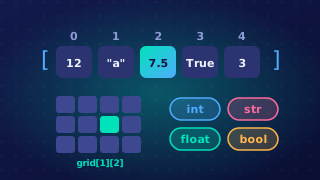
A data type is the kind of value that a data item can hold. It tells you what a value actually is — a whole number, a number with a fraction, a true or false answer, or a piece of text — and therefore what you can sensibly do with it. Some types can be used together, such as an integer and a real in a sum, but adding a number to a piece of text does not work, because the two kinds of value are stored in completely different ways.
Primitive data types
Primitive data types are the basic built-in types, such as integer, real, Boolean and character, from which structured data types can be built. A structured data type holds several values grouped together. A string is an example: it is a sequence built from characters, so "Kestrel" is really seven characters placed side by side.
| Primitive type | Kind of value it holds | Example |
|---|---|---|
| Integer | A whole number | 28 |
| Real | A number that can have a fractional part | 3.6 |
| Boolean | One of two values, True or False | True |
| Character | Exactly one character | 'Q' |
Why the type matters
The type is not just a label. It decides how the value is stored in memory, how much memory it needs, and which operations are valid on it. Imagine a game stores your score of 8 as an integer: you can add the next level's 6 points and get a new total of 14. If the same 8 were stored as the string "8", joining it to "6" would give "86" instead of 14, because + would glue the text together rather than do arithmetic. Choosing the type to match the real data is what keeps a program's results accurate.
An integer is a whole number with no fractional part. Every integer is either positive, negative or zero, so a score of 3 in a quiz, a temperature of -4 °C and a total of 0 are all integers.
An integer is the right data type when a value can only sensibly be a whole number: you cannot score half a goal or swim two-thirds of a length. In a program an integer is written without a decimal point, and a minus sign in front of a negative value does not stop it being an integer.
The decimal point matters: 8 is an integer, but 8.0 is a real even though its fractional part is zero, and the computer stores and handles the two differently. The point on the end changes the data type of the value, not just the way it looks.
| Value | Integer? | Why |
|---|---|---|
| 512 | Yes | A whole number written without a decimal point |
| -47 | Yes | Negative, but still a whole number |
| 3.25 | No | It has a fractional part, so it is a real |
| 12.0 | No | Written with a decimal point, so it is a real |
Here two integers are stored in variables and printed. A lap count can only be a whole number and the temperature is below zero, so an integer suits both.
# whole numbers only
laps = 12
laps_left = laps - 5
temperature = -3
print(laps_left)
print(temperature)
Output:
7
-3A real number is a number that can have a fractional part, such as a bag of flour with a mass of 1.5 kg or a race finished in 12.75 seconds. In many languages, Python included, reals are called float or floating-point numbers. Real and float are simply two names for the same data type, so either name is accepted for a value like 12.75.
Spotting a real in a program
You can work out the data type of a number from the way it is written. A numeric literal is a number typed straight into a program.
- A literal with no decimal point, like
184or-12, is an integer. - A literal with a decimal point, like
184.0or-12.5, is a real.
The decimal point is not decoration. Writing 184.0 tells the computer to store a real, even though the fractional part is zero, so 184 and 184.0 are different data types and are stored differently in memory. That is why a whole number written with a point is not an integer.
Worked example
A bag of flour has a mass of 1.5 kg. Adding 0.25 kg of extra flour gives 1.75 kg, and doubling the bag gives 3.0 kg. The answer 3.0 is still a real, because the value you started with was written with a decimal point. Dividing 6 by 4 with / also gives 1.5, a real, even though both literals you typed were integers.
# masses of flour in kilograms
bag_mass = 1.5
extra_mass = 0.25
total_mass = bag_mass + extra_mass
double_mass = bag_mass * 2
print(total_mass)
print(double_mass)
print(6 / 4)
Output:
1.75
3.0
1.5A Boolean is a data type that can hold only one of two values: True or False. Nothing else fits — not a number, not a word. It is the right choice when something can only ever be in one of two states, such as whether a library book has been returned or whether a player is still in a game.
True and False are keywords
In Python, True and False are Boolean keywords: the language already recognises them and treats them as values in their own right, not as pieces of text. Both start with a capital letter, and that spelling matters — writing true in lowercase gives a name Python does not know, so the program stops with an error. A Boolean also never holds words such as yes or no, or the whole numbers 1 and 0; its only two values are True and False.
Quotes or no quotes
This is where a Boolean literal differs from a string literal. A string literal is text, so it is written inside quote marks, and the quotes tell Python that the characters are data rather than code. A Boolean literal is written bare, because the keyword on its own is already a complete value — adding quotes would turn it into text and change its type.
| Written as | Data type | What it holds |
|---|---|---|
True | Boolean | the true value, one of only two possible values |
"True" | string | four characters of text: T, r, u and e |
music_playing = False
reply = "False"  # text, not a Boolean
print(music_playing)
print(reply)
Output:
False
False
Here music_playing stores one of the two Boolean values, while reply stores text made of four characters. They look similar when printed, but they are different data types holding different things, which is exactly why one is quoted and the other is not.
A character, often shortened to char, is a data type that holds exactly one character. That single character can be a letter, a digit, a symbol or a space.
Each of these is one character: "Z", "6", "#" and "$". In Python you write a character inside quotation marks, for example "g". The quotes are not part of the character; they show where the value starts and ends.
A char cannot hold more than one character. "AB" contains two characters, so it is a string rather than a char. A char is always exactly one character long, while a string can contain zero or more characters. An empty string "" is valid, but it is not a character.
| Value | Character? | Why |
|---|---|---|
"W" | Yes | One letter |
"8" | Yes | One digit |
"&" | Yes | One symbol |
"_" | Yes | One symbol |
"W8" | No | Two characters, so a string |
"" | No | Empty string, zero characters |
Characters in Python
The specification lists char as a primitive data type, so if a question asks for the data type of a value such as "M", the answer is char. Python has no separate char type, though: you write the character in quotes and it is held as a string of length one.
You can check the length with len(). For example, len("M") gives 1, confirming a one-character string. This matters when you choose an initial value: to store a player's initial, set the variable to a one-character string such as "M", not to a number or a longer piece of text.
Choosing a data type means picking the type that fits both the value you need to store and the way your program will use it. A variable holding the number of lengths swum in a pool needs a numeric type; a variable holding a swimmer's name needs a text type.
Matching the type to the job
Integer and real values are used for arithmetic, such as adding or dividing. Boolean values are used in conditions, where only true or false makes sense. Character and string values are used for text. Get the match right and the operations you use on the variable make sense.
| Value to store | Sensible type |
|---|---|
| Number of swimmers in a lane | integer |
| Length of a race, 50.5 metres | real |
| Whether a swimmer has finished | Boolean |
| Lane letter C (one character) | character, held in Python as the string "C" |
| Swimmer's full name | string |
# a swimming race program stores one value of each type it needs
lane_letter = "C"      # character: one character, held as a string
race_length = 50.5     # real: can have a fractional part
swimmers = 6           # integer: counted and added to
finished = False       # Boolean: only True or False
Why the wrong type causes trouble
If the type does not suit the data, the program can produce incorrect results or fail with an error. Joining two strings that look like numbers glues the text together instead of adding it, so "8" + "5" gives "85" rather than 13. Adding a number to a string stops the program with an error.
swimmers = "6"
total = swimmers + 1   # text cannot be added to an integer
print(total)
Output:
TypeError: can only concatenate str (not "int") to str (line 2)Memory and starting values
The data type also affects how much memory is allocated to the variable: a real number generally needs more space than an integer, and a string needs room for each character it holds. Choosing the most suitable type keeps memory use down.
When you initialise a variable, the starting value should be of the intended type. A score that will be added to should start as 0 rather than "", and a finished flag should start as False. Starting a numeric total as "" makes the first addition fail.