Arrays (Lists)
Python Lists
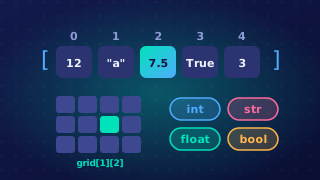
A Python list gives you array-style storage: one name holds a collection of related values. You create one with square brackets, separating the items with commas.
In a standard array, every item must be the same data type, and the length is fixed when the array is created. A Python list is more flexible: it can store different data types, although keeping to one type is advised so the values are easier to process, and it has no fixed length.
| Feature | Standard array | Python list |
|---|---|---|
| Data types | Every item must be the same type | Can mix types, but one type is advised |
| Length | Fixed when created | Can change while the program runs |
| Adding to the end | Cannot grow; you may need a larger array and copy the items across | append adds an item to the end |
Creating and adding items
A list can be created empty (scores = []) or with initial items (scores = [12, 8, 15]). The append operation adds a new item to the end, making the list one item longer. A standard array cannot grow beyond its fixed length, so adding more items may mean creating a larger array and copying the existing items across. A Python list avoids that limitation.
Why lists are useful
Lists are useful when many related values need the same operation. One identifier and a loop can handle all the values, so you avoid many separate variables and repeated code. A loop can input, process, search, sort or output every item without writing separate code for each variable, which makes lists natural for large groups of related data.
For example, you can keep daily step counts in one list, append today's count, then use a loop to add every count to a running total.
daily_steps = [4200, 6100, 3800]
daily_steps.append(5500)

total_steps = 0
for steps in daily_steps:
    total_steps = total_steps + steps

print(total_steps)
Output:
19600Practise this
Edexcel GCSE Computer Science · Arrays (Lists)