Binary and Hexadecimal Basics
Hexadecimal
Hexadecimal is a base-16 number system, so it is built from 16 different symbols. Ten of them are the digits 0 to 9, standing for the values zero to nine. The other six are the letters A to F, standing for the values ten to fifteen. Once you reach F you have used every symbol, so you carry into the next column, just as 9 rolls over to 10 in denary.
Four bits per digit
The reason hexadecimal suits computing so well is that each hexadecimal digit represents exactly 4 bits, which is one nibble. There are 16 possible patterns of 4 bits and 16 hexadecimal symbols, so the two line up one-to-one and conversion is quick in both directions.
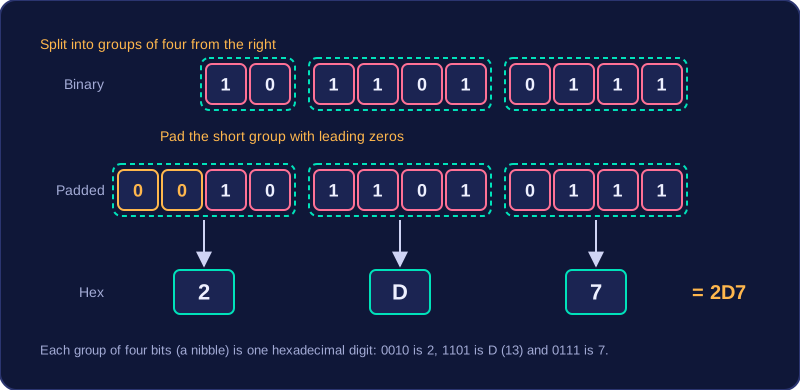
- Binary to hexadecimal: split the bits into groups of four starting from the right, pad the leftmost group with leading zeros if it is short, then swap each group for its hexadecimal digit.
- Hexadecimal to binary: swap each hexadecimal digit for its 4-bit pattern, keeping any leading zeros inside each group.
For example, take 1011010111. Grouping from the right gives 10 1101 0111, and padding the short group gives 0010 1101 0111. Now 0010 is 2, 1101 is D and 0111 is 7, so the pattern is 2D7. Going back, 2D7 becomes 0010 1101 0111, and dropping the leading zeros returns 1011010111.
Why programmers use it
Hexadecimal is a compact way of writing binary. One byte is eight bits, so it needs exactly two hexadecimal digits, and a long run of 0s and 1s can be copied, compared and checked as a much shorter string that is easier to read, easier to remember and less likely to be mistyped. Programmers meet it wherever binary values are shown or written, such as memory addresses, colour settings and error codes.
Hexadecimal does not reduce storage space: the computer stores exactly the same binary value, and only the written version gets shorter. It is a human-friendly notation, so any hexadecimal you type is converted to binary before the processor uses it.
Practise this
Edexcel GCSE Computer Science · Binary and Hexadecimal Basics
Edexcel GCSE Computer Science · Hexadecimal to Binary Conversion
Edexcel GCSE Computer Science · Binary to Hexadecimal Conversion
Edexcel GCSE Computer Science · Denary to Hexadecimal Conversion