Communication technologies
Contents
1. Ad hoc networks
An ad hoc network is a network created temporarily when it is needed, rather than being permanently installed. The devices connect directly to each other and do not rely on a central access point, router or server.
That last point matters: nothing sits in the middle passing data along, so each device talks straight to the ones next to it. The network only exists for as long as those devices stay connected.
| Traditional network | Ad hoc network | |
|---|---|---|
| Equipment | Cables and fixed hardware | Just the devices themselves |
| Setting up | Planned and installed by technicians | Limited setup, working within minutes |
| Changing it later | Difficult and costly once installed | Add or remove devices whenever you like |
For example, a youth theatre group rehearsing in a different community hall each Saturday needs to share rehearsal videos between tablets. There is no equipment in the hall they can use, so they connect the tablets directly to each other, swap the files, and the network disappears when they pack up.
Three common types
Three set-ups are commonly used: a personal area network (PAN), a link over open Wi-Fi, and tethering, which many people call a personal hotspot. You set each one up when you need it, and it lasts only as long as it is needed, with no cabling or fixed equipment of your own to install.
Why they are useful
- Flexible – you can set one up temporarily, at any time and in any location, so work does not have to stop because a building has no network point.
- Scalable – new devices can join as the group grows, without any extra sockets, cables or ports being installed.
- Limited setup – devices can communicate almost immediately once a connection is established, which suits short tasks such as sending a file between two people.
Because nothing controls the network from the middle, each device handles its own security, so an ad hoc network is not automatically safer than one with a central access point.
2. Personal Area Networks (PANs)
A personal area network (PAN) is a small network that links the devices you carry or wear. Your phone, smart watch, wireless earbuds and laptop can be linked in the same PAN, letting them share data without any cables between them.
Devices in a PAN usually communicate using Bluetooth or Wi-Fi. Bluetooth is the common choice for a PAN because it is designed for short distances and uses very little power, so it suits gadgets that are worn or carried.
Before two devices can swap anything, they must be paired. Pairing proves that you own both devices: one device shows a code, such as a PIN, which you type into the other, or both devices show the same code for you to confirm. Only then can the devices exchange files, images and documents directly. For example, you could pair your phone with a friend's tablet and send across a video clip you filmed on a school trip.
A PAN has a limited range, so the devices must stay near one another. Bluetooth normally reaches about 10 metres, and the link can break if you walk into the next room. That short range is part of what makes a PAN personal: only the devices within a few steps of you take part.
When a PAN is created with Bluetooth, it is sometimes called a piconet.
3. Open Wi-Fi
Open Wi-Fi is a wireless internet connection provided in a public place that anyone nearby can join. It usually needs no password, so you can connect a device straight away, although many providers show a web page where you accept their terms before you get online. This is different from a personal hotspot, which shares one device's own mobile data connection.
For organisations, open Wi-Fi supports flexible working. Staff can work away from the organisation's premises instead of returning to the office. For example, a catering manager running a stall at a food market can use open Wi-Fi on a tablet to place an urgent stock order with a supplier. Work carries on while staff are out and about, which suits remote and mobile working patterns.
Because anyone can join an open network, the data being sent is not protected, and other users on it may be able to read that data. Staff should avoid sending sensitive information over it and use their organisation's own secure connection instead.
4. Tethering and Personal Hotspots
Tethering is when a device that already has a network connection shares it with a device that does not. The sharing device acts as a small gateway, passing data to and from the network on behalf of the other device. When a smartphone does this, it is offering a personal hotspot, and the device that joins can reach the internet even though it has no internet connection of its own.
Setting up a hotspot
Tethering is switched on in the phone's settings, and that creates the hotspot. On the second device you switch on Wi-Fi or Bluetooth and connect, choosing the hotspot's name and typing the password shown on the phone; Bluetooth devices are paired instead. The phone then uses its mobile data network and passes data between that network and your device.
For example, imagine taking a handheld games console to a park with no Wi-Fi. Your phone has a mobile data plan, so you turn on its hotspot; the console connects and you can play online, because every request travels out through the phone's mobile data connection and the reply comes back the same way.
Wired and wireless tethering
Tethering does not have to be wireless. A USB cable can carry the shared connection, and it charges the phone while it works, which suits a single device that needs a steady link.
| Method | How the devices link | When it suits you |
|---|---|---|
| Wi-Fi | Second device joins the hotspot by name and password | Several devices need the connection at once |
| Bluetooth | Devices are paired first | Short range, low power, small amounts of data |
| USB cable | One device is plugged into the phone | You want a steadier link and a charging phone |
Why organisations tether
Staff often work away from the building, where there is no fixed network to join. At a district athletics competition, a teacher recording results on a tablet can tether it to a phone and still add each result to the school's online sports database, because the phone's mobile data connection carries the traffic to the internet and on to that service. Unlike public open Wi-Fi, a hotspot shares mobile data that you control.
5. Security Issues with Open Networks
An open network is one that anyone can access, and many open networks let devices connect without a password. That convenience comes at a cost: because the network is open and often unencrypted, the data travelling across it is not protected.
Interception and theft
When data is unencrypted, it travels in a form that anyone on the same network can read. A person sitting nearby with the right software can intercept that traffic and view it. Anything sent in plain text, such as a password typed into a login page, card details entered at an online checkout or a private message, can be captured and then reused to sign into your accounts or spend your money. For example, signing into your email over an open network in a shopping centre could let someone else copy your username and password as you type them. Stolen data has value, so it can also be sold on for financial gain.
Malware
An open network is easy for a malicious user to join, and once they are on it they can introduce malware onto a connected device. If that software installs successfully, it can corrupt files, damage the operating system or give the attacker control of the device and everything stored on it.
Ad hoc networks
An ad hoc network is created directly between devices, so it is open in much the same way and is easier for a hacker to reach. Because no server controls who joins, security is managed by each device individually rather than centrally. Each person has to configure and protect their own device, and there is no single point where an administrator can block intruders or apply rules for everyone. That is why an ad hoc network with no central security is less safe, not more.
6. Data Interception
Sometimes called Man in the Middle attack or Passive attack, the attacker monitors data being sent over a network. The data being sent can be read and it may contain passwords, sensitive information, credit card details etc. Usually the attacker does not modify the data so the victims don’t realise it is happening.
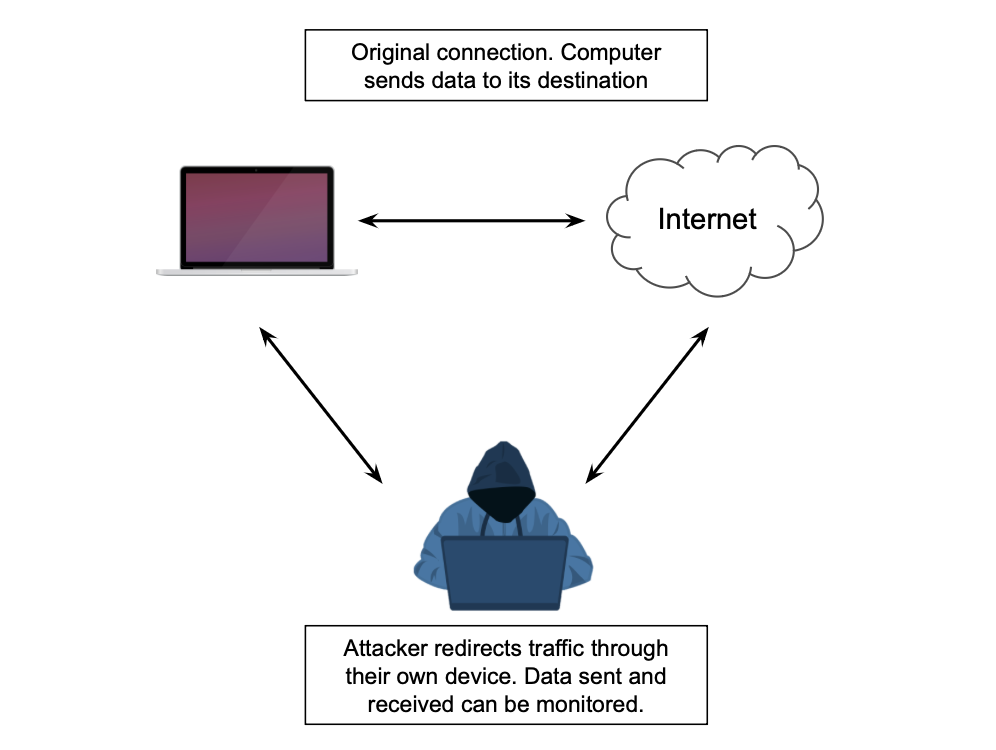
Data interception cannot be prevented however the risks can be mitigated by using encryption to stop the data from being read.
7. Performance Issues with Ad Hoc Networks
An ad hoc network is set up on the spot, with devices connecting directly to each other instead of through a router or access point. That flexibility comes at a price: nothing central manages the traffic, so performance depends on how far apart the devices are, how many are connected and what else is using the airwaves nearby.
Weak and intermittent signals
Ad hoc networks have a limited range, so devices must be within range of each other, often in the same room or a small space. Move a device too far away, or place a wall between the devices, and the signal weakens. You then get a poor or intermittent signal, where the connection fades in and out. A transfer running at that moment can be cut off part way through, so the file has to be sent again from the start.
Sharing one connection
Every device on the network shares the same connection. Add three or four devices and each one gets a smaller slice, so data speeds drop for everybody, and with more devices transfers may be interrupted altogether. A device that is far from the others is slower even on its own, because a weak signal carries less data reliably. For example, four friends in a park play a multiplayer game on handheld consoles using an ad hoc connection: the two consoles nearest each other swap game maps in seconds, while the console furthest away keeps losing the connection and its download of a map stops half way. When many devices compete for the same connection, the network can become unavailable to a device trying to join.
Interference and a disorganised network
Interference happens when other nearby devices send signals over the same channels, and it gets worse as people move around and signals cross. Ad hoc networks are also disorganised: devices join and leave as they are needed, and some may be out of range of each other. In a group of five, one device might reach the ones nearest it but not the one at the other end, so not everyone can share data with everyone else.
8. Network Availability
Network availability means being able to connect to a network when you need it. It depends on your location and the infrastructure available, such as masts and cables.
In rural areas, there are fewer users, so telecom companies may not invest as much in masts and other equipment. This leads to weaker coverage and poorer performance. Streaming video uses a lot of bandwidth and resources, so if several people in a remote village stream videos at the same time, the limited bandwidth becomes strained, giving everyone a poorer service. The same applies to developing countries, where a lack of investment and logistical problems can mean mobile networks are less advanced than in developed countries.
Blackspots are areas with no or poor signal. They are caused by geographical features like hills and valleys, and by buildings that block wireless signals. Tunnels, mountains and buildings can also make a mobile connection drop out or become unstable. Limited or no service, and electrical interference, can have the same effect.
Not everything that stops you using a network is a loss of availability. A flat battery, having no data allowance left or a damaged device affects your device or your data plan, not the network itself. A generally slow connection is a performance problem rather than a loss of availability.